
Original local CLI tests, October 11, 2026. FFmpeg 6.1.1-3ubuntu5 on Ubuntu 24.04.3; synthetic material only. This is not a test of the latest upstream binary. No affiliate commission from linked sources.
Your editor asks for the microphone and desktop audio separately, but the MP4 you just made contains only one track. FFmpeg did exactly that in our first test: the command finished successfully, the video survived, and the second audio stream disappeared. Adding an explicit stream map fixed the handoff. That gap between a successful command and a usable delivery is the reason to learn this tool carefully.
For a creator who already works in a terminal, FFmpeg is useful because the conversion can be written down, repeated and checked. For someone expecting a track inspector with friendly labels and a preview button, it is a demanding first choice. This review focuses on one job: moving a small multitrack recording into an MP4 without re-encoding its selected streams. It is not a benchmark of every encoder or a claim that every editor accepts the result.
The recording handoff we tested
We ran FFmpeg 6.1.1-3ubuntu5 and its companion ffprobe on Ubuntu 24.04.3, x86-64, on October 11, 2026. The source was a four-second synthetic MKV: a 160 × 90 navy video at 10 frames per second, plus two separate mono AAC streams at 48 kHz. One carried a 440 Hz tone and the other an 880 Hz tone. They were labeled Interview mic and Desktop cue so there was a clear reason to keep both.
The source file was 75,064 bytes. These are deliberately small, identifiable signals, not a customer interview and not an OBS recording. They let us check routing without publishing anyone’s private material. We did not test an hour-long recording, corrupted camera media, mobile use, Windows installation or an NLE import. The binary version describes our environment; it is not a recommendation to install that older version instead of a current supported build.
A one-line conversion silently missed the job
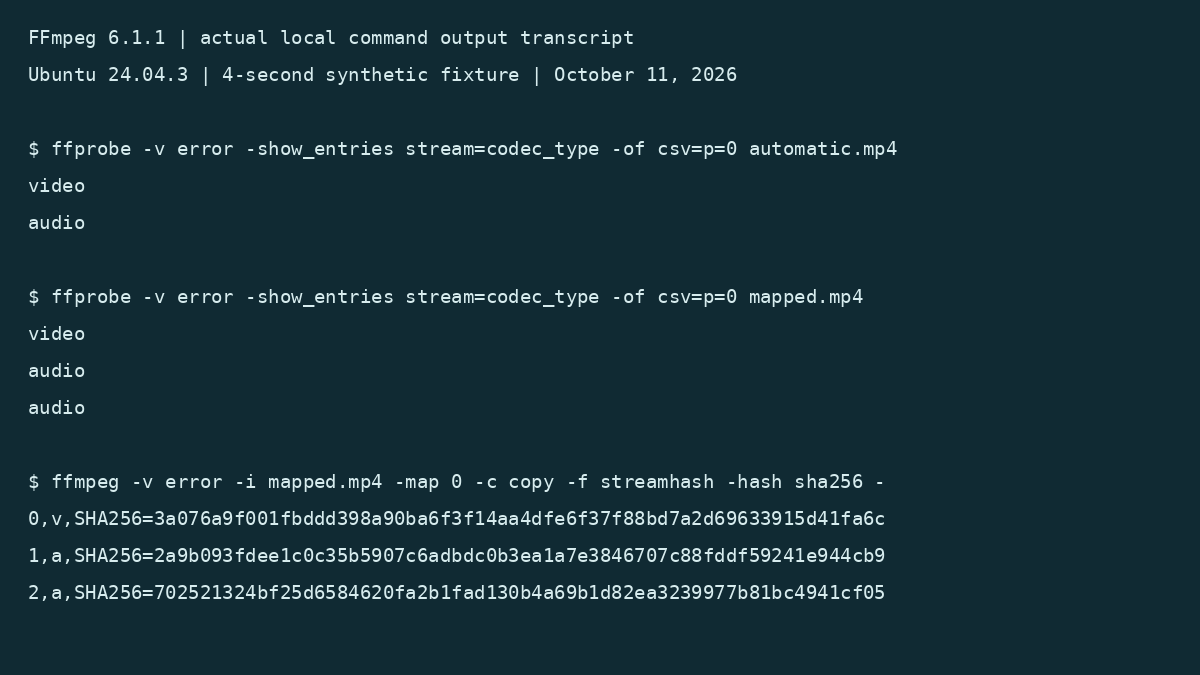
ffmpeg -hide_banner -n -i "source recording.mkv" -c copy automatic.mp4This command returned exit code 0. Probing the result showed H.264 video and one AAC audio stream. The input had two audio streams, so the conversion was successful in the narrow sense while the handoff was incomplete. If we had checked only whether the output file existed, we would have sent the wrong deliverable.
The inconvenient part is that -c copy sounds broader than it is. It specifies how selected streams are handled; it does not by itself request every stream in the input. The official stream-selection documentation explains the separate role of -map. Our small fixture exposed why that distinction matters before a deadline.
| Check | Automatic selection | Explicit audio mapping |
|---|---|---|
| Command exit status | 0 | 0 |
| Video streams | 1 H.264 | 1 H.264 |
| Audio streams | 1 AAC | 2 AAC |
| Both isolated sources available | No | Yes, as separate streams |
This is not an argument against automatic selection for a quick single-track export. It is an argument against using an implicit selection rule when your acceptance criterion is “keep the tracks separate.” A creator delivery and a casual viewing copy have different requirements, even when both end in .mp4.
The useful part: make the selection explicit
ffmpeg -hide_banner -n -i "source recording.mkv" -map 0:v:0 -map 0:a -c copy mapped.mp4In this command, input 0 supplies its first video stream and all its audio streams. Our output contained one video and two audio streams. The file name included a space, and quoting it correctly was enough for the command to read the source. There was no upload step or account in this local-file workflow.
The convenience here is operational: the stream choice is visible in the command rather than hidden inside a preset. A teammate can review that choice, reuse it with a different file name and compare the result with the source. We did not measure minutes saved, and a four-second sample cannot establish large-file throughput.
There is a deliberate limit to this recipe. It does not preserve subtitle, attachment or data streams, because we did not map them. It is a video-and-audio handoff recipe. A delivery that also needs subtitle tracks, chapters or specific metadata deserves a different acceptance checklist. Copying everything indiscriminately is not automatically safer if the destination container or application does not support it.
Checking the result beats trusting the filename
ffprobe -v error -show_entries stream=index,codec_type,codec_name,sample_rate -of json mapped.mp4ffprobe returned three streams for the mapped output: index 0 was H.264 video, and indexes 1 and 2 were AAC audio at 48 kHz. That gave us the basic structural check the first command lacked. The number of audio streams matters more here than the file extension or a progress line reaching the end.
We then asked FFmpeg to hash the copied encoded stream contents, using the same map on the source and output:
ffmpeg -v error -i "source recording.mkv"   -map 0 -c copy -f streamhash -hash sha256 -
ffmpeg -v error -i mapped.mp4   -map 0 -c copy -f streamhash -hash sha256 -
All three stream hashes matched between the source and mapped MP4. In this fixture, that supports the specific conclusion that the selected encoded payloads survived the remux unchanged. It does not mean the entire files are byte-identical. The container changed, and these checks do not establish identical metadata, time-base representation or compatibility in every player.
There was also a useful metadata warning: our MKV audio streams carried title tags, but those titles were absent from the ffprobe fields we requested on the MP4. Two tracks can survive while their helpful labels do not. If a downstream editor relies on names rather than stream order, verify those names explicitly instead of assuming that payload preservation includes labeling.
The errors that actually interrupted the workflow
Requesting a third audio stream failed clearly
ffmpeg -hide_banner -n -i "source recording.mkv" -map 0:a:2 -c copy missing.m4aThe input contained two audio streams, so the zero-based third audio selection did not exist. FFmpeg reported that the stream map matched no streams and returned nonzero status, observed as 234 by our subprocess wrapper. Do not hard-code that exact number across environments; the important outcome is failure rather than a valid handoff.
That strict failure is useful when an isolated microphone track is required. The error also mentions making a map optional with a trailing question mark. Optional selection has a place in scripts that tolerate absent tracks, but it would weaken this job’s minimum requirement. A missing required source should stop the export, not disappear quietly.
Volume adjustment cannot stay a stream copy
ffmpeg -hide_banner -n -i "source recording.mkv" -map 0:a:0 -af volume=0.5 -c:a copy filtered.m4aThis failed with a message explaining that filtering and streamcopy cannot be used together; our wrapper observed exit status 218. That is a real friction point for a creator who thinks “same audio, just quieter” should still be a lossless packet copy. Changing sample values requires a processing path, so you must choose an appropriate encoding output and accept that this is a different task.
Overwrite protection still needs an output check
We reran the mapped command with -n against an existing mapped.mp4. FFmpeg printed that the file already existed and was exiting. The output file’s SHA-256 was unchanged. Surprisingly, this particular packaged binary returned exit code 0 in our test despite refusing the output. That is another reason not to treat a bare zero as proof that a new deliverable was produced.
For a repeatable batch, use a fresh output path and verify the file you intended to create. If reuse is necessary, record the expected modification or hash and inspect the error stream. Do not add unconditional overwrite merely to make a script look successful. Keep the original recording separate from every delivery copy.
Where it fits, and where it is awkward
Best fit: a technically comfortable creator or developer who wants a repeatable local media operation and can verify stream selection. FFmpeg made it possible to define the exact handoff in a short command, and ffprobe exposed the missing audio before we treated the conversion as finished.
Weak fit: an editor who needs to listen to tracks, audition edits and label them visually. The CLI did not give us a waveform, a track-solo control or a friendly preview. Reading a stream list tells you what exists; it does not tell you whether someone’s microphone is intelligible or whether the desktop track contains the intended sound.
Do not stretch these tests into a privacy certification. We supplied local files and local outputs and did not use a hosted service, but we did not perform a network capture. FFmpeg also supports network inputs. A local command in this review is not evidence that every command, wrapper or download you find online is offline or trustworthy.
Installation is another practical limit. The official download page links to source and platform-specific build providers, rather than one universal installer we tested. Your build affects available codecs. Start from the project’s download page, keep security updates current and record ffmpeg -version when comparing a result with ours.
Cost and the decision before delivery
FFmpeg is open-source software, with LGPL/GPL conditions depending on enabled components. We used a local distribution package without a paid service or trial account. This review does not audit redistribution compliance, codec patent obligations or the cost of a commercial wrapper built around it.
For our narrow handoff, the mapped command met the requirement: two separately addressable audio streams survived, and their encoded contents matched the source. The default command did not. Use FFmpeg when you are willing to make that selection explicit and inspect the output. If your job needs visual track editing or verified compatibility inside a particular NLE, do that final application check before delivering the file.
Sources and test scope
- Official FFmpeg stream-selection and streamcopy documentation
- Official ffprobe documentation
- Official download entry point
- Project licensing notes
Documentation checked October 11, 2026. Observations above came from the named local binary and synthetic fixture. No large-file, Windows, macOS, mobile, network-capture or editor-import tests were performed.