
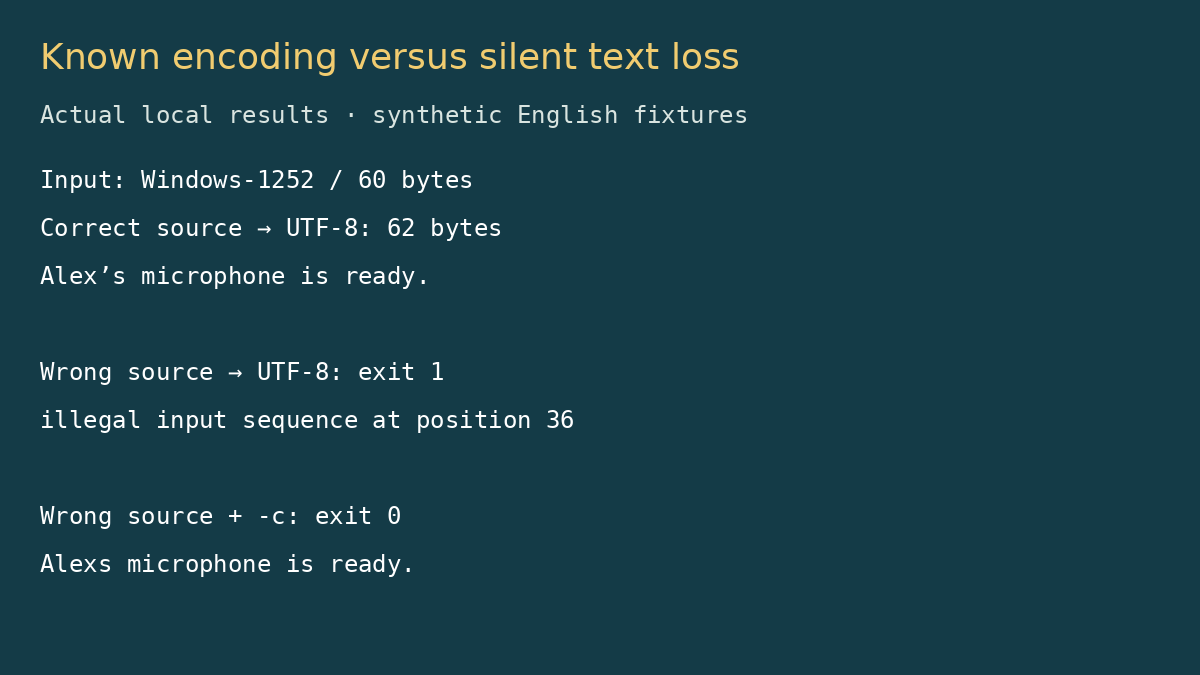
A subtitle file can look almost correct after conversion while losing the punctuation that tells you whether the text survived. Our Windows-1252 fixture contained “Alex’s microphone is ready.” Using the wrong source encoding with iconv failed clearly. Adding -c made that command succeed, but the line became “Alexs microphone is ready.” That is a bad trade for a caption handoff.
We evaluated iconv for the editor who receives a legacy subtitle export and needs UTF-8 without touching the cue times. The useful question is not how many encodings it lists. It is whether a known source encoding can be converted without silent data loss, and whether the wrong assumption stops the workflow.
The test file was only 60 bytes, but it exposed the decision
Our original English sample had one numbered SRT cue, a start of 1.000 seconds, an end of 2.500 seconds and a curly apostrophe. We encoded it as Windows-1252. The apostrophe was byte 92 in hexadecimal; the equivalent UTF-8 character uses the three bytes E2 80 99. The expected UTF-8 output was therefore 62 bytes. Bigger output did not mean extra caption text.
The tested executable was Ubuntu’s GNU C Library iconv 2.39, not GNU libiconv. Programs with the same name can come from different implementations. We checked the binary version and used a local input and standard output; these results do not establish behavior on every operating system.
Explicit conversion did the narrow job correctly
iconv -f WINDOWS-1252 -t UTF-8 legacy.srtThis returned status 0 and preserved the cue number, timing line, newline structure and “Alex’s” text in our fixture. Converting that UTF-8 result back to Windows-1252 produced bytes identical to the original. That round trip is useful evidence for this sample: the tested conversion did not merely produce readable-looking text.
The command is convenient when the export format is documented. You specify the source and destination directly, so the conversion is repeatable and can be checked before a caption upload. There is no account, import wizard or hosted service in the operation we ran. We did not capture network traffic or test third-party wrappers, so this is a local-command observation rather than a privacy certification.
The dangerous option was the one that hid the failure
iconv -f UTF-8 -t UTF-8 legacy.srtDeclaring the legacy bytes to be UTF-8 returned status 1 and reported an illegal input sequence at position 36. It also wrote a partial output ending at “Alex”. That matters if your shell redirects standard output to a file: an output file existing on disk does not mean conversion finished.
We then ran the same incorrect declaration with -c. It returned status 0 and removed the offending apostrophe. The cue timing remained plausible, which makes this especially easy to miss in a quick inspection. The output was not equivalent to the source even though a batch script checking only the return code would accept it.
| Command choice | Observed outcome | Delivery implication |
|---|---|---|
| WINDOWS-1252 → UTF-8 | 62 bytes; punctuation retained | Passed our known-encoding fixture |
| UTF-8 → UTF-8 on legacy bytes | Status 1; partial output | Stop and investigate the source encoding |
| Same incorrect conversion with -c | Status 0; apostrophe missing | Success hid text loss |
What iconv leaves you to figure out
It does not decide the original encoding for you. If you choose the wrong source character set, some files fail while others may yield plausible but incorrect text. Our round trip was meaningful because we knew how the fixture was created. It is not a universal encoding detector.
It does not validate SRT structure. Encoding success says nothing about reversed cue times, missing text or synchronization with the recording. Check timing and compare the text after conversion. A clean UTF-8 file can still be a bad caption track.
The command line creates a file-handling obligation. Use a separate destination, inspect errors and promote the result only after a successful conversion. Redirecting onto the source path can truncate your original before the program reads it. This is shell behavior, not an encoding repair feature.
We did not test huge transcripts, malformed mixed encodings or conversion speed. No limit in megabytes is inferred from a 60-byte fixture. The friction we verified was narrower and more useful: wrong encoding plus an ignore-errors option can quietly change words.
When we would use it
Use iconv when you can establish the export’s source encoding and want a transparent, repeatable conversion. For an unknown or already corrupted file, ask for the original export and inspect representative punctuation before picking a conversion. An editor with an explicit encoding selection may be easier if you need a visual comparison, but we did not benchmark an alternative editor here.
Our next step would be the separate safe-conversion guide, which prevents partial output from replacing the source. See the iconv directory profile for the implementation distinction.
Sources and test boundaries
Tests were run October 12, 2026 (Asia/Shanghai), on Ubuntu with GNU C Library iconv 2.39. Synthetic English captions only; no GUI, clipboard, mobile, large-file or network-capture tests. The GNU C Library project is the source family of the tested implementation. GNU libiconv’s manual documents its separate implementation, including discard behavior; do not infer identical builds from the shared program name.