
A developer reproducing a query-string bug from a sanitized log needs the search value to survive escaping and copying exactly. Does &page=1 belong to the search text, or is it a second query parameter? That is the bug to settle before reaching for an encoder. I used Seattle coffee&page=1 as one literal search value in IT Tools: the ampersand became %26, and the decoder returned the original text. The same page will happily escape an entire URL, so a plausible-looking result can still be the wrong kind of link.
By ToolBrivio Editorial. We tested the hosted URL encoder in desktop Chrome on October 11, 2026. Its footer identified the build as v2024.10.22-7ca5933; this is a review of that served interface, not a claim that it just launched. Samples are synthetic. Screenshots are from our session. We did not audit hosted network traffic or test every utility in the suite. Links earn no affiliate commission.
Start with the value that got split
The page has an Encode input and result above a separate Decode input and result. Both update as you edit; each result has its own Copy button. There is no separate conversion button to press after changing a value; the result updates in the same panel. We did not time this against another workflow. Putting text in Encode does not automatically populate Decode. That independence is handy when comparing a raw value with an encoded string taken from a log, but a round-trip check requires pasting the result into the second input.
Raw value:
Seattle coffee&page=1

Encoded result:
Seattle%20coffee%26page%3D1

Decoded result:
Seattle coffee&page=1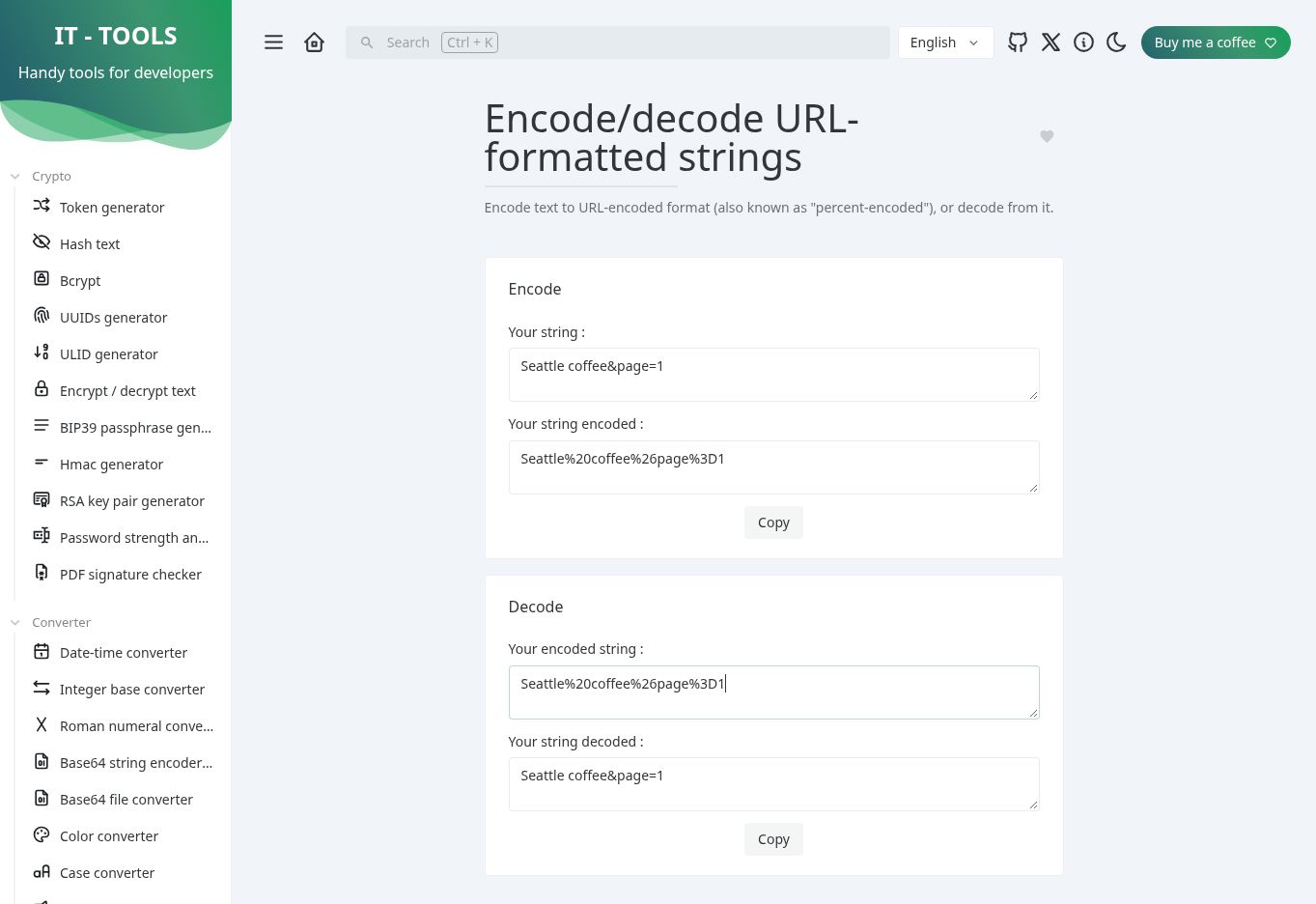
The important character here is the ampersand. If &page=1 is part of the user’s search text, encoding it as %26page%3D1 keeps it inside that value. If it is meant to introduce a separate page parameter, it must remain outside the encoded value. A converter cannot decide which meaning you intended.
Copy preserved the result, including intentional spaces
For this debugging task, a correct preview is not enough if Copy changes the string. Clicking the Encode panel’s Copy button put exactly Seattle%20coffee%26page%3D1 on the clipboard, with no added leading or trailing spaces. We also decoded %20Seattle%20coffee%20 and copied the result. It contained one intentional space before Seattle and one after coffee. The tool preserved those spaces rather than trimming them.
// Clipboard values shown as JSON strings to make spaces visible.
"Seattle%20coffee%26page%3D1"
" Seattle coffee "
If your pasted log value carries accidental whitespace, that preservation can carry the mistake forward. Inspect the raw value before stripping spaces; an intentional space is still part of the data.
Next suspect: the plus sign
We pasted a+b%20c%2Bd into Decode and got a+b c+d. This is useful when checking a percent-encoded component. It can surprise you when the string came from an HTML form or a form-style query serializer, where a plus can represent a space.
The URLSearchParams documentation covers that distinction. In Node.js, we ran this separate comparison:
new URLSearchParams("q=a+b%20c%2Bd").get("q")
// "a b c+d"
Those outputs answer different questions. IT Tools showed the decoded component; the query parser applied form-style plus handling. Before “fixing” a plus sign, check which encoding the producer used. Blindly replacing all plus signs would corrupt a value that genuinely contains one.
A second decode can make the bug worse
%252F decoded to %2F, not /. A percent sign encoded as %25 is a common clue that a value has been escaped more than once. One pass was predictable in our test. Repeatedly decoding until no percent signs remain is a bad repair rule: it can turn an intended literal %2F into a path separator.
Inspect the producer and the number of transformations instead. If a log stores the encoded representation of an already encoded field, document that second layer explicitly. Keep the original string beside the decoded view so the investigation remains reversible.
What happens when the escape is damaged
The damaged sequence %E0%A4%A produced a red input boundary, the message Impossible to parse this string, and an empty result. The page stayed usable and the Encode panel kept its own output. This is better than silently displaying a partial decoded string, but the error does not identify a position or explain whether the escape digits or the UTF-8 sequence are wrong.
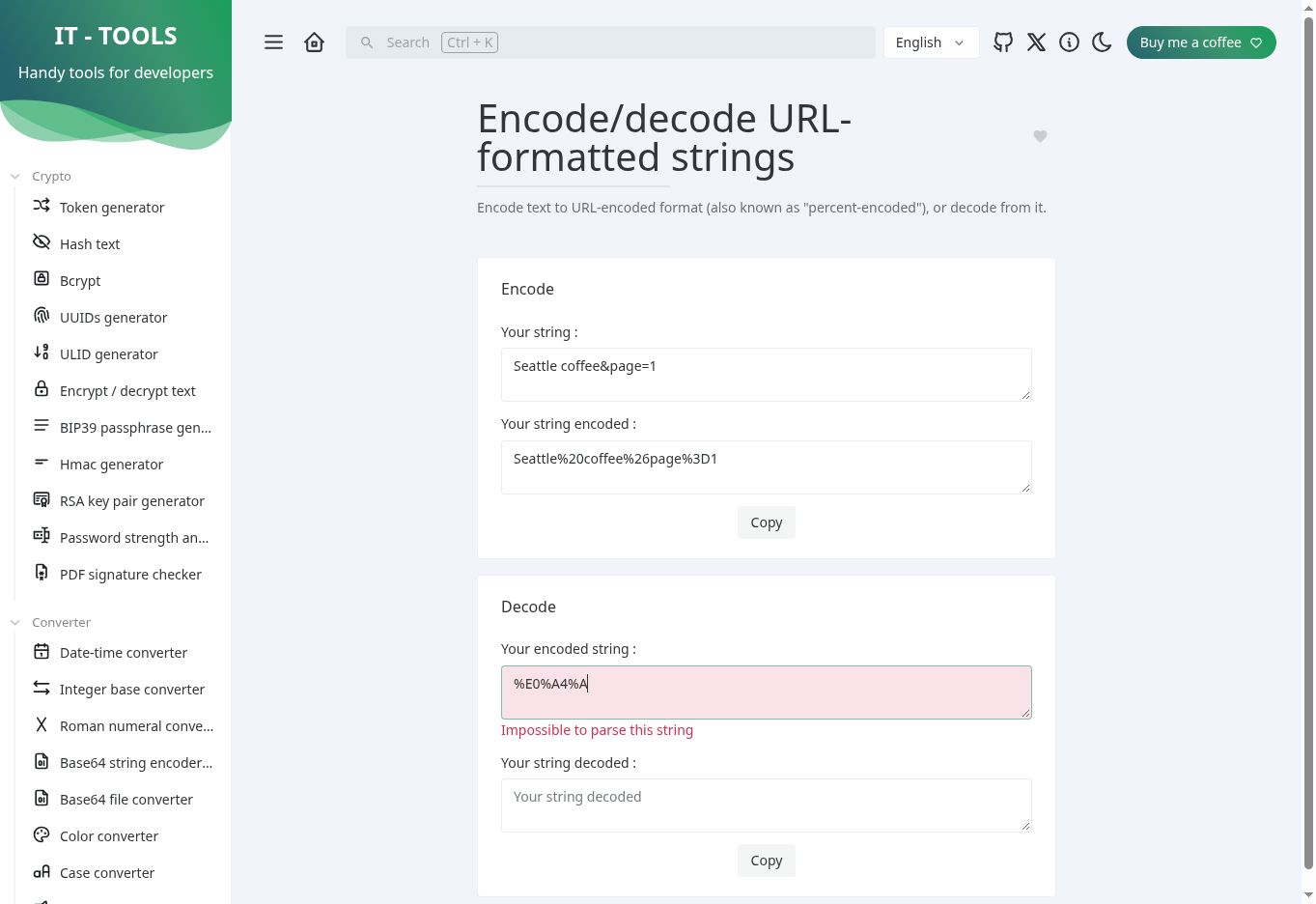
For a long value, reduce the problem to the smallest failing segment. Check every percent sign has two hexadecimal digits, then check that the resulting bytes form valid text. Do not remove characters from the production value merely to make the error disappear.
The repair belongs in URLSearchParams
We encoded this synthetic address:
https://example.com/search?q=Seattle&page=1The tool returned:
https%3A%2F%2Fexample.com%2Fsearch%3Fq%3DSeattle%26page%3D1That is appropriate when the entire URL is itself a value inside another parameter. It is not the link you should use when you only meant to encode the search term. The encodeURIComponent documentation describes component encoding and its treatment of URI syntax characters; the observed output is consistent with that behavior.
For a normal application URL, build the parameters rather than concatenating escaped fragments. We executed this example in Node.js:
const url = new URL("https://example.com/search");
url.searchParams.set("q", "Seattle coffee&page=1");
url.searchParams.set("page", "2");
console.log(url.href);
// https://example.com/search?q=Seattle+coffee%26page%3D1&page=2
The page=1 text stays inside q; the actual page parameter is 2. Notice the plus used for the space. Avoid pre-encoding the string before passing it to searchParams.set, or the percent signs will themselves be encoded.
The short test log
| Input and operation | Observed output | Why it matters |
|---|---|---|
Decode a+b%20c%2Bd | a+b c+d | Literal plus stayed plus; %20 became a space |
Decode %252F | %2F | One layer was decoded, not two |
Decode %E0%A4%A | Empty result; “Impossible to parse this string” | Malformed escapes fail without a character offset |
Encode a complete https://…?q=…&page=1 URL | Colon, slashes, question mark and separators escaped | The result is an encoded value, not a directly navigable replacement |
Keeping the tool in the debugging workflow
The hosted tool required no login or payment step for these tests. The official repository is GPL-3.0 licensed and documents Docker self-hosting. We did not deploy that image. For a team that wants several utilities at one internal address, self-hosting is a documented option, with maintenance work still belonging to the team.
Do not equate percent encoding with encryption: anybody can decode the output. We used synthetic text and have not verified a blanket zero-upload promise for every hosted utility. The suite’s navigation also offers Base64 conversion and a URL parser, but this review tested the URL encoder route only.
The friction is small but real: Encode and Decode are independent, so checking a round trip takes another paste. The decoder cannot tell you whether a plus came from form serialization, and its malformed-input message gives no offset. It is a convenient inspection tab for a short log value; the URL API above is the repeatable fix in application code.
For the developer checking one logged search value, the tool met the round-trip and clipboard-fidelity requirement in our tests. It did not decide whether an ampersand should be a separator or whether a plus represented a form-encoded space. That decision still belongs to the producer’s encoding contract. I would use this tab to inspect the value, then apply the URLSearchParams repair in code rather than hand-build the final link.
We tested short strings in desktop Chrome, not large logs or mobile layout. We did not inspect input-bearing network requests or verify offline startup. If zero data upload is a requirement, this review cannot certify the hosted page for confidential logs. The tests establish specific outputs and copying behavior, not throughput or numeric time savings.