
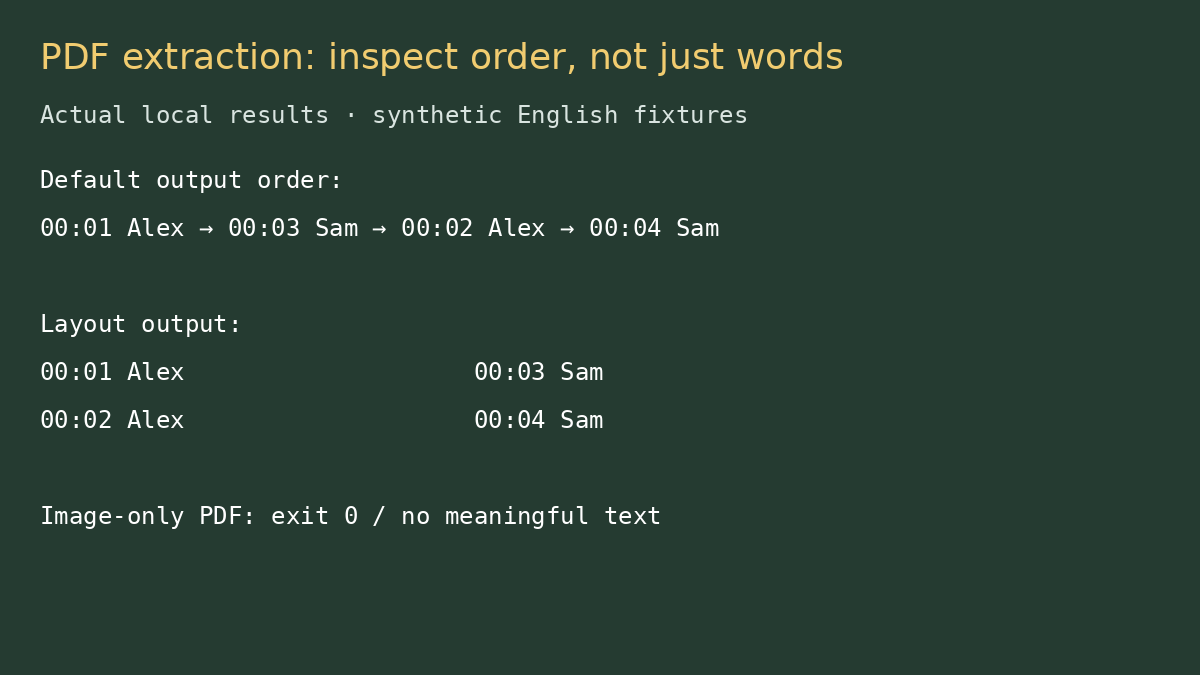
Copying an interview out of a PDF can rearrange the conversation before you notice. In our two-column test, pdftotext’s default output read the first left-hand line, then the first right-hand line, then returned to the second left-hand line. Every sentence survived, but the order was not the order a transcript editor might expect.
We tested the command for a creator who receives a PDF draft and needs editable text for corrections. The minimum requirement was not merely a nonempty output file. It was recoverable words with enough structure to reconstruct the intended sequence and a clear stop when the PDF contained no extractable text.
Two small PDFs, two very different outcomes
The test input was an original two-page PDF, generated locally with selectable English text. Page one had two parallel columns of timestamped dialogue. Page two had a single delivery-checklist line. A separate control PDF contained an image with visible English words but no text layer.
We used pdftotext 24.02.0 from Ubuntu’s Poppler utilities. It was the installed distribution build, not a test of the latest Poppler release. All fixtures were local and synthetic. There was no real client transcript, browser upload, OCR service or performance benchmark.
The default retained words and scrambled our expected sequence
pdftotext interview.pdf default.txtThe first four extracted lines, separated by blank lines, appeared in this order:
00:01 Alex: Check the microphone.
00:03 Sam: Keep desktop audio.
00:02 Alex: Record a clean take.
00:04 Sam: Review the captions.
The timestamps make the problem visible. A quick “text exists” check would pass. A transcript editor expecting chronological dialogue would need to restore sequence before using the text. This is our fixture’s result, not a statement that default extraction always interleaves columns; page geometry and text placement matter.
It would be tempting to call this missing transcription accuracy, but that would be the wrong diagnosis. The tool was extracting existing PDF text, not listening to speech. All four sentences were present. The friction came from the relationship between page layout and the reading order inferred during extraction.
Layout mode helped comparison, not automatic cleanup
pdftotext -layout interview.pdf layout.txtWith layout mode, each horizontal pair remained on one output line. We could compare the left and right columns against the PDF more easily, but the result still was not a ready-to-publish single-column transcript:
00:01 Alex: Check the microphone.   00:03 Sam: Keep desktop audio.
00:02 Alex: Record a clean take.    00:04 Sam: Review the captions.
This is the useful tradeoff. Default mode gave cleaner-looking prose that could encourage an unsafe quick paste. Layout mode made the structure harder to ignore and required deliberate separation. For an editor doing a line-by-line comparison, that extra whitespace was information rather than clutter.
The image-only file returned success and no words
Extracting the control scan returned status 0. The text file contained only a form-feed character, which looked empty after whitespace was removed. The command had processed the PDF without an execution error; it had not performed OCR or recovered the visible image text.
A pipeline must distinguish those states. Treating status 0 as “the transcript is extracted” would let an empty deliverable through. Our practical gate is both a successful command and a nonempty text check, followed by comparison with the source.
| Test | Observed result | What we would do |
|---|---|---|
| Selectable two-column text, default | All lines present; interleaved order | Compare sequence before editing |
| Same text, -layout | Horizontal column pairs retained | Separate and review columns |
| Image-only PDF | Status 0; form-feed only | Stop; request text export or authorized OCR |
| -nopgbrk on selectable PDF | No form-feed characters | Useful for plain-text handoff, not order repair |
Where the command earns its place
For a PDF with a usable text layer, pdftotext is a simple way to get an inspectable plain-text starting point. Naming the output explicitly avoids guessing where it was saved. The flags let you compare two extraction representations without repeatedly copying page fragments by hand. We did not measure time savings.
The limitations are material: extraction is not transcription, layout preservation is not semantic sequence reconstruction, and a success exit code does not establish meaningful output. We also did not test password-protected PDFs, unusual embedded fonts, tables spanning pages or thousands of pages. An unrelated failure in one of those files should not be blamed on the small column fixture.
For recurring transcript delivery, ask for the original text or caption export instead of making a PDF your primary interchange format. If PDF is all you have, keep the PDF beside the output and compare representative sections before editing. The separate extraction checklist walks through that gate.
Documentation and scope
The packaged pdftotext manual describes layout and page-break options; our outputs above came from the named installed version. Poppler’s project site is the upstream entry point. See our Poppler directory card and profile. Tests ran October 12, 2026 (Asia/Shanghai); the results support this extraction workflow, not broad PDF compatibility or privacy certification.