
A frontend developer hooking a user API into a TypeScript component needs a draft that does not quietly weaken the response contract. The first thing I would change in this generated interface is deletedAt: any. Our sample had deletedAt: null; Transform.tools converted the nested profile and string array correctly, then left the nullable field wide open. The useful part is getting the nested declarations without typing every property by hand. The bottom line is stricter: nullable fields must match the API contract, and the copied code must belong to the current valid input. We tested those two risks instead of treating generated output as a pass.
By ToolBrivio Editorial. We tested the hosted JSON-to-TypeScript page in desktop Chrome on October 11, 2026, using the synthetic samples below. Screenshots show that session, not a recreated interface. We did not audit network traffic, benchmark large files or install the self-hosted version. No affiliate commission is earned from these links. Our review method.
A useful first draft, with two checks before Copy
Use it for a small, representative payload when hand-writing nested interfaces would interrupt your work. Review nullable fields and confirm there is no error banner before copying. Generated types describe the sample; they do not prove what the API will return tomorrow.
The response and the generated draft
Open JSON to TypeScript directly. The page starts with a sample object and its interface. Replace the whole left-hand document rather than appending another object. We used a small user record containing an ID, an English name, a nested profile, an array and a nullable date:
{
  "id": 42,
  "name": "Alex Morgan",
  "profile": {"active": true},
  "tags": ["api", "json"],
  "deletedAt": null
}
The right pane updated without a separate Convert button. It emitted these declarations:
export interface Root {
  id: number
  name: string
  profile: Profile
  tags: string[]
  deletedAt: any
}

export interface Profile {
  active: boolean
}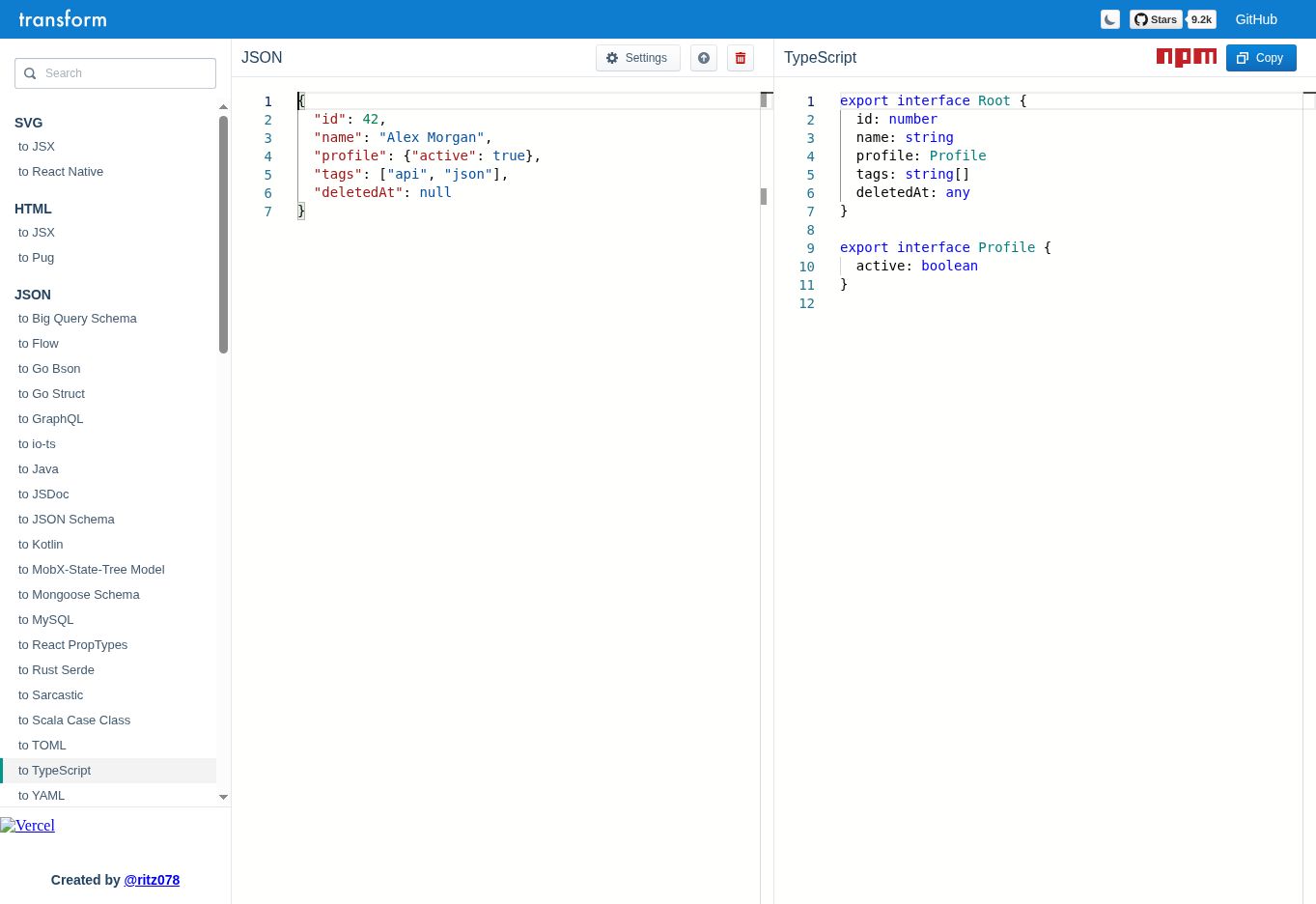
The side-by-side layout is the convenient part here: you can compare profile with its extracted interface and spot tags: string[] without switching tabs. The English name became name: string. This checks inference from a fictional user fixture, not whether future responses satisfy an API contract.
The null field is where the shortcut stops
A single null value did not produce a useful nullable contract. The output was deletedAt: any, which permits values much wider than the intended date-or-null field. We replaced the sample with {"id":42,"deletedAt":"2026-10-11T08:00:00Z"}. The output then became deletedAt: string. It did not infer a Date object, and neither individual sample expressed both possible states.
If the API documentation says that the field is always present and holds an ISO timestamp or null, a reviewed declaration would be:
interface User {
  id: number;
  name: string;
  profile: { active: boolean };
  tags: string[];
  deletedAt: string | null;
}
That edit is based on a stated contract, not something the converter discovered. If the property can be omitted entirely, it needs a separate optional-property decision, such as deletedAt?: string | null. Do not add the question mark just because null appeared in one response. Missing and null are different states.
The TypeScript handbook explains any, union types and optional properties. Its practical implication for this workflow is simple: inspect every generated any, and compare required properties with the API specification. A successful conversion is not a review of that specification.
Malformed input leaves the last good output visible
After the successful conversion, we replaced the input with a trailing-comma object:
{"id":42,}An error strip appeared at the bottom. Its wording included Unable to parse JSON sample, wrapped in a ';' expected style diagnostic. More importantly, the right pane still showed the previous Root and Profile interfaces, and the Copy control remained visible. We then tested Copy itself: after saving the successful result, we replaced the input with the malformed object, set a distinct clipboard marker, and clicked Copy again. The clipboard was replaced with the previous Root and Profile declarations, byte for byte. This was not just a stale preview; the action a developer would use to take code into a project also returned the old result.
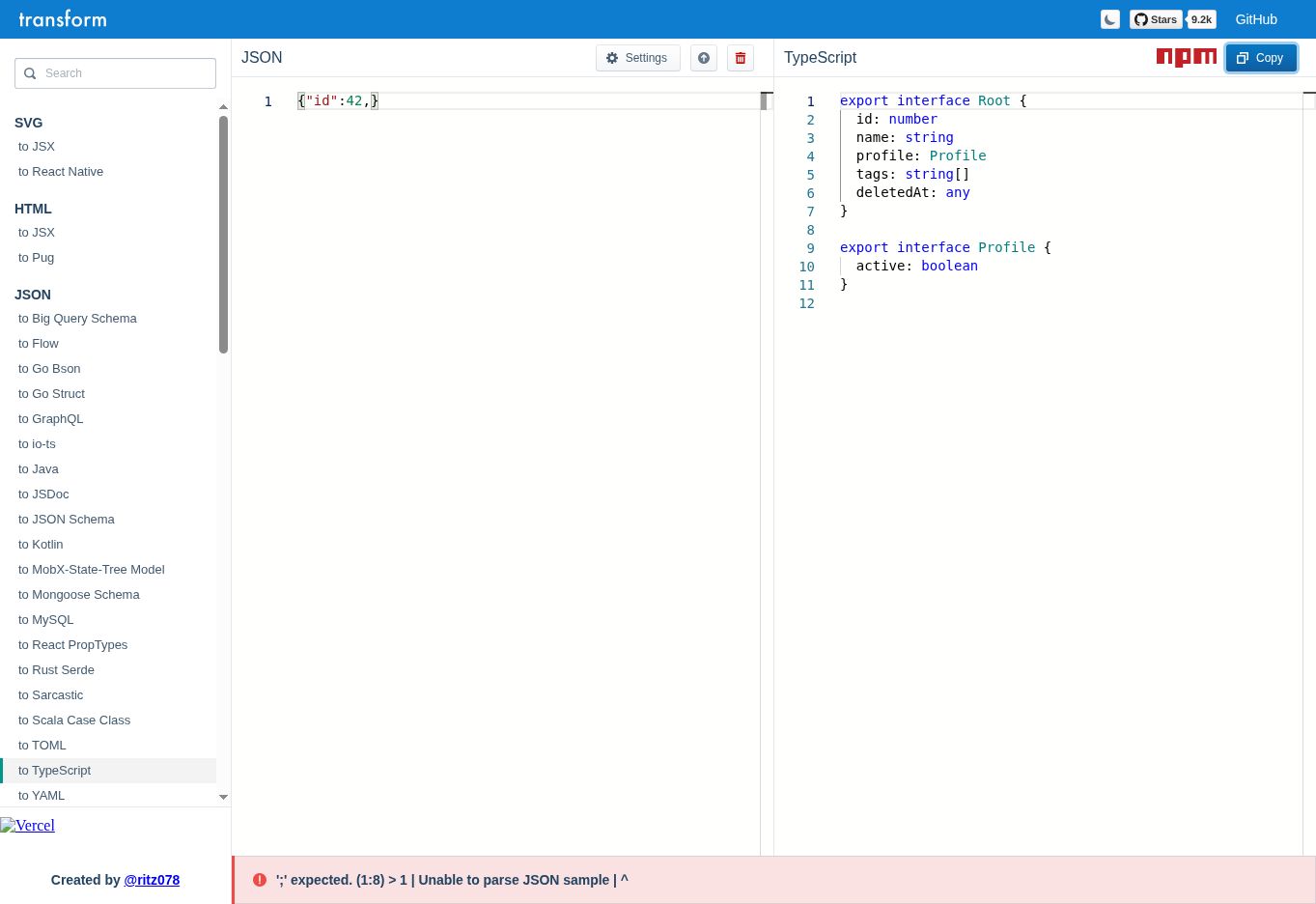
This is a real usability snag when you are editing quickly: a populated output pane is not proof that the current input converted. Check the error strip first. For a JSON-specific explanation and a highlighted location, repair the payload in ToolBrivio’s JSON Formatter, then replace the converter input with the corrected document.
A larger string did not fix the inference gap
To check one bounded size case, we pasted a 131,135-byte JSON document containing a 128 KiB ASCII notes string, a nested profile and deletedAt: null. The editor produced notes: string, profile: Profile and deletedAt: any; Copy returned those declarations. That input completed conversion in this session. We did not measure conversion latency, test a 2 MB payload or a many-key response, so this is not a large-file speed or crash-limit claim.
// Generate the exact bounded input in JavaScript.
JSON.stringify({
  id: 42,
  notes: "A".repeat(128 * 1024),
  profile: { active: true },
  deletedAt: null
})
My review checklist before committing these types
- Remove secrets and customer data from the sample. We have not independently verified a zero-upload guarantee for the hosted service.
- Use a representative object, including fields that are sometimes null, missing or empty. Keep a second fixture for alternate states.
- Paste the complete document into the JSON pane. Wait for the current result and check the bottom error area.
- Review
any, optional fields, date strings and generated names such asRoot. Rename types to match their domain. - Copy the reviewed declarations into the project and run its TypeScript checks. Validate incoming data separately at runtime if your application needs that protection.
Transform.tools lists JSON Schema-to-TypeScript and JSON-to-Zod routes in its navigation. We did not test those routes here; they are alternatives to investigate, not capabilities proven by this session. A TypeScript interface itself does not validate an HTTP response at runtime.
What this draft still leaves to you
Our hosted conversion required neither an account nor a payment step. The official repository is MIT-licensed and documents self-hosting. We did not install it, so deployment effort and offline behavior are outside this review. Self-hosting means taking responsibility for dependencies and updates, rather than assuming a public tab meets an internal data policy.
- Null-only input is under-specified: our nullable field became
any, so copying the output untouched would weaken the contract. - Error and output can disagree: malformed input left the earlier successful interfaces visible.
- Dates remain strings: the timestamp fixture produced
string; parsing and validating dates belongs in application code. - Sample coverage is your job: a converter cannot discover an absent field or an unseen API variant from one object.
For the developer who needs an interface skeleton, the tool completed the mechanical nesting work. It did not meet the stricter goal of generating a ready-to-commit nullable contract, and its error-state Copy can take an earlier draft into the project. I would use it for a sanitized response with a manual contract review. I would skip this sample-based route when a maintained API schema already exists.
Our evidence is from desktop Chrome. We did not verify mobile layout, offline startup or input-bearing network traffic. If your requirement is that confidential API data never leaves the device, this hosted test does not establish that guarantee. No numeric time saving was measured.