
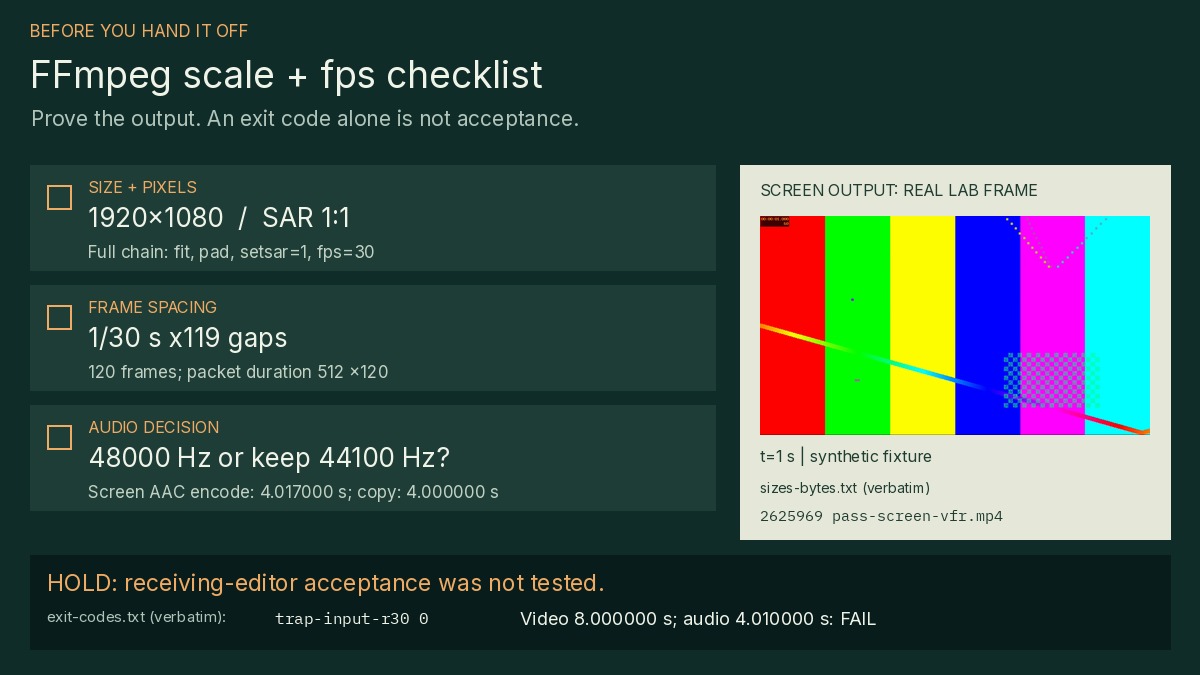
Make each clip the same size and frame rate before handing it to another editor. Use the command below for the tested target, then inspect the output. An exit code of 0 is not the delivery gate: a file can still have the wrong frame timing, pixel shape, or duration.
This is the working checklist, not another benchmark. The companion FFmpeg scale and fps handoff review holds the comparison tables and frame-drop discussion.
Test record: November 7, 2026 (Asia/Shanghai), FFmpeg/ffprobe 7.1.5-0+deb13u1 on Debian GNU/Linux 13. All fixtures are locally generated testsrc2 pictures with sine tones, not real phone, camera, or screen recordings. The procedure below uses the tested 1920x1080, 30 fps target. Other delivery targets need their own verification.
1. Write the delivery contract before encoding
ffmpeg -version
ffprobe -version
2. Probe each input, including audio
ffprobe -v error -show_entries "stream=index,codec_type,codec_name,width,height,sample_aspect_ratio,pix_fmt,avg_frame_rate,r_frame_rate,time_base,start_time,duration,nb_frames,sample_rate,channels:format=duration,size" -of json input.mp4 > input-probe.jsonThe synthetic screen source was 1366x768, with avg_frame_rate=40/1 and r_frame_rate=60/1, AAC at 44100 Hz, and a 4.000000 s duration. Its actual frame gaps were 1/60 s and 1/20 s. A header rate alone is not proof of constant timing.
3. Encode one trial with the whole chain
ffmpeg -i input.mp4 -map 0:v:0 -map 0:a:0 \
  -vf "scale=1920:1080:force_original_aspect_ratio=decrease,pad=1920:1080:(ow-iw)/2:(oh-ih)/2,setsar=1,fps=30" \
  -c:v libx264 -preset veryfast -crf 20 -pix_fmt yuv420p \
  -af aresample=48000:async=1 -c:a aac -b:a 160k \
  handoff.mp4
printf "EXIT=%s\n" "$?"
The line continuation and exit-code command above use a POSIX shell. Pick a new output filename. Without -y, FFmpeg asks before overwriting an existing file.
If the agreed contract allows the existing audio rate, the tested alternative is to remove the entire -af option and replace the AAC encode options with -c:a copy. On the screen fixture, that kept 44100 Hz and a 4.000000 s audio duration. It did not normalize the batch to 48000 Hz. Do not combine an audio filter with audio stream copy.
4. Check dimensions, pixels, and both stream durations
ffprobe -v error -count_frames -show_entries "stream=index,codec_type,codec_name,width,height,sample_aspect_ratio,pix_fmt,avg_frame_rate,r_frame_rate,time_base,start_time,duration,nb_read_frames,sample_rate,channels:format=duration,size" -of json handoff.mp4 > handoff-probe.jsonAll three full-chain video streams were 4.000000 s with 120 frames. The phone and camera outputs had 4.010000 s audio and container duration; the resampled screen output had 4.017000 s audio and container duration. Those small measured tails are not proof of lip sync. Agree on acceptable end behavior rather than silently trimming it.
5. Prove frame spacing, not just the average rate
ffprobe -v error -select_streams v:0 -show_frames \
  -show_entries frame=best_effort_timestamp -of json handoff.mp4 > handoff-frames.json
ffprobe -v error -select_streams v:0 -show_packets \
  -show_entries packet=duration -of json handoff.mp4 > handoff-packets.json
Use the video time_base from handoff-probe.json. Subtract each adjacent best_effort_timestamp value and multiply by that time base. Count the distinct gaps; skip no frames. Packet duration values use the same stream time base. Save the counts, not just a screenshot of the average rate.
6. Stop on loud failures and silent traps
7. Open the trial in the receiving editor
8. Attach the proof and sign off
Evidence checkpoints
Use these as lab examples, not size targets for your own footage. The full-chain phone output was 1,683,234 B; camera output 3,521,460 B; screen output 2,625,969 B. All had the video timing described above. The audio-copy screen output was 2,611,253 B and retained 44100 Hz.
Trace: evidence/ffmpeg-scale-fps-handoff/NOTES.md records the source and PASS matrices and failure cases. run-lab.sh records the commands. summary-probes.json and probes/ hold dimensions, stream durations and frame timing; sizes-bytes.txt holds exact bytes. logs/pass-*.log and logs/fail-*.log plus exit-codes.txt record encoder outcomes. The silent duration trap is in logs/trap-input-r30.log and its matching probe; the SAR trap is in logs/trap-hardscale-stretch.log and its matching probe.
Download the checklist
Download the checklist (Markdown). Keep it with the probes and fill in each box before delivery. For the control runs and the cost of dropped or repeated frames, return to the companion review.
FAQ
Can I use -c:v copy to normalize size and frame rate?
No. Filtering requires video encoding. The lab command combining scale=1280:720 with -c:v copy exited 218 and produced no output.
Does scale alone make a VFR clip constant frame rate?
No. The scale-only screen control retained 1/60 s and 1/20 s frame gaps. Keep fps=30 in the chain and verify output timestamps.
Are matching avg_frame_rate and r_frame_rate enough?
No. Inspect adjacent frame timestamps and compare stream durations too. Our input -r 30 trap reported 30/1 but doubled video duration to 8.000000 s.
Should I copy or resample audio?
Use the agreed handoff contract. The tested copy path retained 44100 Hz; the resample-and-AAC path produced 48000 Hz. Neither short synthetic run proves lip sync or long-recording stability.
What still needs a HOLD after the probes pass?
Receiving-editor acceptance, real-footage behavior, speech sync, and long-recording drift still need checks. Those were not tested in this lab.
Honest limits
Not tested: real phone, camera or OBS media; NLE import or timeline playback; GPU/NVENC/VAAPI; minterpolate or scene-aware interpolation; HDR/10-bit; interlaced inputs; speech lip sync; long-recording drift; upload previews; large-file speed; or subjective image quality. This checklist does not certify those paths. Other frame-rate targets and audio/channel layouts need separate trial probes. No deep retests of unrelated workflows are included.