
By ToolBrivio Editorial · Hands-on test of FFmpeg/ffprobe 7.1.5-0+deb13u1 on Debian 13, November 7, 2026 (Asia/Shanghai). Community pages are linked where they raised a test case; every number below comes from our own synthetic files. We earn no affiliate commission from links on this page. Research approach · Link disclosure.
You have three clips for one timeline: a phone shot at 4K60, a camera at 1080p30, and a screen recording whose frame timing wanders. Before anyone imports them, you want one size and one constant frame rate. This is the chain we ended up with:
ffmpeg -i input.mp4 -map 0:v:0 -map 0:a:0 \
  -vf "scale=1920:1080:force_original_aspect_ratio=decrease,pad=1920:1080:(ow-iw)/2:(oh-ih)/2,setsar=1,fps=30" \
  -c:v libx264 -preset veryfast -crf 20 -pix_fmt yuv420p \
  -af aresample=48000:async=1 -c:a aac -b:a 160k \
  handoff.mp4
Read it left to right. scale fits the picture inside 1920x1080 without stretching. pad fills any leftover area with black. setsar=1 marks the pixels square. fps=30 drops or repeats frames so every output frame lands on a 1/30 s grid. The audio line resamples to 48 kHz and re-encodes to AAC.
The three test clips
All three are 4 seconds of testsrc2 with a sine tone, generated on the box. Nothing was downloaded.
- Phone stand-in: 3840x2160, 60 fps, 240 frames, AAC 48 kHz, 54,408,955 bytes.
- Camera stand-in: 1920x1080, 30 fps, 120 frames, AAC 48 kHz, 7,834,172 bytes.
- Screen-capture stand-in: 1366x768 with AAC at 44.1 kHz, 5,369,940 bytes. We started from 60 fps and, for the middle two seconds, kept only every third frame. That left 160 frames.
We checked that the screen clip really was variable. ffprobe listed each frame's timestamp: 119 gaps of 1/60 s and 40 gaps of 1/20 s. Packet durations told the same story, 120 packets of 256 ticks and 40 of 768 ticks at a 1/15360 time base. The stream header said avg_frame_rate=40/1 and r_frame_rate=60/1. Neither number describes the file on its own. The frame-by-frame gaps do.
What came out of the full chain
| Input | Exit | Output size | Frames | Frame gaps | Audio | Bytes |
|---|---|---|---|---|---|---|
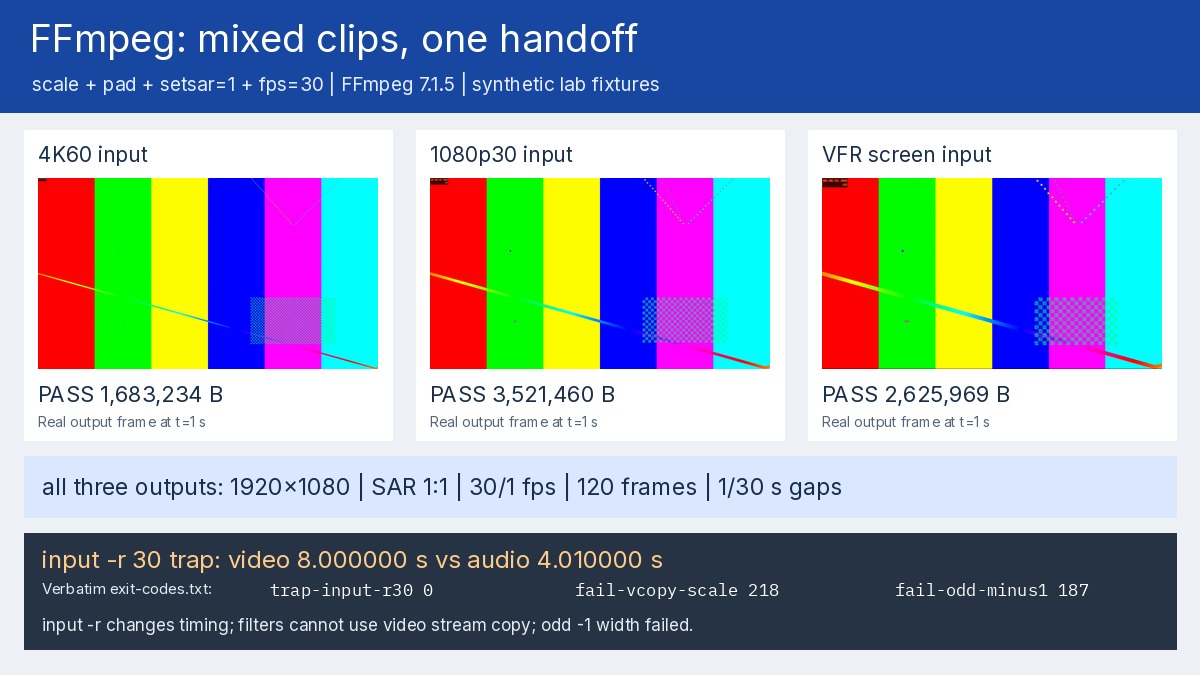
| Phone 4K60 | 0 | 1920x1080, SAR 1:1 | 120 | 1/30 s x119 | AAC 48 kHz, 4.010000 s | 1,683,234 |
| Camera 1080p30 | 0 | 1920x1080, SAR 1:1 | 120 | 1/30 s x119 | AAC 48 kHz, 4.010000 s | 3,521,460 |
| Screen VFR | 0 | 1920x1080, SAR 1:1 | 120 | 1/30 s x119 | AAC 48 kHz, 4.017000 s | 2,625,969 |
Every output video stream was 4.000000 s with avg_frame_rate and r_frame_rate both 30/1. We did not stop at those two fields. The per-frame timestamps had a single gap value, 1/30 s, and all 120 packets had the same 512-tick duration. That is the evidence for constant frame rate here.
The audio tracks ran slightly longer than the video: 0.010000 s on the 48 kHz sources and 0.017000 s on the resampled screen clip. That is a measurement of stream end times, not a lip-sync test. We had no speech and no editor in this run.
What fps=30 did to the frames
Frame rate conversion is not free. To count what the filter did, we ran fps=30 without encoding and hashed each decoded frame. On the screen clip, 160 frames became 120. Twenty of those were straight repeats, all between output frames 31 and 88, which is the slow middle section. Sixty source frames from the 60 fps parts never made it out. The phone clip went from 240 frames to 120, so half were dropped.
If your screen recording has a cursor flicking across a menu, some of those in-between positions are gone. If you need every frame kept, this is the wrong tool. The r/ffmpeg poster who wanted 50 fps "without dropping or duplicating any frames" hit exactly that wall.
One trap in our own checking: after x264 encoding, the repeated frames no longer hashed identically, because lossy compression decoded them slightly differently. Hash the filter output before encoding if you want to count duplicates.
Half a chain still leaves a mess
| Command | Input | Size | Frames | Frame gaps | Bytes |
|---|---|---|---|---|---|
| scale + pad only | Phone 4K60 | 1920x1080 | 240 | 1/60 s x239 | 1,661,566 |
| scale + pad only | Screen VFR | 1920x1080 | 160 | 1/60 s x119, 1/20 s x40 | 3,151,659 |
| fps=30 only | Phone 4K60 | 3840x2160 | 120 | 1/30 s x119 | 13,016,778 |
| fps=30 only | Screen VFR | 1366x768 | 120 | 1/30 s x119 | 1,730,026 |
Scaling alone copied the variable timing straight through. The resized screen clip still had 40 gaps of 1/20 s and still reported 40/1 against 60/1. The phone clip stayed at 60 fps. With fps=30 alone, the timing lined up but the three outputs were 3840x2160, 1920x1080 and 1366x768. The audio was not touched either: the fps-only screen file still carried 44.1 kHz.
Mistakes we made on purpose
Filter plus stream copy
ffmpeg -i camera-1080p30.mp4 -vf scale=1280:720 -c:v copy -c:a copy out.mp4EXIT 218, no output file. FFmpeg said: Filtergraph 'scale=1280:720' was specified, but codec copy was selected. Filtering and streamcopy cannot be used together. Good. Resizing or retiming always means a video re-encode. The Super User asker with a mixed 24p and 30p file wanted the same shortcut and ended up editing a Matroska header for one TV instead.
Odd widths
A hard-coded scale=1919:1080 into libx264 exited 187 with width not divisible by 2 (1919x1080). It left a 0-byte file behind, so check the exit code, not just whether the file exists.
The quieter version comes from -1. We made a 1365x767 source (we had to crop it after converting to 4:4:4, because testsrc2 rounded our first attempt down to 1364x766). scale=-1:720 computed a 1281-pixel width and failed with EXIT 187. scale=-2:720 rounded to 1282x720 and passed. It also left a sample aspect ratio of 37800:37819 because we did not add setsar=1. The Stack Overflow thread on libx264's divisible-by-2 error covers both -2 and padding up to an even size.
-r in front of the input
ffmpeg -r 30 -i phone-4k60.mp4 -vf "scale=1920:1080,setsar=1" ... out.mp4EXIT 0, and the file looks fine in a probe summary: 1920x1080, 30/1, constant 1/30 s gaps. But all 240 frames were kept and retimed, so the video ran 8.000000 s while the audio stayed at 4.010000 s. The picture plays at half speed and ends 4 seconds after the sound. As an input option, -r overrides the source timestamps. Put frame-rate changes in the filter chain.
Hard-coding 1920:1080 on a source that is not 16:9
scale=1920:1080,fps=30 on the 1366x768 clip exited 0. The output was 1920x1080 with SAR 2049:2048. 1366x768 is close to 16:9 but not exact, so FFmpeg recorded the tiny stretch in the SAR field. Some tools honor that field and some ignore it. The fit-and-pad chain with setsar=1 avoids the question.
Audio: resample or copy?
We ran the screen clip through the same video chain twice. With -af aresample=48000:async=1 -c:a aac, audio came out at 48 kHz, 4.017000 s. With -c:a copy, it stayed at 44.1 kHz, 4.000000 s, and the file was 2,611,253 bytes. Both kept the video at 4.000000 s. Copy is fine for timing on a short clip like this. It does not give you one sample rate across the batch, which is half the point of a handoff. Neither run tells you anything about drift on a 40-minute recording. We did not test that.
What community pages raised
The Super User duplicating-frames question tried -r 29.97, then fps=fps=29.97, and got repeated frames or broken sync. One answer points to -fps_mode passthrough, which is the opposite goal from ours: keep the original timing. We used that thread as a reminder that frame-rate options do different jobs depending on where they sit.
We also read a VFR-to-CFR tutorial on FFmpeg Cookbook. It checks timing on one synthetic source. Our gap was the mixed-source case: size, aspect, frame rate and audio rate together, plus the commands that fail. No text or numbers from that page were reused.
Handoff checklist
- Probe every clip: width, height, SAR,
avg_frame_rate,r_frame_rate, audio sample rate. - For anything that might be variable, list per-frame timestamps with
ffprobe -show_frames -show_entries frame=best_effort_timestampand count the distinct gaps. - Use one chain for every clip: fit, pad,
setsar=1, thenfps. Keep frame-rate changes out of the input options. - Use
-2or a fixed even size. Never trust-1with libx264. - Probe the outputs the same way you probed the inputs, including frame gaps. Then open a short clip in your editor before converting a whole shoot. We did not do that step.
Pros, cons and test limits
- Pro: One chain gave three different sources identical size, SAR, frame count, frame gaps and audio rate.
- Pro: The filter-plus-copy and odd-width mistakes fail loudly with clear messages.
- Con:
fpsdrops and repeats frames. On our screen clip it threw away 60 frames and repeated 20. - Con: Input
-rand hard-coded scale both exit 0 with a wrong result. A probe summary alone did not expose the half-speed video; comparing video and audio durations did. - Con: Every path re-encodes video. Plan for the time and generation loss.
- Not tested: importing into Premiere, Resolve or any other editor; timeline playback; real phone, camera or OBS footage; lip sync on speech; long-recording drift; GPU encoders;
minterpolate; HDR or 10-bit; interlaced sources; upload previews; speed on large files; visual quality. - Vertical reframing has its own Shorts crop and pad review. Swapping a finished soundtrack is covered in the replace-audio review.
Sources and evidence
All measurements came from FFmpeg/ffprobe 7.1.5-0+deb13u1 on Debian 13 with locally generated lavfi fixtures. The evidence folder ffmpeg-scale-fps-handoff, November 7, 2026, holds the commands, full logs, EXIT codes, ffprobe JSON, per-frame timestamp lists, frame hashes and byte sizes.