
By ToolBrivio Editorial · Hands-on test of FFmpeg 7.1.5-0+deb13u1 (libx264) on Debian 13, October 17, 2026, plus official and independent encoding guides for structure where marked. Complementary to our HandBrake delivery encode review — not a rewrite of the HandBrake vs FFmpeg comparison. We earn no affiliate commission from links on this page. Research approach · Link disclosure.
LosslessCut already dropped the dead air. The keep merge is still huge—camera bitrate or a near-lossless stand-in—and you need a smaller MP4 that a shell script or CI job can re-run without clicking presets. That is a delivery encode: lossy libx264, not another stream-copy cut. We ran four FFmpeg lines on one fat 1080p Seattle interview stand-in, timed them, and probed every output.
Review basis: FFmpeg/ffprobe 7.1.5-0+deb13u1 on Debian 13. Source: 30.000 s, 1920×1080@30, 1,102,887,801 bytes (1051.80 MiB), synthetic color+noise panels (US-English KEEP A / KEEP B labels)—not a client shoot. Software x264 only. We did not test Windows or macOS builds, NVENC/QSV, AV1/HEVC, hour-long files, subtitle burn-in, or picture-quality scores (no VMAF).
Verdict
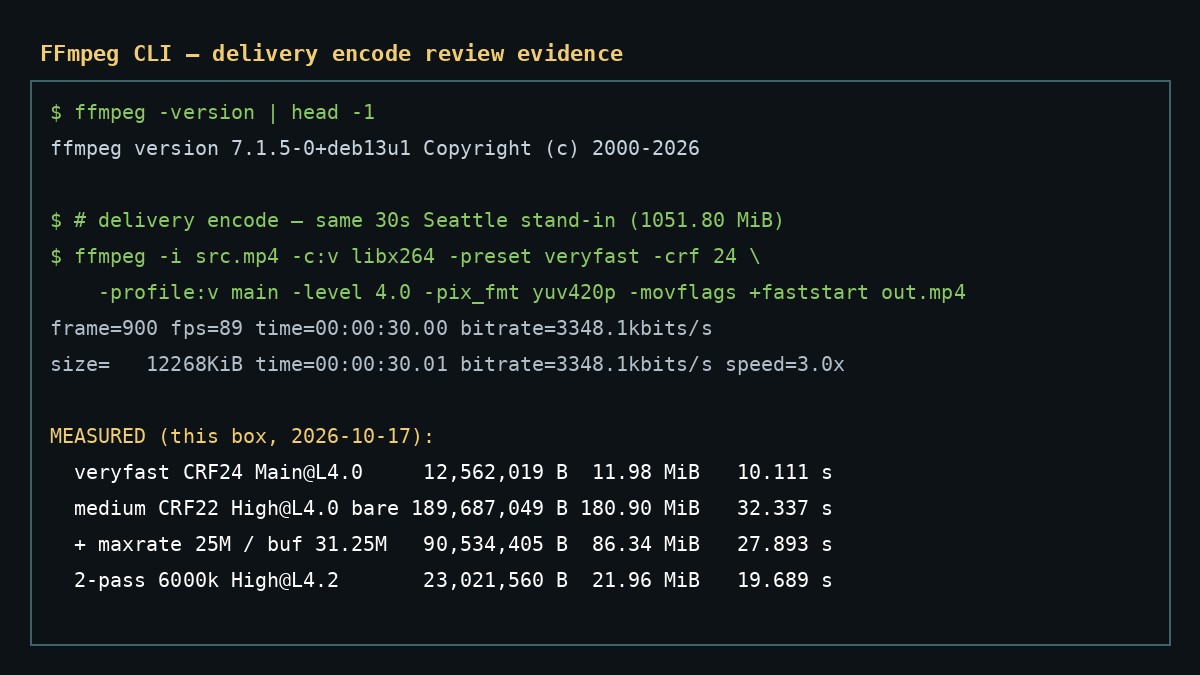
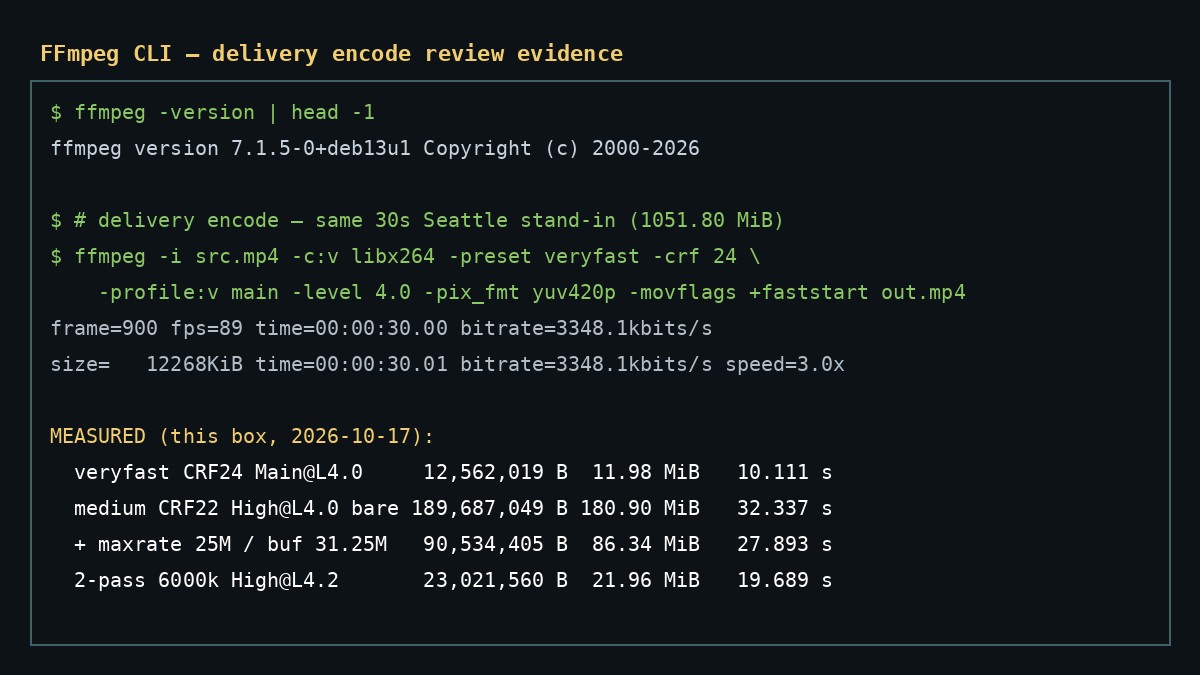
If your job is “put a reviewed encode line in a script and hit a delivery size class,” FFmpeg’s explicit flags do that path. On our fixture, veryfast + CRF 24 + Main@L4.0 wrote 12,562,019 bytes (11.98 MiB) in 10.111 s. medium + CRF 22 + High@L4.0 without a bitrate cap wrote 189,687,049 bytes (180.90 MiB)—fine stills, useless as a “platform-sized” promise. Adding -maxrate 25000k -bufsize 31250k (Level 4.0-style VBV) dropped the same CRF/preset to 90,534,405 bytes (86.34 MiB) in 27.893 s. For a hard ~25 MB / 30 s class, a 2-pass -b:v 6000k finished at 23,021,560 bytes (21.96 MiB) in 19.689 s. Prefer HandBrake when the team shares named presets instead of flag lines—see the HandBrake review. Prefer LosslessCut when you only need to drop retakes without touching the bitstream.
- Pro: Every knob is visible in the command; teammates can diff a one-liner in git.
- Pro: Bare CRF vs capped CRF is measurable: 180.90 MiB → 86.34 MiB on this noisy clip after adding VBV.
- Pro: 2-pass 6000k stayed under 25 MB on a full 30 s clip without HandBrake’s Social preset name.
- Con: No preset picker. You must choose CRF, preset, profile, and (when needed) maxrate yourself.
- Con: CRF alone is not a size or peak-rate guarantee—public H.264 guides warn about that; our bare CRF 22 run shows why.
- Limit: Software x264 only here; hardware paths unverified. Synthetic noise ≠ facial detail claims.
What we encoded
Critical path: fat post-cut 1080p MP4 → smaller delivery MP4 with a pasteable command. This is not a mux/language-tag job—see MKVToolNix delivery mux—and not a keyframe cut—see LosslessCut interview cut. For HandBrake’s named-preset path on the same fixture, see the HandBrake delivery encode review.
- Start from a cut (or fat) H.264/AAC file. Ours: 30.000 s, 1920×1080@30, near-lossless CRF 12 + noise, 1051.80 MiB.
- Pick a rate-control mode: CRF for a quality target, CRF+VBV when a peak bitrate matters, or 2-pass ABR when a byte class matters.
- Encode to MP4 with
-pix_fmt yuv420pand-movflags +faststartfor common players and progressive download. - Verify with ffprobe: duration, resolution, codecs, byte size vs target.
Why bare CRF is not a platform limit
Public FFmpeg H.264 and rate-control guides split the job cleanly: CRF aims at a quality level and lets bitrate float with content; a platform or Level-style peak needs VBV (-maxrate plus -bufsize); a hard average size class wants 2-pass ABR. Preset (veryfast / medium / …) is a separate dial—speed versus compression efficiency—not a substitute for CRF or maxrate. We did not copy anyone else’s measured bitrates; we used that structure to decide which four commands to run.
Fast path: veryfast + CRF 24
ffmpeg -y -i seattle_interview_delivery_src.mp4 \
  -c:v libx264 -preset veryfast -crf 24 -profile:v main -level 4.0 \
  -pix_fmt yuv420p -r 30 -c:a aac -b:a 160k -movflags +faststart \
  ff_veryfast_crf24.mp4
Wall clock 10.111 s. Output 12,562,019 bytes (11.98 MiB), Main@L4.0, ~3.18 Mbps video, duration 30.000 s video / 30.016 s container. Same byte count as our October 16 evidence archive for this fixture; wall time was 8.400 s that day—box load moves the clock, not the file size here. Good default when you want a small, scriptable delivery and do not need a written peak-rate cap.
CRF 22: bare vs VBV-capped
ffmpeg -y -i seattle_interview_delivery_src.mp4 \
  -c:v libx264 -preset medium -crf 22 -profile:v high -level 4.0 \
  -pix_fmt yuv420p -r 30 -c:a aac -b:a 160k -movflags +faststart \
  ff_medium_crf22.mp4
Wall clock 32.337 s. Output 189,687,049 bytes (180.90 MiB), High@L4.0, ~50.4 Mbps. Stills look fine. The file is still in “fat export” territory on this noisy source. CRF 22 alone did not enforce a delivery peak.
ffmpeg -y -i seattle_interview_delivery_src.mp4 \
  -c:v libx264 -preset medium -crf 22 -profile:v high -level 4.0 \
  -maxrate 25000k -bufsize 31250k \
  -pix_fmt yuv420p -r 30 -c:a aac -b:a 160k -movflags +faststart \
  ff_medium_crf22_vbv25.mp4
Same CRF and preset, plus a 25 Mbps / 31.25 Mbps buffer VBV pair (the Level 4.0-style numbers HandBrake injects on an RF 22 / L4.0 job). Wall clock 27.893 s. Output 90,534,405 bytes (86.34 MiB), ~24.0 Mbps. Teaching point: when a client or platform brief implies a peak rate, write -maxrate and -bufsize into the script—do not assume CRF will stay polite. Our October 16 archive had 86.83 MiB for this recipe; this retest is within about half a mebibyte.
-maxrate 25000k -bufsize 31250k: 86.34 MiB on this fixture.Size-cap path: 2-pass 6000k
ffmpeg -y -i seattle_interview_delivery_src.mp4 \
  -c:v libx264 -preset medium -b:v 6000k -pass 1 -profile:v high -level 4.2 \
  -pix_fmt yuv420p -r 30 -an -f null /dev/null
ffmpeg -y -i seattle_interview_delivery_src.mp4 \
  -c:v libx264 -preset medium -b:v 6000k -pass 2 -profile:v high -level 4.2 \
  -pix_fmt yuv420p -r 30 -c:a aac -b:a 160k -movflags +faststart \
  ff_social_2pass_6000k.mp4
Wall clock 19.689 s (pass 1: 8.844 s; pass 2: 10.846 s). Output 23,021,560 bytes (21.96 MiB)—under a 25 MB label on this 30 s clip. Final stream: H.264 High @ L4.2, ~6.0 Mbps. Use this pattern when the brief is a hard byte class, not when you only care about a quality number. It is not a guarantee that every different source at 6000k lands under 25 MB.
Results table
| Check | Source | veryfast CRF 24 | CRF 22 bare | CRF 22 + VBV | 2-pass 6000k |
|---|---|---|---|---|---|
| Bytes | 1,102,887,801 | 12,562,019 | 189,687,049 | 90,534,405 | 23,021,560 |
| MiB | 1051.80 | 11.98 | 180.90 | 86.34 | 21.96 |
| Wall time | — | 10.111 s | 32.337 s | 27.893 s | 19.689 s |
| Video duration | 30.000 s | 30.000 s | 30.000 s | 30.000 s | 30.000 s |
| Resolution | 1920×1080 | 1920×1080 | 1920×1080 | 1920×1080 | 1920×1080 |
| Control | libx264 CRF 12 (fixture) | veryfast CRF 24 | medium CRF 22 | medium CRF 22 + 25M VBV | medium 2-pass 6000k |
| Profile (ffprobe) | Constrained Baseline | Main | High | High | High |
What failed or needed a clear caveat
- CRF is not a size guarantee. Bare CRF 22 wrote 180.90 MiB here. Measure bytes after encode.
- Missing VBV when a peak rate is implied. Add
-maxrateand-bufsizetogether; one without the other is incomplete. - Preset ≠ quality number.
-preset veryfastvsmediumchanges speed and efficiency; it does not replace-crfor a bitrate target. - FFmpeg does not replace lossless cut. Re-encode cost is real; trim first with LosslessCut (or stream-copy) if you only need to drop dead air.
- Hardware encode untested. Timings are software x264 only on this box.
- Fixture bias. Color panels + noise overstate how easy text survives; they understate facial detail risk. No VMAF claims.
Who it suits
FFmpeg fits a creator or editor who already lives in a terminal or CI and wants a pasteable, reviewed delivery encode. According to the FFmpeg project site, the tool is free and open source under LGPL/GPL conditions depending on enabled components; we used the Debian 7.1.5 package. If your team prefers clicking named presets, use HandBrake. If you only need to drop retakes without re-encoding, stay in LosslessCut. If you need language defaults on a multi-track MKV, mux after encode with MKVToolNix.
Limits of this test
- 30-second synthetic fixture; not proof of hour-long throughput or disk speed.
- Linux CLI only for size/time numbers.
- Windows, macOS, SVT-AV1, HEVC, and hardware encoders unverified.
- Subtitles, chapter burn-in, and privacy/network behavior unverified.
Sources and evidence
Structure for rate-control choices was checked against the FFmpeg Encode/H.264 wiki, Werner Robitza’s rate-control overview, Encode Wiki’s quality-controls guide, and the Academy Software Foundation H.264 encoding notes (October 17, 2026). We used those pages for which questions to ask—not for their sample numbers. Command log, versions, outputs, ffprobe dumps, encode logs, and frame grabs are kept in ToolBrivio’s evidence archive for this review (ffmpeg, October 17, 2026), with symlinks to the shared Seattle fixture and prior HandBrake / comparison archives.