
By ToolBrivio Editorial · Hands-on test of LosslessCut 3.69.0 (official Linux x64 build from GitHub release v3.69.0) on Linux, October 16, 2026, plus official documentation where marked. We earn no affiliate commission from links on this page. Research approach · Link disclosure.
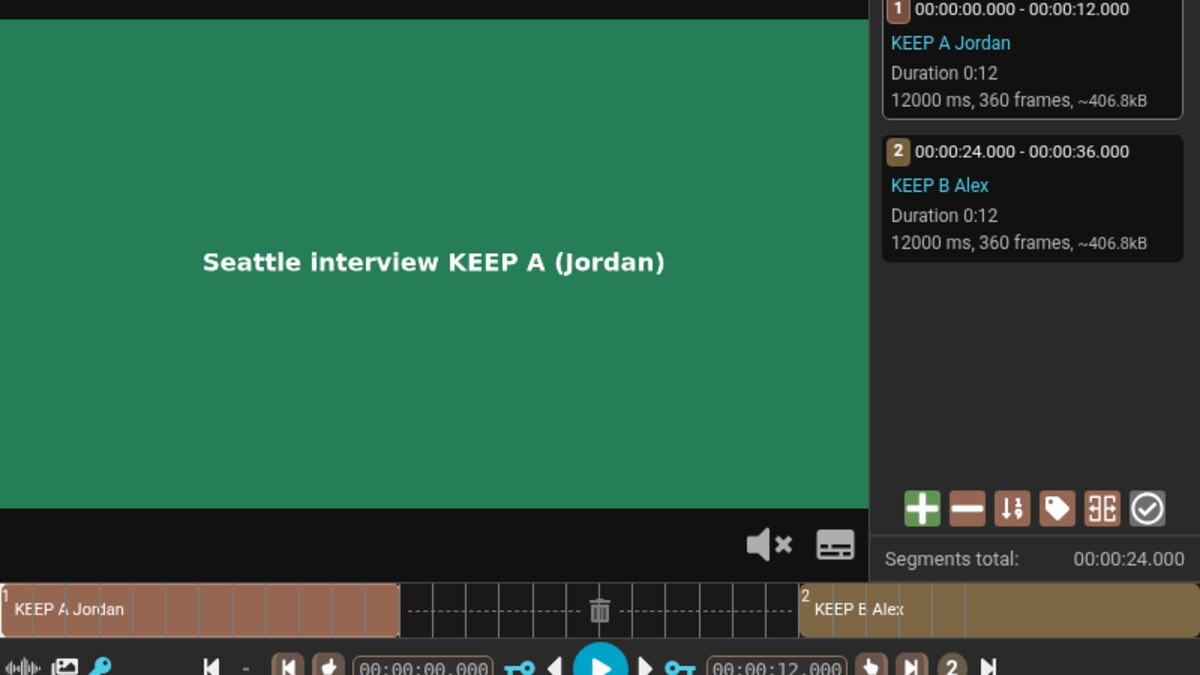
You finished a long talking-head take. Twelve seconds of usable answer, twelve seconds of dead air and a retake, then another usable block. You do not want Premiere or Resolve to re-encode the whole file just to drop the middle—and you do not want to hand-write FFmpeg -ss/-t cuts that land on the wrong keyframe. We ran that job in LosslessCut’s GUI on a synthetic Seattle interview, exported with Merge cuts, then checked the files with ffprobe, frame samples and the app’s own FFmpeg log.
Review basis: LosslessCut 3.69.0 on Debian 13 under a headless X server (Xvfb), with an isolated home and config directory, networking disabled for the run. The fixture was a 36.000 s US-English synthetic (green KEEP A / gray dead air / blue KEEP B, H.264 keyint 30 at 30 fps, AAC, soft captions)—not a client shoot. We did not test Windows or macOS installers, mobile use, Smart Cut, hour-long sources, or privacy beyond launching with --disable-networking.
Verdict
For an editor who needs to see keep regions on a timeline and still leave the bitstreams alone, LosslessCut does the critical path: open the file, mark in/out (or load a project), choose Merge cuts, export. Our keyframe-aligned keep merge wrote H.264 + AAC + soft captions with every stream on -c copy in the logged FFmpeg commands. The sharp edges we measured are the ones lossless cutting always has: start times snap to the previous keyframe, merged duration was about a second longer than the 24 s of “keep” we marked, the Success dialog itself warns that cutpoints may be inaccurate, and a deliberate mid-GOP cut pulled gray dead-air frames into the deliverable.
- Pro: Export log used
-c copyon video, audio and subtitle maps, then concat with copy—no silent re-encode on our run. - Pro: Soft captions survived both MP4 (
mov_text) and MKV (subrip) keep-merges; the dead-air cue disappeared from the extracted MKV captions. - Pro: Separate-files mode wrote two named segment MP4s when we turned merge off—useful before a later encode or mux.
- Con: Marked keep total 24.000 s; merged MP4 container measured 25.021 s (720 video packets). Plan for keyframe/timeline padding, not sample-accurate duration.
- Con: Mid-GOP keep ends/starts (12.500 / 24.400) still stream-copied, but output frames at ~12.0–12.4 s sampled as dead-air gray—lossless cut cannot invent a keyframe inside the GOP.
- Limit: Official troubleshooting (v3.69.0 docs) states start cut times normally round to the previous keyframe; our
-ss 24.400000before-imatches that model. Smart Cut was not tested.
What we cut
Critical path: one multi-minute-style interview file (36 s stand-in), drop the dead middle, keep audio and captions, leave codecs untouched. Baseline alternatives are a full NLE re-encode or raw FFmpeg segment copy. This is not a language-tag mux job—see our MKVToolNix delivery mux review for that workflow.
- Build or open a long take with clear keep / dead / keep regions. Ours used H.264 High-ish Constrained Baseline 1280×720 @ 30 fps with
-g 30so keyframes landed every second. - In LosslessCut, set segment in/out (I / O) for each keep region, or load a
.llcproject. We marked 0–12 s “KEEP A Jordan” and 24–36 s “KEEP B Alex”. - Confirm Tracks (3/3) if you need captions; set output to MP4 or Matroska; choose Merge cuts (or Separate files).
- Export (E). On success, read the dialog: our run showed “Cutpoints may be inaccurate.”
- Verify with ffprobe: codecs unchanged, duration vs marked keep, subtitle stream present if expected.
Keyframe-aligned merge (primary result)
With segments ending and starting on whole seconds (keyframes in our fixture), LosslessCut logged:
ffmpeg … -i seattle_interview.mp4 -t 12.000000 -map 0:0 -c:0 copy -map 0:1 -c:1 copy -map 0:2 -c:2 copy … KEEP-A.mp4
ffmpeg … -ss 24.000000 -i seattle_interview.mp4 … -c:0 copy -c:1 copy -c:2 copy … KEEP-B.mp4
ffmpeg … -f concat … -c:0 copy -c:1 copy -c:2 copy … cut-merged.mp4
ffprobe on the merged file: h264 + aac + mov_text, format duration 25.021333 s, video stream duration 25.0 s, audio 25.021333 s (≈21 ms gap—AAC priming scale, not a multi-second drift on this short clip). Video packet count was 720 (24.0 s of frames at 30 fps). ffmpeg’s blackframe filter reported no near-black frames on this merge. Color samples at the junction moved from KEEP A green to KEEP B blue without a black flash.
Results table
| Check | Keyframe keep-merge | Mid-GOP keep-merge |
|---|---|---|
| Marked keep | 0–12 + 24–36 (24.000 s) | 0–12.5 + 24.4–36 (24.100 s) |
| Container duration | 25.021 s | 25.021 s |
| Video packets | 720 | 735 |
| FFmpeg codecs | all copy | all copy |
| Subtitles | mov_text retained | mov_text retained |
| Dead-air frames in output? | Not observed (green→blue) | Yes—gray samples ~12.0–12.4 s |
| Black frames (filter) | None hit | None hit (gray ≠ black) |
What failed or needed a workaround
- Duration is not the sum of segment labels. Two 12 s keeps became a ~25.02 s file. Treat LosslessCut as “near keyframe” cutting. The Success dialog’s “Cutpoints may be inaccurate” matched what we measured.
- Mid-GOP in/out still copies packets. Ending keep A at 12.5 s included the first half-second of our dead-air gray (dead started at 12.0). Starting keep B at 24.4 s used
-ss 24.400000before-i(previous-keyframe seek). Gray frames appeared in the merged output. Fix: place cuts on keyframes you can see on the timeline, or accept a re-encode / Smart Cut path we did not verify. - Separate segA container read 13.000 s while carrying 360 video packets (exactly 12 s of frames). Always check packet count or play the file—not only the container duration field.
- Caption times shift with the cut. On the MKV keep-merge, extracted SubRip dropped the dead-air cue and retimed Alex’s lines onto the merged timeline (≈14 s / 20 s with a ~21 ms offset). Re-spot captions if a client needs frame-locked timing.
MKV + soft SRT
The same keep regions on seattle_interview.mkv exported as Matroska with -c copy on H.264, AAC and subrip. Extracted captions kept Jordan’s early cues, removed the dead-air line, and kept Alex’s answers with new timestamps. Language tags on audio/subs remained eng in ffprobe.
Who it suits
LosslessCut fits a creator who already has a long H.264/AAC take and needs a fast, visual way to drop retakes before delivery or a later encode. According to the official LosslessCut repository, the app is free and open source; we used the GitHub Linux x64 build, not an app-store package. If you still need language defaults on a multi-file mux, use MKVToolNix after you cut. If you need sample-accurate edits or effects, you need a re-encoding editor—LosslessCut’s own FAQ lists crop/resize/volume as out of scope for lossless mode.
Limits of this test
- 36-second synthetic fixture; not a proof of large-file speed or disk throughput.
- Linux GUI under Xvfb only; playback was not auditioned (volume set to 0 in config).
- Smart Cut, Windows, macOS and mobile UIs unverified.
- Privacy/network behavior unverified beyond the
--disable-networkinglaunch flag we used for the test session.