
By ToolBrivio Editorial · Hands-on test of MKVToolNix 92.0 (Debian mkvtoolnix / mkvtoolnix-gui 92.0-1+deb13u1) on Linux, October 15, 2026, plus official documentation where marked. We earn no affiliate commission from links on this page. Research approach · Link disclosure.
You have a finished picture file, a separate dialogue track, and an SRT. The client wants one MKV with the languages labeled and the right track marked default—without another video encode. We ran that job in MKVToolNix’s GUI and again with mkvmerge on the same fixtures, then checked the file with mkvmerge -J, mkvinfo and ffprobe.
Review basis: MKVToolNix 92.0 (“Everglow”) on Debian 13 under a headless X server (Xvfb), with an isolated home directory. Fixtures were synthetic US-English materials (Seattle interview labels), not a client shoot. We did not test macOS or Windows installers, mobile use, hour-long sources, network privacy or player auto-selection beyond what ffprobe reports for default disposition.
Verdict
For a finishing editor who needs to see language and default-track flags before export, the Multiplexer UI does the job the CLI alone makes easy to skip: add video, audio and SRT, set Language and “Default track” on each row, then Start multiplexing. Our correct deliverable carried H.264 + AAC + SubRip, English labels on audio and captions, subtitle default off, and a video bitstream byte-identical to the source (SHA-256 of the extracted Annex-B stream matched). The sharp edges we hit were real: a mistyped language code enq still muxed; a Windows-1252 SRT without an explicit charset produced replacement characters; wrong default flags are written faithfully and show up in ffprobe.
- Pro: GUI Properties expose Language and “Default track” flag beside the track list—useful when you refuse to FFmpeg-mux blindly.
- Pro: Stream copy held: source, CLI and GUI outputs shared the same H.264 payload hash (
41199096f6ee…d2e9c7) for 180 frames at 1280×720. - Pro:
mkvmergeaccepts the same language / default-track flags for scripted repeats after you confirm them once in the GUI. - Con: Typing
enqinstead ofengin the Language field did not block the mux; identify showedlanguage_ietf=enqwhile the conventional language field stayedund. - Con: A Windows-1252 SRT muxed without
--sub-charsettriggered a UTF-8 warning; extracted cues showed � for curly apostrophes andcafé. - Limit: We did not verify how every player picks the default subtitle or audio track beyond container flags.
What we muxed
Critical path: separate video-only H.264 MP4 (6.000 s, 1280×720, High@L3.1, no audio in the file), a sidecar AAC LC mono track at 48 kHz labeled as English dialogue, and a UTF-8 SRT with three English cues (Jordan / Alex, Seattle studio). Baseline alternatives for the same handoff are a pure FFmpeg mux (see our FFmpeg multitrack remux review) or shipping three loose files.
- Create or collect the three sources. Keep the picture file free of a throwaway audio track if the client’s dialogue lives only in the sidecar.
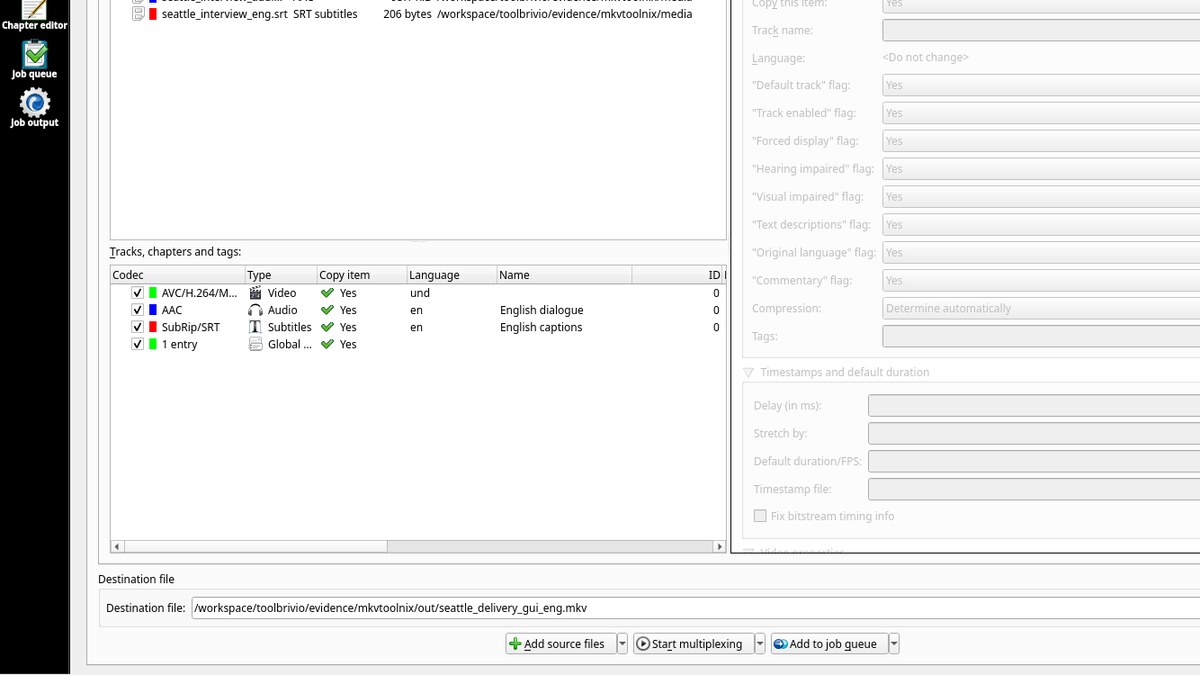
- In MKVToolNix GUI → Multiplexer, use + Add source files (or pass the files on the command line). Confirm three rows under Tracks: AVC/H.264, AAC, SubRip/SRT.
- Select each track. Set Language (we used
undfor video,engfor audio and captions), set “Default track” flag (Yes on video and audio, No on captions), and optional track names (“English dialogue”, “English captions”). - Choose a Destination file ending in
.mkv, then Start multiplexing. - Verify with
mkvmerge -Jor ffprobe: three streams, expected languages, expected default dispositions, codec names stillh264/aac/subrip.
CLI check (same job, scriptable)
mkvmerge -o seattle_delivery.mkv \
  --language 0:und --default-track-flag 0:yes video_only.mp4 \
  --language 0:eng --track-name 0:"English dialogue" --default-track-flag 0:yes dialogue.aac \
  --language 0:eng --track-name 0:"English captions" --default-track-flag 0:no captions.srt
On our run, mkvmerge -J reported video und default true, audio eng (IETF en) default true named “English dialogue”, subtitles eng default false named “English captions”. ffprobe agreed on codecs and default disposition. Extracting the video elementary stream from the source MP4 and from the MKV produced identical SHA-256 digests—evidence of copy, not a silent re-encode.
Results table
| Check | CLI correct mux | GUI after eng fix |
|---|---|---|
| Video codec | h264 (AVC High) | h264 (AVC High) |
| Audio codec | aac LC, 48 kHz mono | aac LC, 48 kHz mono |
| Subtitle codec | subrip / S_TEXT/UTF8 | subrip / S_TEXT/UTF8 |
| Languages (mkvmerge -J) | und / eng / eng | und / eng / eng |
| Default flags | video yes, audio yes, subs no | video yes, audio yes, subs no |
| H.264 payload SHA-256 | matches source | matches source |
What failed or needed a workaround
- Mistyped language
enq. In the GUI Language field we once committedenqinstead ofeng. Multiplexing still finished. Identify listedlanguage_ietfasenqwhile the older language field readund. Fix: re-enter a real code (eng/ English) and remux; do not trust the track-name string alone. - Windows-1252 SRT without charset.
mkvmergewarned that the track contained invalid UTF-8 sequences. Extracted cues showed replacement characters. The same file with--sub-charset 0:windows-1252extracted as proper UTF-8 (“That’s”, “café”). Convert or declare the charset before delivery. - Wrong default flags are not “fixed” by the muxer. When we set subtitle default Yes and audio default No on purpose, ffprobe reported exactly that. A player that follows the default flag will prefer the wrong track. Confirm the flags in the GUI before export.
- Locale abort on first GUI launch. With
LC_ALL=en_US.UTF-8unavailable on the test image, the GUI aborted withlocale::facet::_S_create_c_locale name not valid.C.UTF-8started cleanly. Irrelevant on a normal desktop with a full locale set; recorded because it blocked our first headless attempt. - CLI overwrite. Re-running
mkvmerge -oto an existing path replaced the file with exit status 0 in our run. Prefer a new filename for each client revision.
Who it suits
MKVToolNix fits a subtitle freelancer or finishing editor who already has separate essence files and needs one labeled Matroska for delivery—especially when a GUI confirmation of languages and defaults matters more than another CLI one-liner. According to the official MKVToolNix site, the tools are free / open-source; we did not re-audit the license text beyond that site check on October 15, 2026.
If your only task is remuxing an already-bundled multitrack file and you live in the terminal, the FFmpeg review linked above covers stream maps and silent track loss. If you are still fixing cue timing, start with Subtitle Edit before you mux. OBS remux guides address recorder MKV→MP4 convenience, not language tagging for client handoff.
Limits of this test
- Six-second synthetic fixtures; not a proof of large-file speed or disk throughput.
- Linux GUI under Xvfb only. PulseAudio failed to connect in the log; we did not audition playback inside the GUI.
- Default-track player behavior beyond ffprobe disposition is unverified.
- Mobile, macOS and Windows UIs unverified.