
By ToolBrivio Editorial · Hands-on test of FFmpeg/ffprobe 7.1.5-0+deb13u1 on Debian 13, November 6, 2026 (Asia/Shanghai). Community sources are linked where they raised a test case; every result below is from our own synthetic files. We earn no affiliate commission from links on this page. Research approach · Link disclosure.
You have the finished interview MP4 and a clean WAV from the audio edit. Do not send the picture through another encode. This is the command we would use for a WAV replacement:
ffmpeg -i finished.mp4 -i clean.wav \
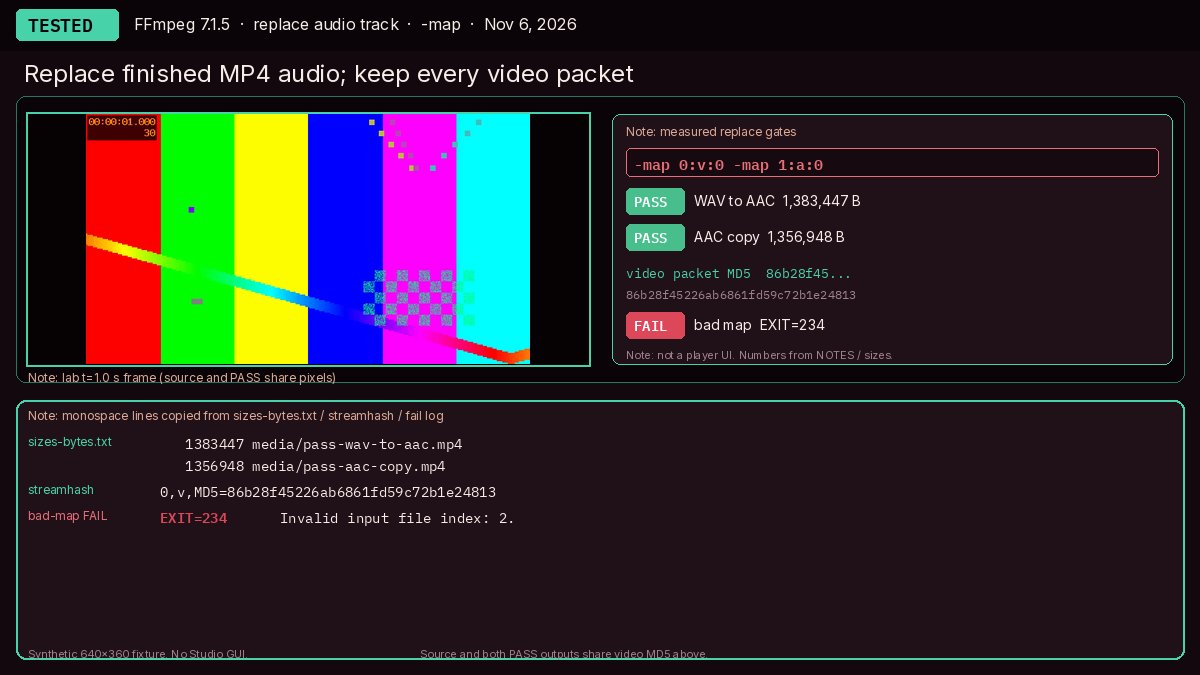
  -map 0:v:0 -map 1:a:0 \
  -c:v copy -c:a aac -b:a 192k \
  replaced.mp4
The two -map options are the job. 0:v:0 is the first video stream in the first input. 1:a:0 is the first audio stream in the second input. Nothing maps the original audio, so it does not come along. -c:v copy copies the compressed video packets; -c:a aac encodes only the new audio.
What passed in this lab
Our source was generated with testsrc2 and a 440 Hz tone. The replacement was a separate 880 Hz mono file at 48 kHz. Source video: H.264, 640x360, yuv420p, 30 fps, 8.000000 s, 240 frames. The MP4 was 1,357,399 bytes and held one video stream plus one AAC audio stream.
| Test | Exit | Video | Audio | Bytes |
|---|---|---|---|---|
| WAV to AAC, exact map | 0 | 8.000000 s, 240 frames | AAC, 8.000000 s, 1 stream | 1,383,447 |
| M4A AAC copy, exact map | 0 | 8.000000 s, 240 frames | AAC, 8.000000 s, 1 stream | 1,356,948 |
No map, -c copy | 0 | 8.000000 s | Original AAC retained, 1 stream | 1,357,368 |
-map 0 -map 1:a, copy | 0 | 8.000000 s | Old plus new AAC, 2 streams | 1,485,955 |
4 s audio, no -shortest | 0 | 8.000000 s, 240 frames | 4.000000 s | 1,303,852 |
4 s audio, with -shortest | 0 | 4.000000 s, 120 frames | 4.000000 s | 693,102 |
12 s audio, no -shortest | 0 | 8.000000 s, 240 frames | 12.000000 s | 1,460,328 |
12 s audio, with -shortest | 0 | 8.000000 s, 240 frames | 8.000000 s | 1,383,446 |
The source, WAV-to-AAC output and AAC-copy output all produced video streamhash MD5 86b28f45226ab6861fd59c72b1e24813. Their framemd5 runs each contained 240 rows, and every row matched. That proves identical copied video packets and identical decoded pixels for these files. It is stronger than checking only codec name or resolution.
For the copy path, we first encoded the clean 8-second audio to M4A AAC, then changed -c:a aac -b:a 192k to -c:a copy. Input and output audio streamhash MD5 both read 2fc80679e4042a50034c8463d5285cf5. That avoids another lossy audio encode. Use it only when the input codec is valid in the destination container.
The map mistakes are quiet
We tried two bad versions because a playable MP4 is not proof that the replacement happened.
No map with -c copy: the old tone won
ffmpeg -i source-old-audio.mp4 -i new-clean-8s.wav \
  -c copy wrong-no-map-copy.mp4
EXIT was 0. ffprobe still showed one H.264 stream and one AAC stream. The default selected the original file's audio, not the second input. Its audio MD5 was 05c194d7ec0be7ae8fd9f15e2692152f, exactly the old 440 Hz stream. The output measured 1,357,368 bytes, 31 bytes smaller than the source, despite retaining the old audio packets. A quick duration check would miss this.
Mapping all of input 0: now there are two audio tracks
ffmpeg -i source-old-audio.mp4 -i new-clean-8s.m4a \
  -map 0 -map 1:a -c copy wrong-old-plus-new-copy.mp4
EXIT was 0, but ffprobe found 3 streams: one video and two audio. Stream 1 matched the old audio MD5. Stream 2 matched the new AAC MD5. This is an added track, not a replacement. If you need to preserve subtitles or attachments while replacing audio, use selective mapping such as -map 0:v -map 1:a -map 0:s?; the optional subtitle form was not tested here.
A nonexistent input index gave a cleaner failure. -map 2:a:0 with only two inputs exited 234: Invalid input file index: 2. followed by Invalid argument.
Do not use -shortest as a generic safety switch
The word sounds safe. It is not. It means stop at the shorter output stream, and a short replacement can be the thing that ends your picture.
- 4-second audio, no flag: video stayed 8.000000 s; audio ended at 4.000000 s. That leaves the final 4 seconds without replacement audio. It does not synthesize silence into the audio stream.
- 4-second audio with
-shortest: video and container ended at 4.000000 s. Only 120 frames remained. The copied packets for those frames were intact, but the second half of the finished picture was gone. - 12-second audio, no flag: video remained 8.000000 s, audio became 12.000000 s, and the container reported 12.000000 s. There were no added video frames; player behavior during the last 4 seconds was not tested.
- 12-second audio with
-shortest: this trimmed the replacement to the picture's 8.000000 s and retained all 240 frames.
First probe both files. If the new audio is shorter, finish the audio edit before this mux step. If it is longer, -shortest is useful only because the video is the shorter stream. Community suggestions include apad to extend short audio with silence; that needs an audio re-encode and was not tested in this review.
AAC encode versus copy, including a version surprise
Our practical split is simple: WAV to MP4 gets a new AAC encode. AAC in M4A to MP4 can use -c:a copy. Both passed with exactly one output audio stream and zero changes to the video hashes.
We expected PCM stream copy into MP4 to fail. It did not on this build. PCM signed 16-bit little-endian and big-endian, plus FLAC, all muxed with EXIT 0. That is a FFmpeg/container observation, not a promise that your editing software or upload target accepts those tracks. WMA2 supplied the deliberate incompatibility: -c:a copy into MP4 exited 234 with Could not find tag for codec wmav2 in stream #1, codec not currently supported in container. Re-encode that audio to AAC instead.
What the community pages helped us check
The Super User replacement-audio thread leads with explicit input mapping and separates video copy from audio compatibility. Its multi-track answer also shows why -map 0 needs a negative audio map if you want other original streams. We tested the simpler failure: without removing old audio, it stayed.
A duration question on Super User describes both failure directions and discusses padding rather than treating -shortest as universal. The first-input duration thread takes the same angle. Those pages supplied the boundary cases, not our numbers.
On Reddit, one user lost the original audio and three subtitle streams after mapping only video and the new audio. That is the opposite delivery requirement from our single-track replacement, but it exposes the same rule: unmapped streams are not kept. A separate interview workflow question needed the picture to fit varying audio lengths. Our test shows why that intent matters before adding -shortest.
We also opened an old Stack Overflow version-mismatch report. Its FFmpeg 0.6.5 installation rejected -codec copy. That is a reminder to record your version, not evidence of a current FFmpeg 7.1.5 limitation.
Our handoff checklist
- Run
ffprobe -show_streams -show_format -of jsonon the picture and replacement audio separately. - Map
0:v:0and1:a:0. Do not map all of input 0 when the old audio must disappear. - Use
-c:v copy. Encode WAV to AAC, or copy AAC only when the destination accepts it. - Compare durations before deciding on
-shortest. Never add it blindly to a shorter replacement. - Probe the output stream count, codecs and per-stream durations. If this is a delivery, also play the head, a middle edit and the tail on the target player. Target-player playback was not tested here.
Pros, cons and test limits
- Pro: The picture survived byte-for-byte at the packet level in both PASS paths; decoded frame hashes matched too.
- Pro: AAC copy preserved the new audio packets exactly. WAV-to-AAC gives a conventional MP4 audio track while leaving video alone.
- Con: Default selection can ignore the new audio, and broad mapping can retain it alongside the new track. Both returned EXIT 0.
- Con:
-shortestremoved 120 frames when given our 4-second audio. Container duration alone did not reveal that the long-audio case still had only 8 seconds of picture. - Con: Stream copy does not repair a start offset, clock drift or a bad edit. Our fixtures started at zero and used matching clean durations for the sync PASS; lip-sync on human speech, delayed inputs and gradual drift were not tested.
- Not tested: NLE timeline replacement, multiple languages, subtitles, dispositions, attachments, HDR, GPU paths, variable-frame-rate phone footage, large files, batch throughput, platform upload preview, and player compatibility beyond ffprobe/ffmpeg decoding.
- No deep retest of loudnorm, SoX, burn-in, concat or Shorts. Audio finishing belongs in the loudnorm review; same-codec joins belong in the concat review.
Sources and evidence
All measurements came from FFmpeg/ffprobe 7.1.5-0+deb13u1 on Debian 13. Fixtures were generated locally with lavfi, not downloaded. The evidence folder contains commands, complete stdout/stderr, EXIT codes, ffprobe JSON, sizes, SHA-256, streamhash and framemd5 records: ffmpeg-replace-audio-track, November 6, 2026. Community pages shaped the checks above; no peer measurements were reused.
- Super User: replace audio in video
- Super User: keep the input video duration
- Super User: combine inputs at the first input's duration
- Reddit: mapping removed existing audio and subtitles
- Reddit: adapting interview video to audio duration
- Stack Overflow: an old FFmpeg version rejects codec copy syntax
- FFmpeg multitrack remux review
- FFmpeg loudnorm interview review
- FFmpeg product page