
By ToolBrivio Editorial · Hands-on test of FFmpeg 7.1.5-0+deb13u1 (loudnorm / ebur128) on Debian 13, October 24, 2026, plus official filter docs and forum threads for structure where marked. Follows our FFmpeg delivery encode review (size/CRF path) — this is the loudness step after picture is settled. We earn no affiliate commission from links on this page. Research approach · Link disclosure.
The cut looks fine. You upload the interview MP4 and the first comment is “can’t hear the guest” — or worse, your episode sits three clicks quieter than the show before it in someone’s playlist. Boosting with volume= until it “sounds loud” is how peaks slam into 0 dBFS. We wanted one pasteable FFmpeg path that aims at integrated loudness (LUFS) and a true-peak ceiling, without re-encoding the video.
Review basis: FFmpeg/ffprobe 7.1.5-0+deb13u1 on Debian 13. Fixture: synthetic 24 s stereo 1280×720 MP4 with a quiet HOST section (0–12 s) and a louder GUEST section (12–24 s) — US-English Seattle stand-in title cards. Not a client recording. We ran two-pass loudnorm to lab targets I=−14 and I=−16 (TP=−1.5, LRA=11), single-pass defaults, a hard volume= boost, and a short dynaudnorm compare. We did not upload to YouTube or a podcast host; −14 / −16 here are lab targets used by many creators in forums, not official platform contracts.
Verdict
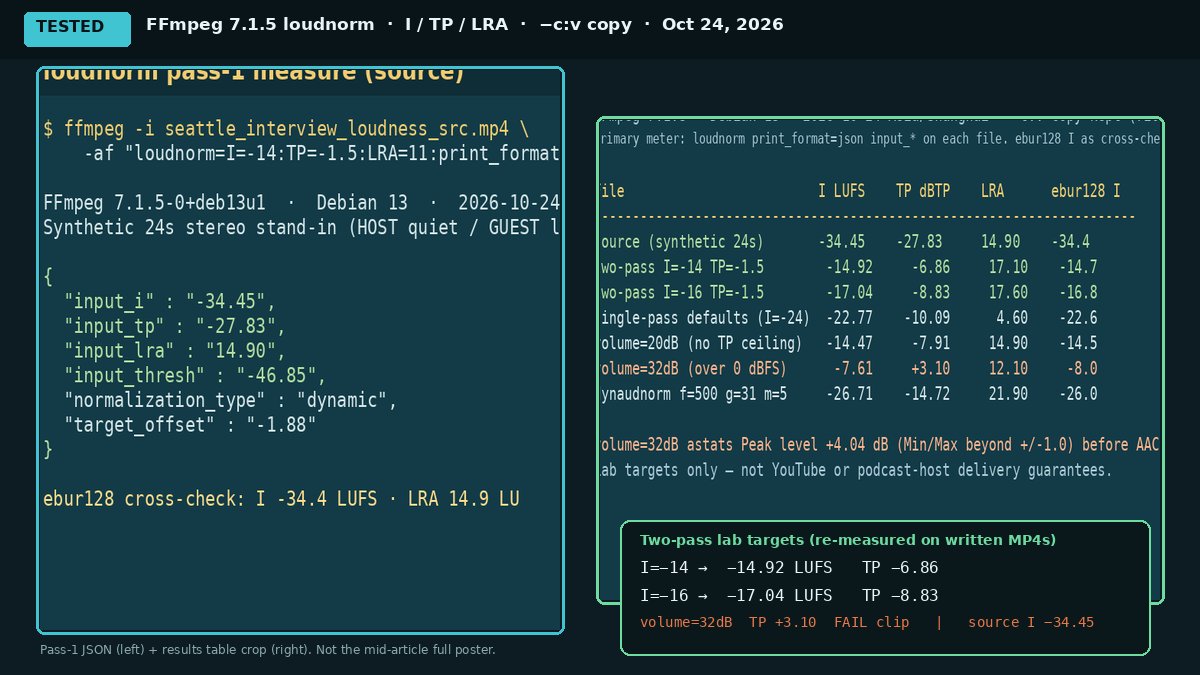
If your job is “match a delivery loudness number on an already-encoded interview MP4 without touching the picture,” two-pass loudnorm plus -c:v copy is the path we trust on this box. Our quiet stand-in measured −34.45 LUFS. After two-pass to I=−14, the written file re-measured −14.92 LUFS / TP −6.86 dBTP (ebur128 I −14.7). The I=−16 twin landed at −17.04 LUFS / TP −8.83 (ebur128 I −16.8). Leaving the filter at defaults (I=−24) produced −22.77 LUFS — still well below those lab targets. A volume=32dB “just make it louder” pass hit Peak level +4.04 dB and true peak +3.10 dBTP. Prefer a DAW or dedicated loudness tool if you need visual meters and stem-level guest rides; prefer dynaudnorm only when the job is local level riding, not a fixed integrated LUFS delivery.
- Pro: Measured two-pass JSON →
measured_*+offsetis reproducible; teammates can diff the one-liner. - Pro:
-c:v copykept the same H.264 stream (720 frames, video bit_rate 18903) while AAC was rewritten. - Pro: Default I=−24 is visible in
ffmpeg -h filter=loudnorm— easy to catch before a quiet YouTube upload. - Con: When source LRA exceeds the LRA target, the filter may stay in dynamic mode even with
linear=true; our LRA moved from 14.90 to ~17 after the −14/−16 runs. - Con: Pass-1 JSON is mixed into stderr with progress lines — scripts must parse carefully.
- Limit: Synthetic fixture; no claim about facial dialogue intelligibility or real host ingest behavior.
What we normalized
Critical path: finished interview/podcast MP4 → measure loudness → two-pass loudnorm to a chosen integrated target → verify I / TP on the written file. Picture size/CRF belongs in the delivery encode review. Metadata/track QC belongs in MediaInfo delivery QC.
- Start from an H.264 + AAC MP4 you already accept for picture. Ours: 24.000 s, 1280×720@30, AAC stereo, 564,848 bytes.
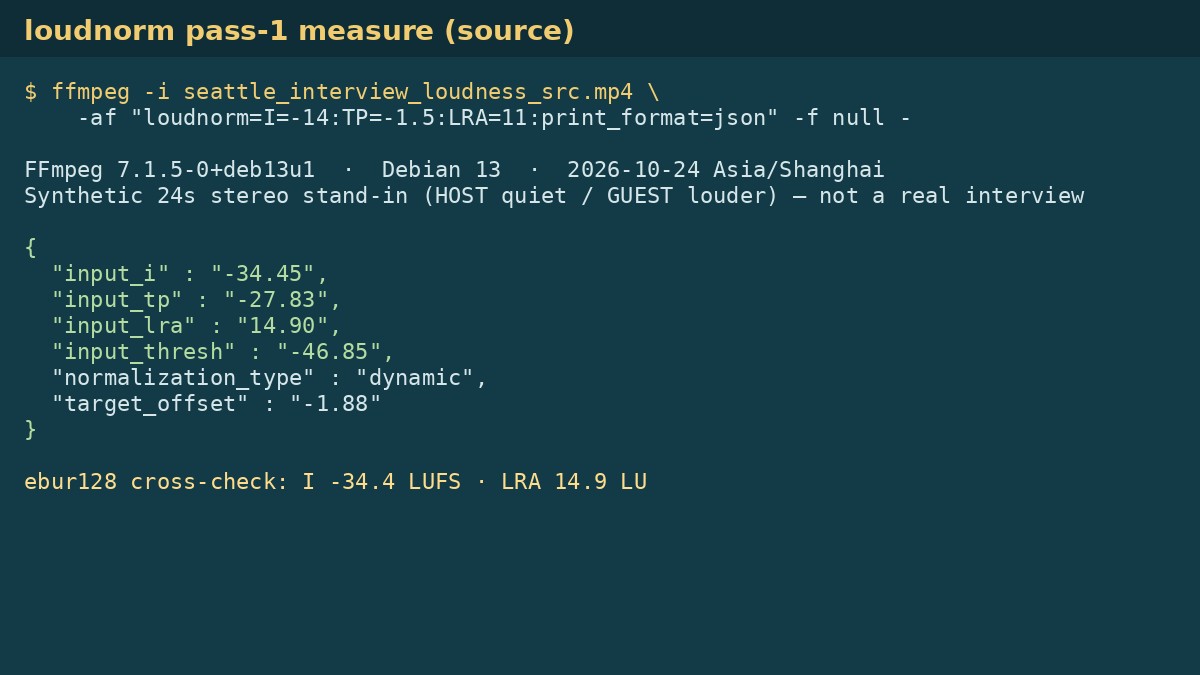
- Pass 1:
loudnorm=…:print_format=jsonto-f null -; recordinput_i,input_tp,input_lra,input_thresh,target_offset. - Pass 2: same targets plus
measured_*,offset,linear=true; encode audio (-c:a aac) with-c:v copy. - Re-measure the written file (loudnorm JSON and/or
ebur128). Do not trust ears alone.
Why default −24 and volume= miss the upload job
FFmpeg’s own filter help sets loudnorm defaults to I=−24, TP=−2, LRA=7 — broadcast-flavored, not “match the podcast next door.” Creators on forums still argue about −16 vs −14; we treat those as lab targets. YouTube’s public formatting Help pages we opened do not publish an upload LUFS contract, so we never claim the platform will leave −14 untouched.
A flat volume= gain raises every sample by the same factor. It does not aim at integrated LUFS, and it will not stop at a true-peak ceiling. On this quiet source, volume=20dB happened to land near −14.5 LUFS with TP −7.91 and the original LRA 14.90 intact — luck, not a delivery method. Pushing volume=32dB drove astats Peak level to +4.04 dB (samples beyond ±1.0) and loudnorm true peak to +3.10 dBTP.
Two-pass to −14 (YouTube-ish lab target)
# Pass 1 — measure (JSON on stderr)
ffmpeg -i seattle_interview_loudness_src.mp4 \
  -af "loudnorm=I=-14:TP=-1.5:LRA=11:print_format=json" -f null -

# Pass 2 — apply measured values; copy video
ffmpeg -y -i seattle_interview_loudness_src.mp4 \
  -af "loudnorm=I=-14:TP=-1.5:LRA=11:measured_I=-34.45:measured_TP=-27.83:measured_LRA=14.90:measured_thresh=-46.85:offset=-1.88:linear=true" \
  -c:v copy -c:a aac -b:a 192k -ar 48000 -movflags +faststart \
  out_loudnorm_I14.mp4
Written-file re-measure: I −14.92 LUFS, TP −6.86 dBTP, LRA 17.10 LU. ebur128 integrated −14.7 LUFS. Close to the −14 lab target on this 24 s clip; LRA rose because pass-1 already flagged dynamic processing when source LRA (14.9) exceeded the 11 LU target.
Two-pass to −16 (podcast-ish lab target)
ffmpeg -y -i seattle_interview_loudness_src.mp4 \
  -af "loudnorm=I=-16:TP=-1.5:LRA=11:measured_I=-34.45:measured_TP=-27.83:measured_LRA=14.90:measured_thresh=-46.85:offset=-2.20:linear=true" \
  -c:v copy -c:a aac -b:a 192k -ar 48000 -movflags +faststart \
  out_loudnorm_I16.mp4
Written-file re-measure: I −17.04 LUFS, TP −8.83 dBTP, LRA 17.60 LU; ebur128 I −16.8. Same video bitstream copy as the −14 run. Pick −16 when your show bible or host docs say so; pick −14 when you are matching common YouTube-facing creator practice — and say which you chose.
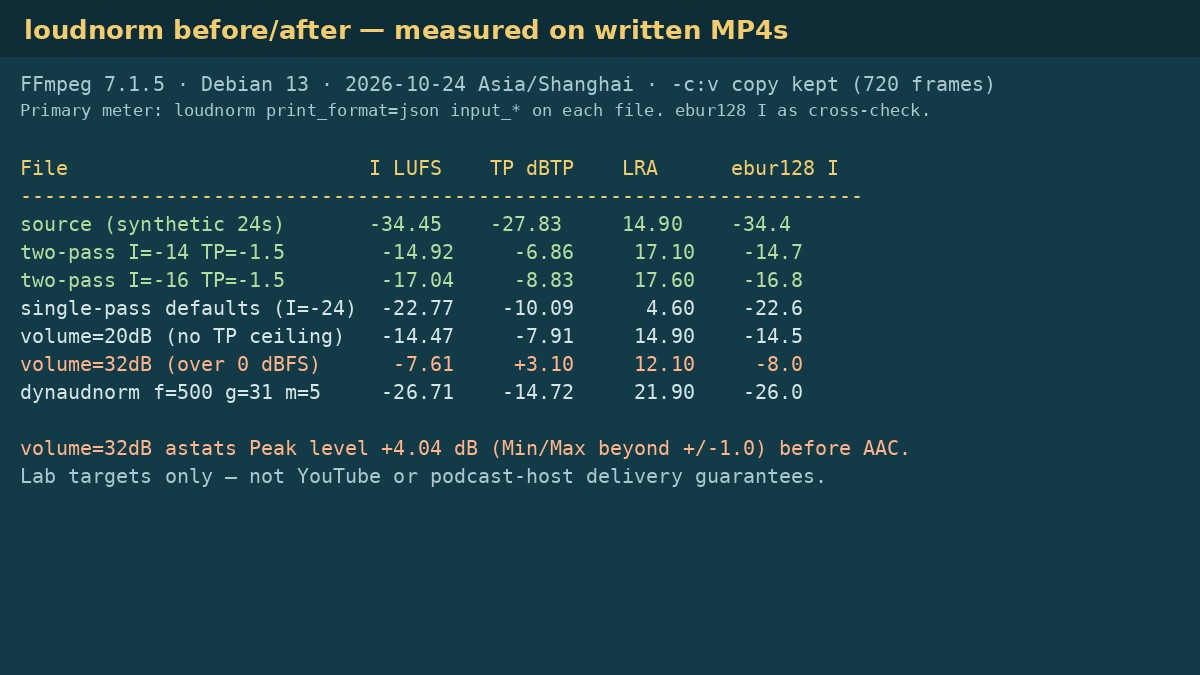
Results table
| File | I (LUFS) | TP (dBTP) | LRA | ebur128 I |
|---|---|---|---|---|
| Source (synthetic) | −34.45 | −27.83 | 14.90 | −34.4 |
| Two-pass I=−14 | −14.92 | −6.86 | 17.10 | −14.7 |
| Two-pass I=−16 | −17.04 | −8.83 | 17.60 | −16.8 |
| Single-pass defaults (I=−24) | −22.77 | −10.09 | 4.60 | −22.6 |
| volume=20dB | −14.47 | −7.91 | 14.90 | −14.5 |
| volume=32dB | −7.61 | +3.10 | 12.10 | −8.0 |
| dynaudnorm (f=500,g=31,m=5) | −26.71 | −14.72 | 21.90 | −26.0 |
Primary columns are loudnorm input_* on each written MP4. ebur128 integrated I is a cross-check; small deltas are expected (separate implementations). Video: -c:v copy preserved 720 H.264 frames on the loudnorm outs.
dynaudnorm vs loudnorm (same file)
Forum threads often ask which filter to use. On this fixture, default-ish dynaudnorm=f=500:g=31:p=0.95:m=5 raised local levels but left integrated loudness at −26.71 LUFS (ebur128 −26.0) with LRA 21.90 — still far from −14/−16. That matches the job split we wanted to show: loudnorm aims at a file-level LUFS/TP target; dynaudnorm rides gain frame-by-frame and does not promise a delivery I number. If guest/host jumps are extreme, you may need both editing and loudnorm — we did not build a full dialogue stem ride here.
What failed or needed a clear caveat
- Default loudnorm is quiet for many upload targets. Single-pass defaults → −22.77 LUFS on this file. Set
I=explicitly. - volume= is not loudness normalization.
volume=32dBclipped (Peak +4.04 dB, TP +3.10 dBTP). - LRA target is not a hard guarantee. Source LRA 14.9 with LRA=11 still exited near 17 LU after our −14/−16 runs.
- Short clips drift. 24 s is enough to exercise the filter; it is not proof for hour-long episodes.
- No platform proof. We did not measure YouTube Stats for Nerds or a podcast host’s ingest meter on these files.
Who it suits
FFmpeg loudnorm fits a creator or editor who already scripts delivery encodes and wants a measured, pasteable loudness step on MP4s before upload. According to the FFmpeg loudnorm filter documentation, the filter implements EBU R128 loudness normalization with configurable I / TP / LRA and optional two-pass measured values; we used the Debian 7.1.5 build. If your team lives in a GUI loudness meter, stay there and export — then verify with the same JSON measure. If you only need to shrink bitrate, see the delivery encode review first.
Limits of this test
- 24-second synthetic stereo fixture; not a real multi-mic interview.
- Linux CLI only; Windows/macOS builds unverified.
- No upload to YouTube, Spotify, Apple Podcasts, or other hosts in this run.
dual_mono, hour-long throughput, and listening-panel scores untested.- ebur128 vs loudnorm meter agreement not claimed beyond the deltas we listed.
Sources and evidence
Filter parameters and defaults were checked against FFmpeg’s loudnorm filter help and the online Filters manual (October 24, 2026). Forum threads (r/podcasting, r/ffmpeg, Super User) informed which user problems to test — not their sample commands or numbers. YouTube Help formatting pages were opened to confirm we should not invent an official upload LUFS guarantee. Command logs, versions, JSON dumps, ebur128 summaries, astats clip evidence, and terminal renders live in ToolBrivio’s evidence archive for this review (ffmpeg-loudnorm, October 24, 2026).
- FFmpeg Filters — loudnorm
- FFmpeg project site
- YouTube Help: video and audio formatting specifications (no LUFS upload contract found)
- r/podcasting discussion on quiet levels / −16 LUFS (Needs trigger)
- r/ffmpeg: loudnorm vs dynaudnorm (Needs trigger)
- FFmpeg delivery encode review (picture/size path)