
By ToolBrivio Editorial · Hands-on test of MediaInfo CLI 25.04-1 (MediaInfoLib v25.04) on Debian 13, October 19, 2026, plus official field docs for structure where marked. Companion to our FFmpeg delivery encode and MKVToolNix mux reviews — this is the read-before-upload step, not another encode. We earn no affiliate commission from links on this page. Research approach · Link disclosure.
The encode finished. HandBrake or FFmpeg wrote an MP4; maybe MKVToolNix already labeled tracks. Before you upload or email the client, you still need one boring check: container, codecs, duration, bitrate, and whether video and audio are actually present. Opening Premiere just to read Properties is slow. We ran that check with MediaInfo’s CLI on the same Seattle fixtures we used for delivery encodes.
Review basis: MediaInfo 25.04-1 / MediaInfoLib v25.04 on Debian 13. Fixtures: synthetic US-English 1080p interview stand-in (30 s, ~1.03 GiB source) plus four existing FFmpeg delivery outputs. Cross-checked one PASS file with ffprobe 7.1.5. We did not test the MediaInfo GUI, Windows/macOS builds, MXF/ProRes briefs, hour-long files, or picture quality.
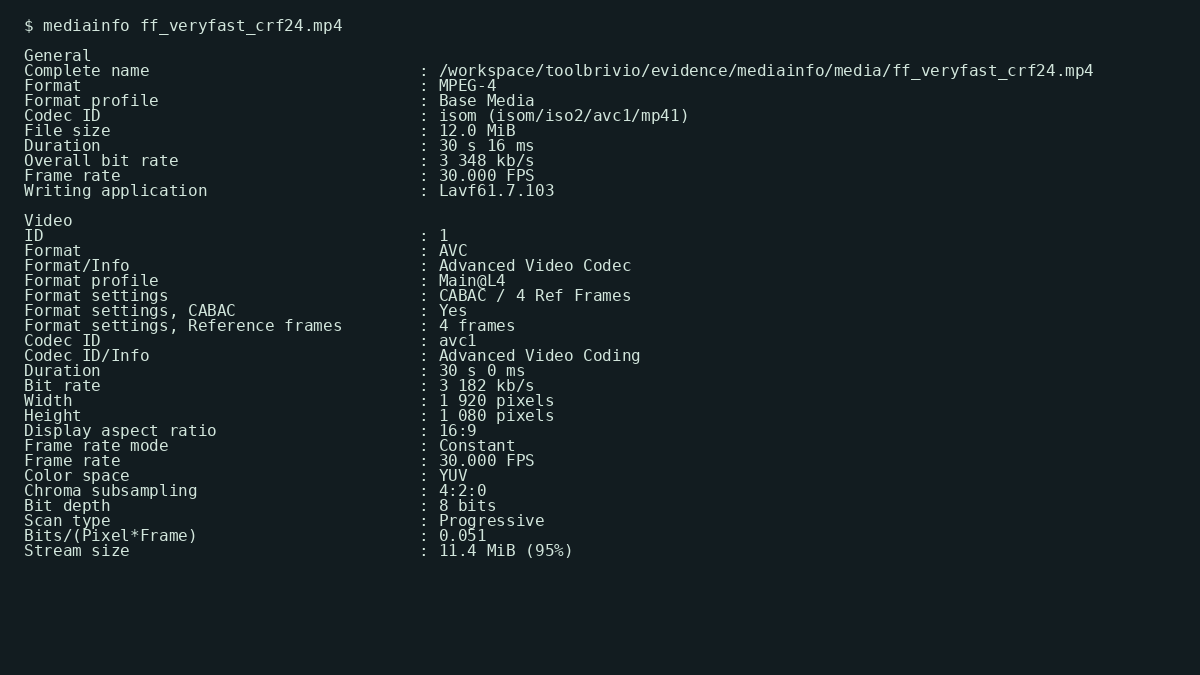
mediainfo ff_veryfast_crf24.mp4 — MPEG-4, 12.0 MiB, 30 s 16 ms, AVC Main@L4, AAC LC 2 channels (October 19, 2026).Verdict
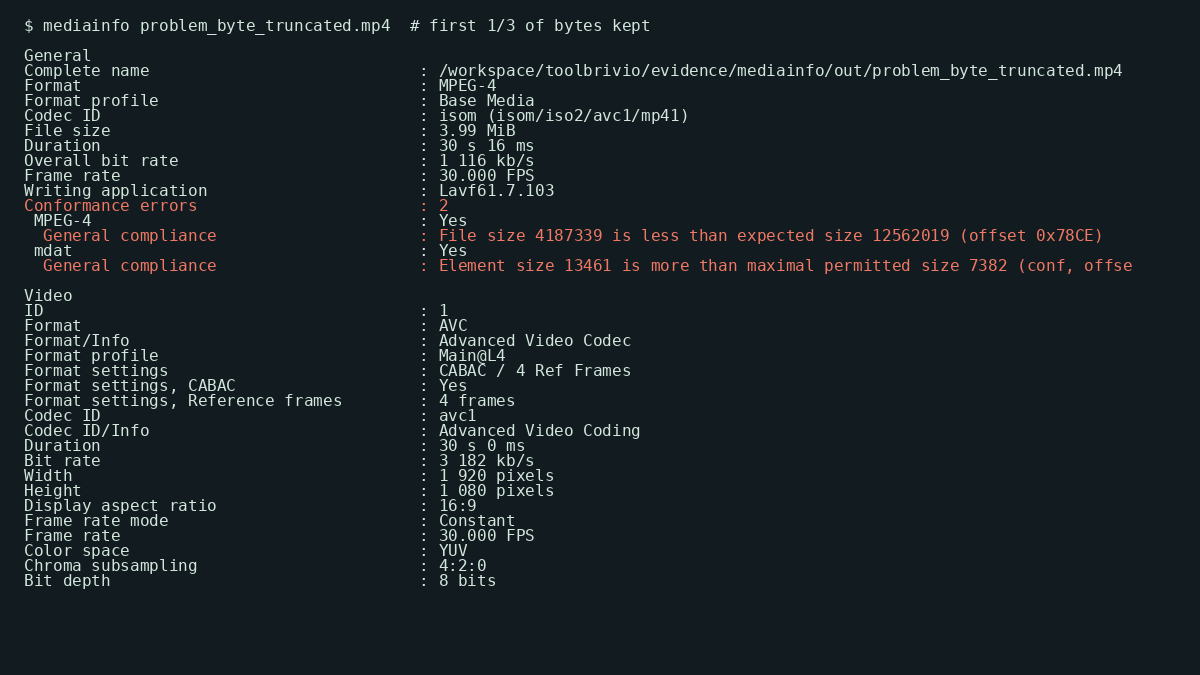
If your job is “confirm the delivery file matches the brief before upload,” MediaInfo CLI does that path with one command and readable fields. On our PASS encode, it reported 12,562,019 bytes, duration 00:00:30.016, overall 3 348 kb/s, video AVC Main@L4 1920×1080@30 at 3 182 kb/s, audio AAC LC stereo 160 kb/s — same size, duration, and bitrates as ffprobe on the same file. The useful FAIL path was not subtle: a file truncated to one-third of its bytes still claimed a 30-second duration in the header, but MediaInfo listed Conformance errors: 2 (file size 4,187,339 < expected 12,562,019). Empty VideoCount / AudioCount and an 8-second duration against a 30-second brief were equally obvious.
- Pro: One default dump covers container, duration, overall bitrate, video profile/level, and audio layout without writing a probe script.
- Pro:
--Informtemplates make track-count and duration checks scriptable for a upload gate. - Pro: Conformance errors on our byte-truncated MP4 caught a corrupt delivery that a naive duration read would have greenlit.
- Con: Duration from a truncated file can still look “correct” until you read Conformance errors or compare FileSize to Stream size.
- Con: No built-in “pass/fail against brief” — you decide that VideoCount must be 1 and Duration must be ~30 s.
- Limit: CLI only here; GUI, broadcast MXF suites, and visual QC unverified.
What we checked
Critical path: finished delivery MP4 → read metadata → accept or reject before upload. This is not a re-encode (see FFmpeg / HandBrake) and not a language-tag mux (see MKVToolNix). It sits after those tools.
- Install CLI: on Debian,
mediainfopackage 25.04-1 pulls MediaInfoLib v25.04. - Run
mediainfo delivery.mp4(or an--Informone-liner for CI). - Confirm General: Format, FileSize, Duration, Overall bit rate, VideoCount, AudioCount.
- Confirm Video: Format profile (e.g. Main@L4), Width×Height, Frame rate, Bit rate.
- Confirm Audio: AAC LC, channel count, sampling rate, bit rate.
- Reject if a required count is empty, duration misses the brief, or Conformance errors appear.
PASS numbers on our Seattle delivery set
mediainfo --version
# MediaInfo Command line,
# MediaInfoLib - v25.04

mediainfo ff_veryfast_crf24.mp4
Source fixture (fat stand-in, same as the FFmpeg review): 1,102,887,801 bytes (1.03 GiB), duration 00:00:30.000, overall 294 Mb/s, video Constrained Baseline@L4 1920×1080@30, audio AAC LC ~192 kb/s. After a veryfast CRF 24 delivery encode, MediaInfo read:
| File | Bytes | Duration | Overall BR | Video | Audio |
|---|---|---|---|---|---|
| seattle_interview_delivery_src.mp4 | 1,102,887,801 | 00:00:30.000 | 294 Mb/s | AVC Baseline@L4 1080p30 | AAC 2ch |
| ff_veryfast_crf24.mp4 | 12,562,019 | 00:00:30.016 | 3 348 kb/s | Main@L4 · 3 182 kb/s | AAC 160 kb/s |
| ff_medium_crf22.mp4 | 189,687,049 | 00:00:30.016 | 50.6 Mb/s | AVC 1080p30 | AAC 2ch |
| ff_medium_crf22_vbv25.mp4 | 90,534,405 | 00:00:30.016 | 24.1 Mb/s | AVC 1080p30 | AAC 2ch |
| ff_social_2pass_6000k.mp4 | 23,021,560 | 00:00:30.016 | 6 136 kb/s | ~6 000 kb/s | AAC 2ch |
Byte counts match the FFmpeg evidence archive for these files. MediaInfo’s human-readable sizes (12.0 MiB, 181 MiB, …) round the same integers. On the veryfast file, ffprobe reported identical size=12562019, duration=30.016, and bit_rate=3348086.
Scriptable Inform line
mediainfo --Inform="General;%Format%|%FileSize%|%Duration/String3%|%OverallBitRate/String%|%VideoCount%|%AudioCount%" \
  delivery.mp4
# Example PASS: MPEG-4|12562019|00:00:30.016|3 348 kb/s|1|1
Official field names (General / Video / Audio groups) are documented on MediaArea’s Fields page; we used that list to pick Duration, FileSize, VideoCount, and AudioCount — not anyone else’s sample numbers. For a gate script, fail when VideoCount or AudioCount is empty, or when Duration is outside your brief window.
What failed on purpose
We manufactured four broken siblings of the veryfast (or source) file and re-ran MediaInfo. Manufacture steps are in the evidence NOTES.
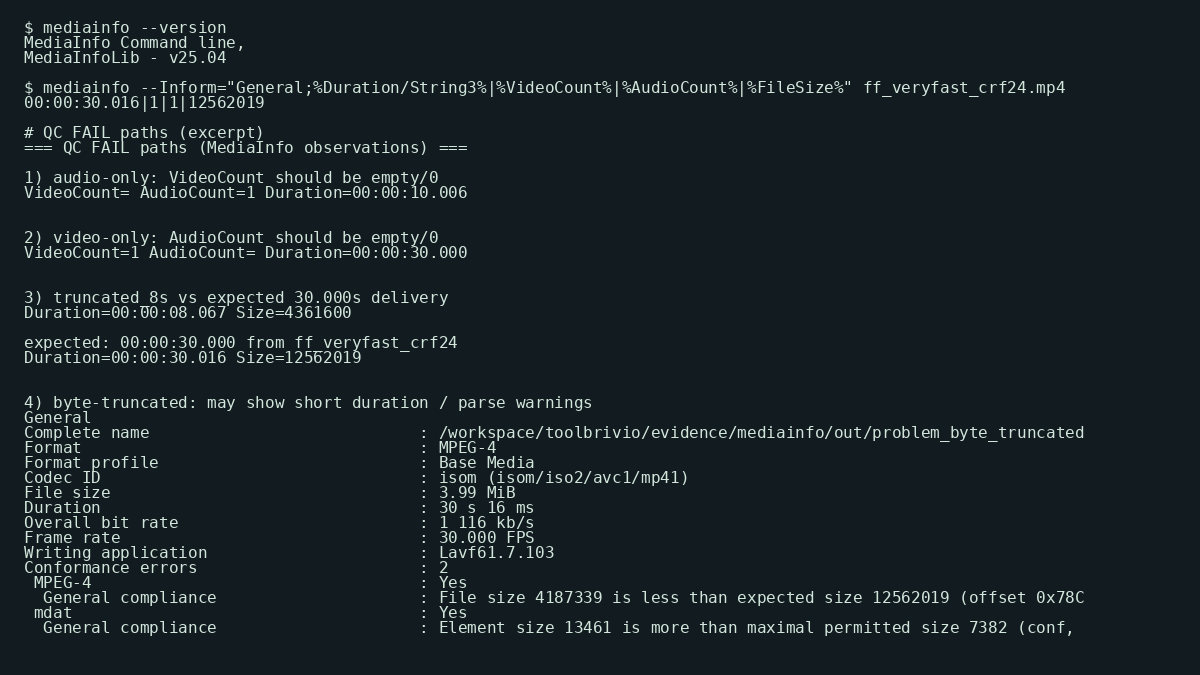
- Audio-only remux (
ffmpeg -vn -c:a copy, 10 s). MediaInfo: VideoCount empty, AudioCount=1, Duration 00:00:10.006, Overall 194 kb/s. Fail if the brief requires picture. - Video-only remux (
ffmpeg -an -c:v copy). AudioCount empty, VideoCount=1, Duration 00:00:30.000. Fail if dialogue is required. - 8-second cut of a 30-second delivery (
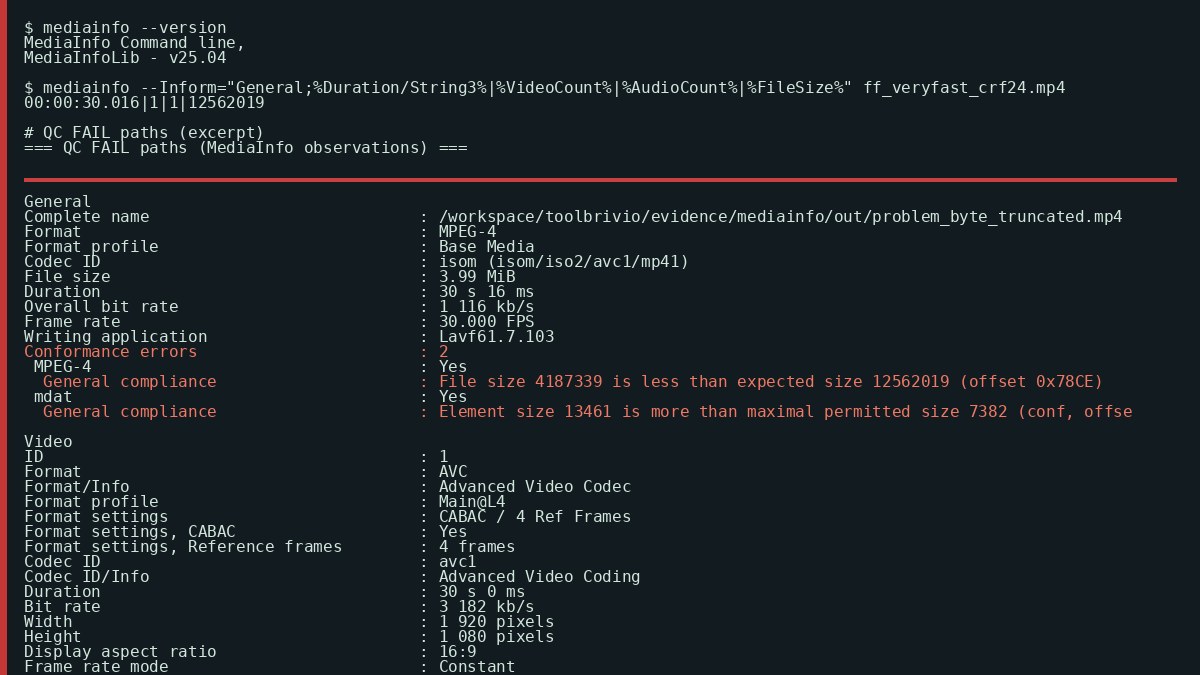
-t 8 -c copy). Duration 00:00:08.067 vs PASS 00:00:30.016. Same codecs; wrong length. - Byte truncation (kept first 4,187,339 of 12,562,019 bytes). Header still advertised ~30 s and Main@L4, but MediaInfo reported Conformance errors: 2 — file size less than expected, plus an mdat size violation. Do not ship on Duration alone.
Who it suits
MediaInfo CLI fits a creator or editor who already lives next to HandBrake, FFmpeg, or MKVToolNix and wants a fast, offline read of what the file actually contains before upload. According to the MediaArea MediaInfo site, the tool reports container, video, audio, and text metadata; we used the Debian CLI package, not MediaInfoOnline. Prefer ffprobe if your pipeline already depends on FFmpeg JSON. Prefer a full broadcast QC suite if you need baseband / MXF compliance — we did not test that class of tool.
Limits of this test
- 30-second synthetic fixtures; not proof of hour-long scan time.
- Linux CLI only. GUI and Windows/macOS installers unverified.
- No HEVC/AV1/ProRes/MXF delivery briefs in this run.
- Subtitle/chapter language QC beyond TextCount unverified.
- No VMAF or visual grade — metadata QC only.
Sources and evidence
Field-group structure was checked against MediaArea’s MediaInfo overview and Fields documentation, plus the Debian mediainfo(1) man page (October 19, 2026). We used those pages for which questions to ask — not for their sample outputs. Command log, versions, full dumps, Inform extracts, problem-fixture manufacture notes, and terminal renders live in ToolBrivio’s evidence archive for this review (mediainfo, October 19, 2026).