
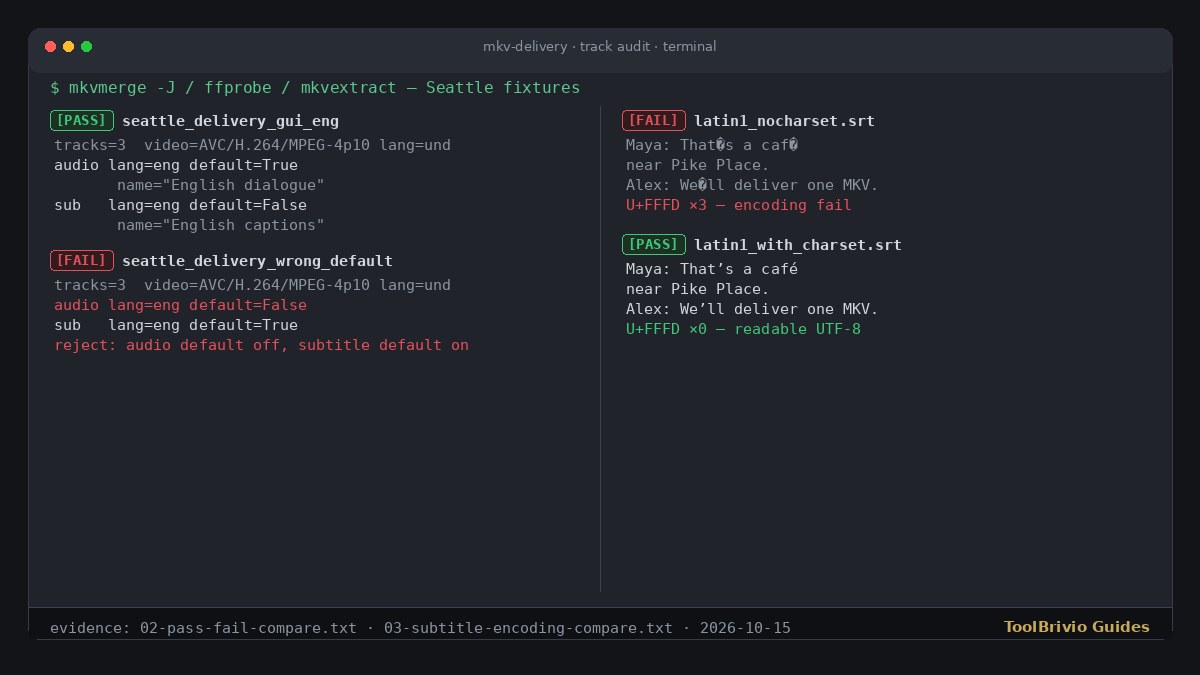
02-pass-fail-compare.txt (gui_eng vs wrong_default disposition) and 03-subtitle-encoding-compare.txt (café vs U+FFFD). Not an MKVToolNix GUI mux shot.A Seattle editor who just received a “final” multi-track MKV from a vendor should not discover a missing English dialogue track, a defaulted caption track, or mangled apostrophes inside Premiere or Resolve. Run mkvmerge -J, mkvinfo and ffprobe first. Reject the file when track count, language tags, default disposition or subtitle text encoding fail the purchase order — then open a copy only after it passes.
This Guide is the receive-side checklist. The same-day MKVToolNix review covers how you mux a delivery. Do not treat them as the same article.
Test note: October 15, 2026, Debian GNU/Linux 13 (trixie). Tools: mkvmerge / mkvinfo / mkvextract v92.0 (“Everglow”) 64-bit; ffprobe 7.1.5-0+deb13u1. Fixtures were reused read-only from same-day MKVToolNix review evidence under evidence/mkvtoolnix/out/ (Seattle H.264 + AAC + SRT samples). We identified, probed and extracted; we did not remux those files for this Guide. We did not open any sample in an NLE.
What “good enough to open” means
Persona: a post editor who bought a finished interview package as one Matroska file. Minimum accept criteria before timeline import:
- Track count and types match the order (here: 1 video + 1 dialogue audio + 1 English SubRip).
- Language tags on dialogue and captions are the ordered codes (here:
eng/en). - Default disposition: primary dialogue audio is default; optional captions are not default unless forced captions were ordered.
- Extracted subtitle text is readable UTF-8 — no U+FFFD replacement characters on curly apostrophes or accented Latin.
Pass / fail criteria
| Check | PASS | FAIL (reject) |
|---|---|---|
| Track count / types | Expected N tracks; video + audio + subtitles present as ordered | Wrong count, missing dialogue, or unexpected type |
| Language tags | Dialogue/captions tagged as ordered (e.g. eng) | und on dialogue, typo codes, or swapped languages |
| Default disposition | Audio default=1; optional subtitle default=0 | Audio default=0 and subtitle default=1 |
| Subtitle encoding | Extracted SRT UTF-8 with intact punctuation (That’s / café) | U+FFFD in extract (That�s / caf�) |
1. Identify with mkvmerge -J
Save machine-readable identify output. Attach the JSON when you reject a delivery.
mkvmerge -J seattle_delivery.mkv > seattle_delivery.mkvmerge-J.jsonConfirm the container is recognized Matroska and count the tracks array. In our Seattle fixtures every sample reported 3 tracks: video AVC/H.264/MPEG-4p10, audio AAC, subtitles SubRip/SRT.
mkvinfo seattle_delivery.mkv
ffprobe -hide_banner -show_streams seattle_delivery.mkv
Use mkvinfo for a human FlagDefault / Language readout. Use ffprobe for TAG:language and DISPOSITION:default on each stream.
2. Check track count and types
On seattle_delivery_correct.mkv and seattle_delivery_gui_eng.mkv, mkvmerge -J listed exactly three tracks (ids 0/1/2). That matched a one-video / one-dialogue / one-SRT order. A file that only contains video, or that adds an unexpected second audio without a language tag, fails this step even if the picture looks fine when scrubbed.
3. Check language tags
Read properties.language / language_ietf (mkvmerge) or TAG:language (ffprobe).
- PASS (correct / gui_eng / wrong_default / latin1 samples): video
und, audioeng(en), subtitleseng(en). - Reject dialogue tagged
undwhen English was ordered, or a typo IETF tag the muxer accepted without blocking (the companion review documents anenqGUI typo — out of scope for this receive checklist, but the same identify JSON catches it).
4. Check default disposition
Wrong defaults are the silent NLE trap: players and some importers prefer the default subtitle and may not select the dialogue audio you expect.
PASS — seattle_delivery_gui_eng.mkv (fresh identify):
- Audio AAC
eng:default_track: true; ffprobeDISPOSITION:default=1; nameEnglish dialogue - Subtitles SubRip
eng:default_track: false; ffprobeDISPOSITION:default=0; mkvinfo shows"Default track" flag: 0; nameEnglish captions
FAIL — seattle_delivery_wrong_default.mkv:
- Audio:
default_track: false/ ffprobedefault=0/ mkvinfo"Default track" flag: 0 - Subtitles:
default_track: true/ ffprobedefault=1
Reject that pair even though languages and codecs look correct. Send the vendor the ffprobe disposition excerpt with the purchase-order expectation.
Note on seattle_delivery_correct.mkv: our fresh identify of the current on-disk file showed audio and subtitle default_track: true (ffprobe default=1 on both). Languages and track count still matched. For a caption track that should stay optional, treat dual-defaults as a disposition fail or at least a hold — do not assume “correct” in the filename means subtitle default is off. Prefer the gui_eng disposition pattern above when you write the accept rule.
5. Check subtitle text encoding
Metadata can pass while the caption bytes are damaged. Extract the SubRip track and read it as UTF-8.
mkvextract tracks delivery.mkv 2:check.srt
# then open check.srt as UTF-8 and search for U+FFFD
FAIL — seattle_delivery_latin1_nocharset.mkv (Latin-1 SRT muxed without a charset declaration in the originating mux). Extracted text contained 3 U+FFFD replacements:
Maya: That�s a caf� near Pike Place.
Alex: We�ll deliver one MKV.
Track count (3), languages (eng) and codecs still looked fine in mkvmerge -J. Encoding fails are invisible if you only read the identify JSON.
PASS after charset — seattle_delivery_latin1_srt.mkv (same Latin-1 source muxed with charset handling in the originating workflow). Extract had 0 U+FFFD:
Maya: That’s a café near Pike Place.
Alex: We’ll deliver one MKV.
If you only control the receive side, reject the nocharset delivery and ask the vendor for a UTF-8 remux (or a fresh SRT). Repairing legacy SRT outside the MKV is a separate Guide (convert Windows-1252 SRT to UTF-8).
Worked compare (our probes)
| Sample | Tracks | Audio default | Sub default | Extract U+FFFD | Verdict |
|---|---|---|---|---|---|
gui_eng | 3 | true / 1 | false / 0 | 0 (UTF-8 cues) | PASS |
correct (current file) | 3 | true / 1 | true / 1 | 0 | HOLD on disposition* |
wrong_default | 3 | false / 0 | true / 1 | 0 | FAIL disposition |
latin1_nocharset | 3 | true / 1 | true / 1 | 3 | FAIL encoding |
latin1_srt | 3 | true / 1 | true / 1 | 0 | PASS encoding** |
*HOLD: languages OK; subtitle also defaulted — confirm against the order before import.
**Encoding pass only; apply the same disposition rule as gui_eng if captions must stay optional.
Download the checklist
Download the MKV delivery track-audit checklist (Markdown). Fill expected track layout and languages from the purchase order, attach mkvmerge -J JSON on rejects, and keep the vendor original untouched.
Honest limits
- We did not import these MKVs into Premiere Pro, DaVinci Resolve, Final Cut Pro or Avid — disposition behavior inside each NLE is inferred from container flags, not measured in those apps.
- Fixtures are short Seattle synthetic packages (~6 s, 1280×720), not client masters.
- We did not judge picture/sound quality, loudness, sync drift or font rendering.
- Attachment, chapter and multi-audio OP layouts beyond the three-track fixtures were not tested.
When the checklist fails, return the file with the identify JSON and the failed row. When it passes, open a copy in the NLE and keep the vendor bit-identical original for the dispute trail.
Test basis: identify/probe/extract on October 15, 2026 against read-only fixtures from evidence/mkvtoolnix/out/. Companion mux review: MKVToolNix review. Related encoding repair: Convert a known Windows-1252 SRT to UTF-8.