
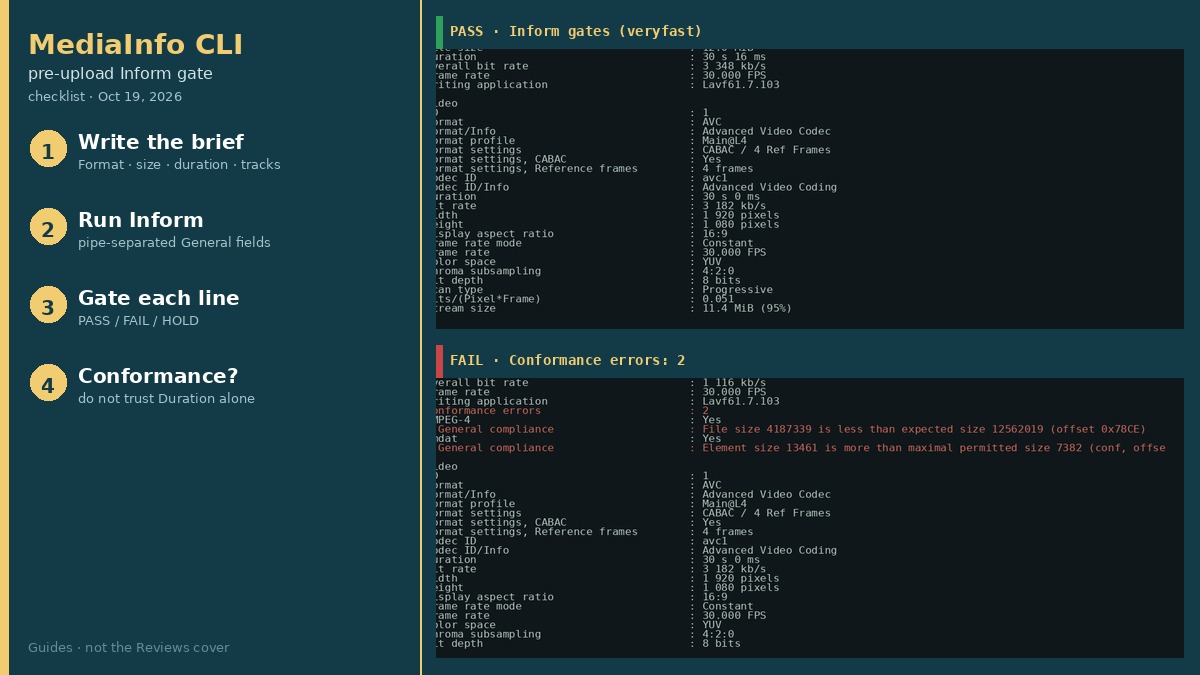
You finished the encode. The portal or client is waiting. The fear is not “is MediaInfo a good tool?” — it is shipping the wrong file: audio-only by accident, an 8-second cut labeled as the 30-second master, or a truncated download that still claims a full duration. Write the brief once, run one Inform line, then PASS or FAIL each gate before upload.
This Guide is that pre-upload Inform / field gate. The companion MediaInfo delivery QC review covers what the CLI is good for as a delivery read. Prefer encode commands? Use the FFmpeg delivery-encode checklist.
Test note: October 19, 2026, Asia/Shanghai, Debian GNU/Linux 13 (trixie). Tools: MediaInfo CLI 25.04-1 / MediaInfoLib v25.04; ffprobe 7.1.5. Fixture PASS: ff_veryfast_crf24.mp4 from the shared Seattle interview stand-in. Problem fixtures manufactured the same day (audio-only, video-only, 8 s cut, byte truncation).
Accept criteria before you upload
Persona: a creator who already has a delivery MP4 and is afraid of handing the wrong one. Minimum gates:
| Gate | PASS | FAIL | HOLD |
|---|---|---|---|
| Format | Matches brief (ours: MPEG-4) | Wrong container for the portal | Portal format unknown |
| FileSize | Within named byte/MiB cap, or matches expected encode class | Far under expected (truncation) or over hard cap | No size target written |
| Duration | Within brief window (ours: ~30.016 s) | Multi-second miss (ours: 00:00:08.067 vs ~30 s) | Expected duration unknown |
| VideoCount / AudioCount | Both 1 when picture + dialogue required | Either field empty | Audio-only delivery was intentional — document it |
| Width × Height | Matches brief (ours: 1920×1080) | Unexpected scale | — |
| Conformance | No Conformance errors line | Conformance errors: 2 (or any count) on our truncated MP4 | — |
1. Write the brief first
Record expected Format, byte class or hard MiB cap, duration window, required track counts, and WxH before you run MediaInfo. On our Seattle veryfast PASS we expected: MPEG-4 · ~12.0 MiB class · ~30 s · VideoCount=1 · AudioCount=1 · 1920×1080. Peer field docs (MediaArea Fields) list General / Video / Audio groups — we used that grouping to pick gates, not their sample numbers.
2. Run the Inform one-liner
mediainfo --version
# MediaInfo Command line, MediaInfoLib - v25.04

mediainfo --Inform="General;%Format%|%FileSize%|%Duration/String3%|%OverallBitRate/String%|%VideoCount%|%AudioCount%"   delivery.mp4

# Optional: resolution gate
mediainfo --Inform="Video;%Width%x%Height%|%Format_Profile%|%BitRate/String%" delivery.mp4
PASS veryfast Inform (measured): MPEG-4|12562019|00:00:30.016|3 348 kb/s|1|1. Full dump also showed AVC Main@L4, video 3 182 kb/s, AAC 160 kb/s.
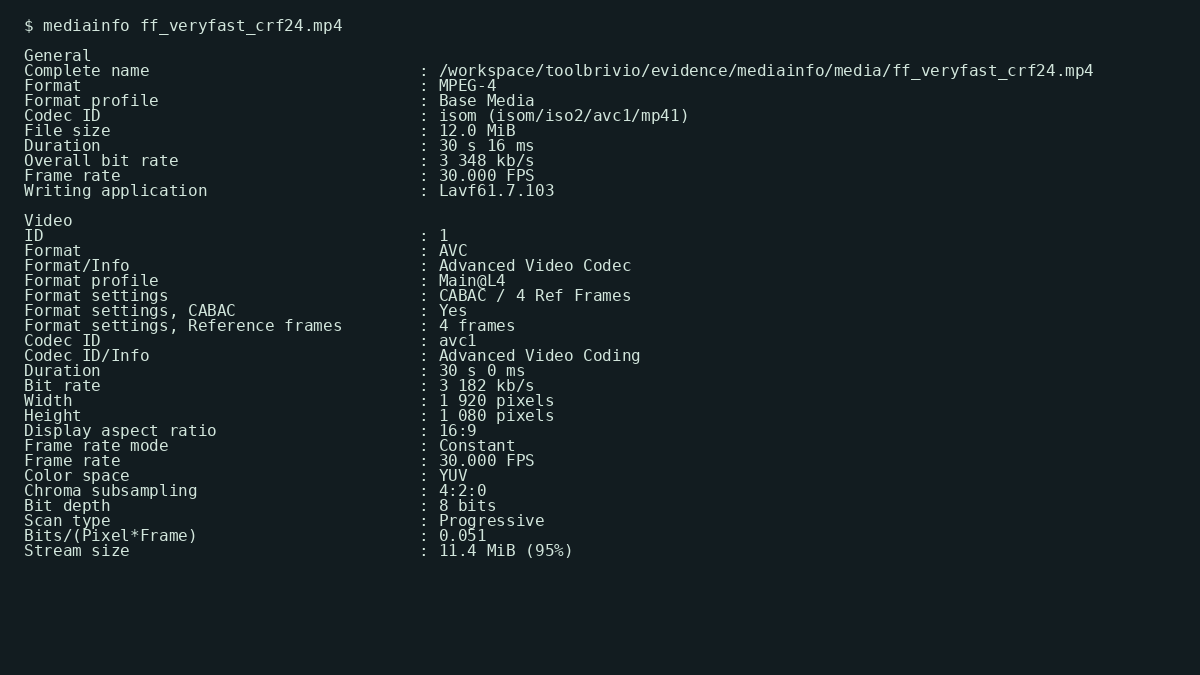
mediainfo ff_veryfast_crf24.mp4 — 12,562,019 B, 00:00:30.016, Overall 3 348 kb/s, Main@L4 1920×1080@30 (October 19, 2026).3. Check each gate (PASS / FAIL)
- Format — expect MPEG-4 (or whatever the portal wrote). Wrong container → FAIL.
- FileSize — compare integer bytes to the brief. Our PASS: 12,562,019. A file at 4,187,339 against that master is already suspicious even before Conformance.
- Duration/String3 — our PASS 00:00:30.016. An intentional short cut that prints 00:00:08.067 fails a 30 s brief.
- VideoCount / AudioCount — empty string = missing track. Audio-only: VideoCount empty, AudioCount=1. Video-only: AudioCount empty, VideoCount=1.
- Width × Height — expect 1920×1080 on our brief. FAIL on surprise scale.
- Overall bit rate — sanity, not a hard gate unless the client named one. PASS veryfast: 3 348 kb/s.
Debian mediainfo(1) documents --Inform / Output modes; MediaArea’s field list names the tokens. Structure only — our numbers are from this box.
4. FAIL signals we measured
- Audio-only remux — VideoCount empty → FAIL if picture was required.
- Video-only remux — AudioCount empty → FAIL if dialogue was required.
- 8-second cut — Duration 00:00:08.067 vs PASS 00:00:30.016.
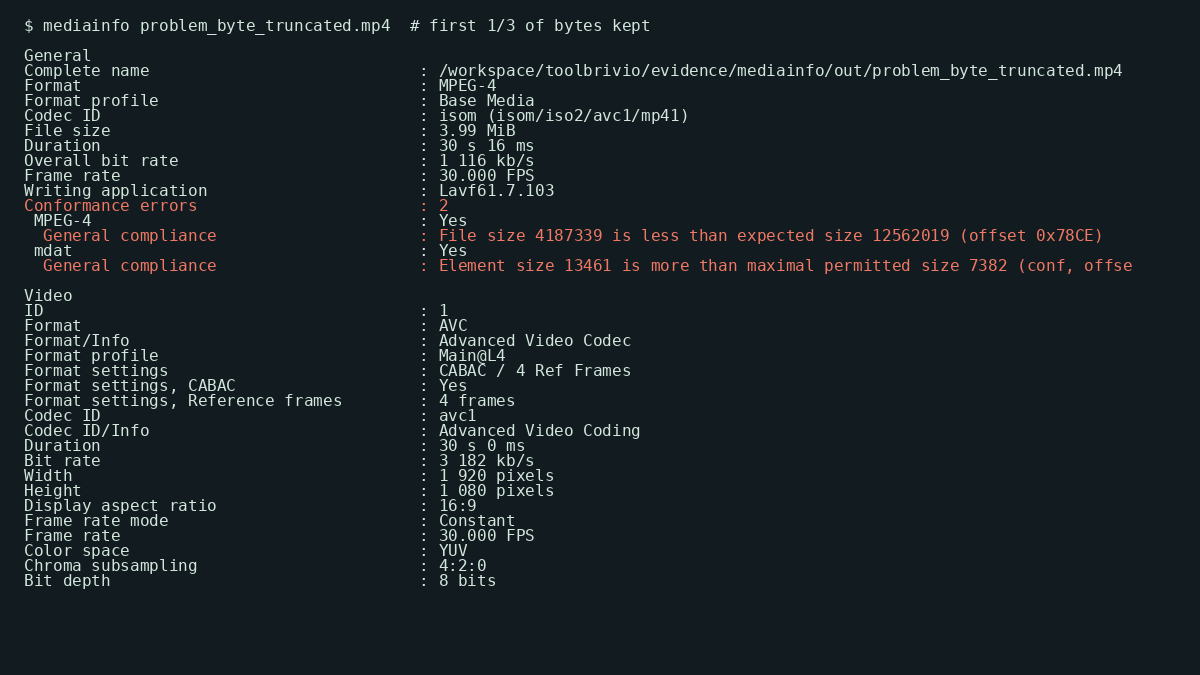
- Byte truncation (kept first 4,187,339 of 12,562,019) — Duration can still lie ~30 s; Conformance errors: 2 is the gate that catches it.
Do not greenlight on Duration alone.
5. When same-file ffprobe is enough
On our PASS veryfast file, MediaInfo and ffprobe 7.1.5 agreed on size 12562019, duration 30.016 s, and overall bit_rate 3348086. If your pipeline already lives in FFmpeg JSON and you only need those three plus codec names on a file you trust, ffprobe alone is enough for that smoke check.
Reach for MediaInfo when:
- You want empty
VideoCount/AudioCountas a one-line gate without writing stream filters. - You need Conformance errors on a damaged MP4 (our truncated file’s primary FAIL).
- You prefer a human default dump (container / video / audio groups) for a client rejection email.
Inform scripting loops (batch over a folder) are a common peer angle; we measured single-file gates only.
Worked PASS (veryfast)
| Field | Measured |
|---|---|
| FileSize | 12,562,019 B (12.0 MiB) |
| Duration | 00:00:30.016 |
| Overall bit rate | 3 348 kb/s |
| Video | AVC Main@L4 1920×1080@30 · 3 182 kb/s |
| Audio | AAC LC 2ch · 160 kb/s |
| VideoCount / AudioCount | 1 / 1 |
Verdict on this fixture: PASS for a 30 s 1080p delivery with picture + dialogue. Re-run Inform on your file — do not ship on hope.
Download the checklist
Download the MediaInfo pre-upload Inform gate checklist (Markdown). Fill the brief first, paste the Inform line, tick each gate, and attach the Inform output on rejects. Keep the master encode untouched.
FAQ
What Inform line should I paste for a pre-upload gate?
On MediaInfo CLI 25.04 we used:
mediainfo --Inform="General;%Format%|%FileSize%|%Duration/String3%|%OverallBitRate/String%|%VideoCount%|%AudioCount%" FILE.mp4On our PASS veryfast file that printed MPEG-4|12562019|00:00:30.016|3 348 kb/s|1|1. Add a Video Inform for Width×Height when the brief names resolution.
When is same-file ffprobe enough without MediaInfo?
When you only need size, duration, overall bitrate, and stream codecs for a clean encode you trust. On our veryfast file MediaInfo and ffprobe 7.1.5 matched size 12562019, duration 30.016 s, and overall bit_rate 3348086. Use MediaInfo when you need empty VideoCount/AudioCount as a gate or Conformance errors on a corrupt/truncated MP4.
Why can Duration look fine on a truncated file?
Our byte-truncated copy (4,187,339 of 12,562,019 bytes) still reported ~30 s in General, but MediaInfo listed Conformance errors: 2 (file size less than expected). Do not PASS on Duration alone — read Conformance and FileSize against the brief.
What FAIL signals did we measure?
Audio-only → VideoCount empty. Video-only → AudioCount empty. 8-second cut → Duration 00:00:08.067 vs ~30 s brief. Byte truncation → Conformance errors: 2 as the primary FAIL.
Honest limits
- GUI (MediaInfo Desktop) on Linux / Windows / macOS — not tested.
- Hour-long or multi-GB delivery scans — not tested (30 s fixtures).
- MXF / ProRes / HEVC / AV1 briefs — out of scope.
- Deep subtitle language QC beyond TextCount — not tested.
- Network privacy — local tool; no traffic capture in this run.
- Upstream MediaInfo 26.x vs Debian 25.04 — unverified.
When a gate fails, fix the file (re-encode, remux, or re-copy) and re-run Inform — do not upload on a soft Duration match. When it passes, upload the checked copy and keep the cut master bit-identical for disputes.
Test basis: Inform dumps, problem fixtures, and MediaInfo-vs-ffprobe cross-check under evidence/mediainfo/, October 19, 2026. Related encode path: FFmpeg delivery-encode checklist.