
You already have a finished or rough-cut MP4. You need a clean audio file for a podcast host, an ASR job, or a separate NLE track. Do not re-export the whole timeline for that. Probe the streams, pull the track you mean, then prove the output has no video and the codec you promised.
This is the working checklist, not another benchmark. The companion FFmpeg extract-audio handoff review holds the comparison tables, extension traps, and community links.
Test record: November 10, 2026 (Asia/Shanghai), FFmpeg/ffprobe 7.1.5-0+deb13u1 on Debian GNU/Linux 13. All fixtures are local lavfi testsrc2 cards with dual AAC tones, not real OBS multitrack, podcast hosts, or NLE exports. Numbers below are lab examples, not size targets for your footage. verification.txt: 18/18 PASS.
1. Write the audio handoff contract
ffmpeg -version
ffprobe -version
2. Probe streams before you map
ffprobe -v error -show_entries "stream=index,codec_type,codec_name,channels,sample_rate,duration:format=duration,size" -of json input.mp4 > input-probe.json3. Copy AAC with -vn -map -c:a copy
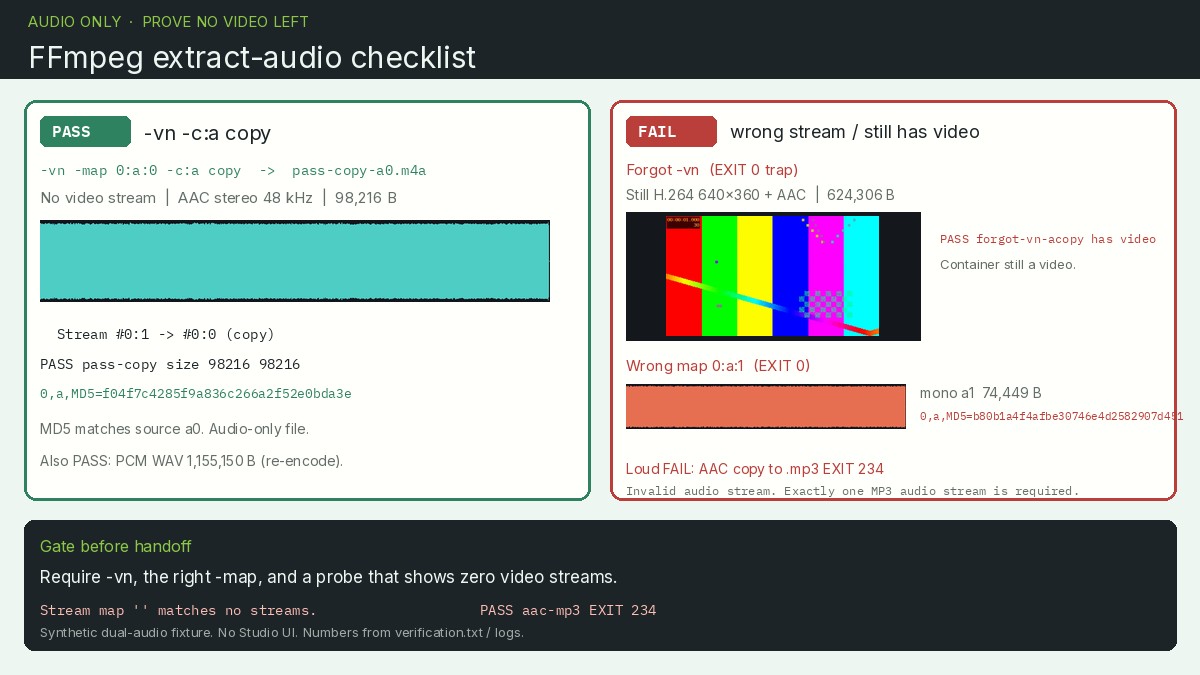
ffmpeg -i source-dual-audio.mp4 -vn -map 0:a:0 -c:a copy pass-copy-a0.m4a
printf "EXIT=%s\n" "$?"
-vn drops video. -map 0:a:0 picks the first audio stream. -c:a copy remuxes AAC without another lossy encode. Use .m4a (or another AAC-friendly container), not .mp3. Pick a new output filename. Without -y, FFmpeg asks before overwriting.
4. Re-encode WAV or a fixed rate when needed
ffmpeg -i source-dual-audio.mp4 -vn -map 0:a:0 -c:a pcm_s16le -ar 48000 -ac 2 pass-wav-pcm.wav
ffmpeg -i source-dual-audio.mp4 -vn -map 0:a:0 -c:a pcm_s16le -ar 16000 -ac 1 pass-wav-16k-mono.wav
printf "EXIT=%s\n" "$?"5. Prove no video and the codec you promised
ffprobe -v error -show_entries "stream=index,codec_type,codec_name,channels,sample_rate,duration:format=duration,size" -of json out.m4a > out-probe.json6. Stop on silent traps and loud failures
7. Open the trial in the receiving tool
8. Attach the proof and sign off
Evidence checkpoints
Use these as lab examples, not size targets for your own footage. PASS copy m4a: 98,216 B. PASS PCM WAV: 1,155,150 B. PASS 16 kHz mono: 192,590 B. Wrong-map control: 74,449 B. Forgot -vn acopy: 624,306 B. Forgot -vn default: 650,720 B. AAC-in-WAV trap: 96,376 B. AAC-to-mp3 / bad-map / video-to-wav: EXIT 234.
Trace: evidence/ffmpeg-extract-audio-handoff/NOTES.md records the source, PASS, control, and trap matrices. run-lab.sh records the commands. summary-probes.json and probes/ hold stream fields; sizes-bytes.txt holds exact bytes; exit-codes.txt and logs/ record encoder outcomes; verification.txt shows 18/18 checks passed. Putting a finished soundtrack back under a picture is covered in the replace-audio checklist; loudness delivery belongs with loudnorm. We did not re-test those here.
Download the checklist
Download the checklist (Markdown). Keep it with the probes and fill in each box before delivery. For the control runs, extension traps, and community links, return to the companion review.
FAQ
Can I copy AAC into a .mp3 with -c:a copy?
No. On our dual-audio fixture, -vn -map 0:a:0 -c:a copy into .mp3 exited 234 with Exactly one MP3 audio stream is required / Could not write header and a 0-byte file. Keep .m4a for AAC copy, or re-encode with libmp3lame if you truly need MP3.
Does -c:a copy into a .wav file give me PCM?
No. Our AAC copy into .wav exited 0 at 96,376 B. The container said wav, but ffprobe codec_name was still aac, not pcm_s16le. Re-encode with pcm_s16le for a real WAV.
Why did a wrong -map still exit 0?
Mapping 0:a:1 instead of 0:a:0 still exits 0. Our wrong-map m4a was 74,449 B, AAC mono 48 kHz, with streamhash matching source a1, not a0. Probe channels or a hash against the intended track.
What happens if I forget -vn?
Without -vn, FFmpeg can keep the picture. Our -c:a copy run without -vn exited 0 at 624,306 B with H.264 640x360 still present. A plain -c copy remux without -vn landed at 650,720 B. Neither is an audio-only handoff.
What still needs a HOLD after the probes pass?
Podcast host upload, cloud ASR accuracy, NLE auto-sync, GPU paths, batch GUIs, real OBS multitrack recordings, copyrighted-song ID, and subjective listening were not tested in this lavfi lab. Leave those on HOLD until checked.
Honest limits
Not tested: podcast host upload; cloud ASR accuracy; NLE auto-sync; GPU paths; batch GUI tools; real OBS multitrack recordings; copyrighted-song identification; subjective listening scores; SoX or loudnorm finishing. Fixtures were lavfi/synthetic. This checklist does not certify those paths. No deep retests of replace-audio, loudnorm, SoX, rotate, scale+fps, Shorts crop/pad, concat, burn-in, thumbnail, or delivery CRF workflows are included.