
By ToolBrivio Editorial · Hands-on test of FFmpeg/ffprobe 7.1.5-0+deb13u1 on Debian 13, November 10, 2026 (Asia/Shanghai). Community pages are linked where they raised a test case; every number below comes from our own synthetic files. We earn no affiliate commission from links on this page. Research approach · Link disclosure.
Skip the whole-timeline re-export. Pull the track you need:
ffmpeg -i finished.mp4 -vn -map 0:a:0 -c:a copy voice.m4a-vn drops video. -map 0:a:0 picks the first audio stream. -c:a copy remuxes the AAC packets without another lossy encode. If the next tool wants WAV or a fixed sample rate, re-encode instead of copying.
What we built on the box
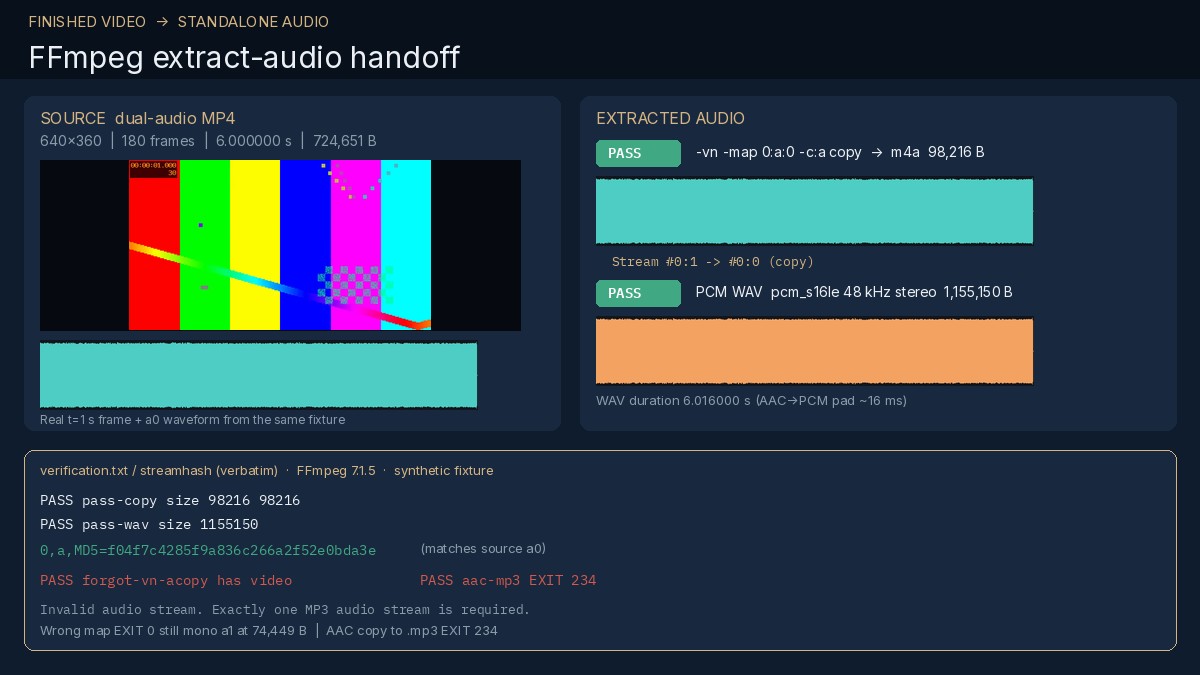
No podcast episode. We muxed a 640x360, 30 fps, 180-frame, 6.000000 s H.264 card with two AAC tracks: stream 0 is a 440 Hz stereo tone (mic stand-in), stream 1 is an 880 Hz mono tone (desk stand-in). The dual-audio MP4 is 724,651 bytes. Streamhash MD5 for a0 is f04f7c4285f9a836c266a2f52e0bda3e; for a1 it is b80b1a4f4afbe30746e4d2582907d451.
That dual-track layout matches the pain the Super User multi-audio mapping thread and the Stack Overflow multichannel extract question describe: without an explicit map, FFmpeg picks one audio stream by its own rules.
PASS: copy AAC, and re-encode WAV
| Output | Exit | Codec / rate / channels | Duration | Video? | Bytes |
|---|---|---|---|---|---|
| -vn -map 0:a:0 -c:a copy → .m4a | 0 | AAC, 48 kHz, stereo | 6.000000 s | none | 98,216 |
| -vn -map 0:a:0 pcm_s16le 48 kHz stereo → .wav | 0 | pcm_s16le, 48 kHz, stereo | 6.016000 s | none | 1,155,150 |
| -vn -map 0:a:0 pcm_s16le 16 kHz mono → .wav | 0 | pcm_s16le, 16 kHz, mono | 6.016000 s | none | 192,590 |
The copy output's audio streamhash matched source a0 exactly. ffprobe shows one audio stream and zero video streams. That is the fast path when the destination accepts AAC in M4A, which is what the Stack Overflow separate-audio answer recommends for a stream copy.
WAV needs a decode. Our 48 kHz stereo PCM file is 1,155,150 bytes. Duration reads 6.016000 s, about 16 ms longer than the 6.000000 s source, which is normal AAC priming into PCM. The 16 kHz mono path is a common ASR-style shape at 192,590 bytes. We did not upload either file to a cloud ASR or a podcast host, so this is a container/probe result only. The r/podcasting batch-rip-to-WAV script is the same job class: video in, audio file out.
Control: wrong map still exits 0
ffmpeg -i source-dual-audio.mp4 -vn -map 0:a:1 -c:a copy desk.m4aEXIT 0. Bytes: 74,449. Codec: AAC mono 48 kHz. Streamhash matches source a1, not a0. You asked for the desk tone and got it. The command looks fine in a probe summary unless you compare channel count or a hash against the mic track. The r/ffmpeg multi-stream extract thread and the language-track map question on Stack Overflow both start from the same rule: probe first, then map the index you actually want.
Control: forget -vn, keep the picture
ffmpeg -i source-dual-audio.mp4 -c:a copy still-has-video.mp4EXIT 0. Output size 624,306 bytes. ffprobe still lists H.264 640x360 plus AAC stereo. Default stream selection kept the video because we never disabled it. A plain -c copy remux without -vn did the same class of thing at 650,720 bytes. If the handoff was supposed to be audio-only, that file fails the job even though FFmpeg smiled.
Extension traps
AAC copy into .mp3 fails closed
ffmpeg -i source-dual-audio.mp4 -vn -map 0:a:0 -c:a copy out.mp3EXIT 234. Message: Invalid audio stream. Exactly one MP3 audio stream is required. then Could not write header (incorrect codec parameters ?): Invalid argument. Zero-byte file. Re-encode with libmp3lame if you truly need MP3, or keep .m4a for AAC copy.
AAC copy into .wav exits 0 with the wrong codec
ffmpeg -i source-dual-audio.mp4 -vn -map 0:a:0 -c:a copy out.wavEXIT 0. Size 96,376 bytes. Format name is wav, but ffprobe codec_name is still aac, not pcm_s16le. Many players and editors choke on that hybrid. The PCM PASS above is the honest WAV path. The multi-stream Reddit example that copies into .wav lands in this trap class; probe the codec name, not only the extension.
Mistakes that fail loudly
- Bad map index:
-map 0:a:9on a two-audio file exited 234 withStream map '' matches no streams./Failed to set value '0:a:9' for option 'map': Invalid argument. No output file. - Video into WAV:
-map 0:v:0 -c copy out.wavexited 234:wav muxer does not support any stream of type video.
Handoff checklist
- Run
ffprobe -show_streams -show_format -of jsonand count audio streams before you map. - For AAC keepers:
-vn -map 0:a:N -c:a copyinto.m4a(or another AAC-friendly container). - For WAV/PCM or a fixed rate: re-encode with
pcm_s16le(and-ar/-acas needed). Do not-c:a copyinto.wavand trust the extension. - Confirm the output has no video stream, matching codec/channels/sample_rate, and a sane duration.
- If the source has several audio tracks, compare a hash or channel layout against the intended track. EXIT 0 is not proof you grabbed the mic.
- Play a short slice in the tool that will actually receive the file. Host upload, cloud ASR accuracy and NLE sync were not tested here.
Pros, cons and test limits
- Pro: AAC copy preserved packets byte-for-byte at the streamhash level and stripped video cleanly.
- Pro: PCM WAV and 16 kHz mono paths give predictable sample rates for tools that refuse AAC.
- Con: Wrong
-mapand AAC-in-WAV both exit 0. You need a probe, not a green terminal status. - Con: Forgetting
-vnleaves a playable MP4 that still carries picture. - Con: WAV duration can read a few milliseconds longer than the AAC source after decode. The duration mismatch thread on Stack Overflow is the same class of surprise.
- Not tested: podcast host ingest, cloud ASR accuracy, NLE auto-sync, GPU paths, batch GUIs, real OBS multitrack recordings, loudnorm/SoX finishing, speech quality scores.
- Putting a finished soundtrack back under a picture is covered in the replace-audio review. Loudness delivery belongs in the loudnorm review. We did not re-test those here.
Sources and evidence
All measurements came from FFmpeg/ffprobe 7.1.5-0+deb13u1 on Debian 13 with locally generated fixtures. The evidence folder ffmpeg-extract-audio-handoff, November 10, 2026, holds the commands, full logs, EXIT codes, ffprobe JSON, sizes, SHA-256 and streamhash records.
- Stack Overflow: separate audio with -map / -c copy
- Stack Overflow: extract a language audio stream
- Stack Overflow: extract audio duration mismatch
- Stack Overflow: map each audio stream on extract
- Super User: pick or drop one of several audio streams
- Reddit r/ffmpeg: extract all audio streams
- Reddit r/podcasting: batch rip MP4 to WAV
- Reddit r/editors: extract audio without changing it
- FFmpeg product page