
By ToolBrivio Editorial · Hands-on test of FFmpeg/ffprobe 7.1.5-0+deb13u1 on Debian 13, November 9, 2026 (Asia/Shanghai). Community pages are linked where they raised a test case; every number below comes from our own synthetic files. We earn no affiliate commission from links on this page. Research approach · Link disclosure.
A phone clip arrives looking fine in the stock player and lying on its side in the edit. The usual reason: the file stores landscape pixels and a displaymatrix that says "rotate me." Some tools honor that tag. Some decode the pixels as written. For a handoff that every downstream tool can trust, bake the orientation into the picture:
ffmpeg -i sideways.mp4 -map 0:v:0 -map 0:a:0 \
  -vf "transpose=clock" \
  -c:v libx264 -preset veryfast -crf 20 -pix_fmt yuv420p \
  -c:a copy upright.mp4
transpose=clock is 90° clockwise. Use cclock for counterclockwise, or stack two for 180°. Audio can stay -c:a copy. Video has to be re-encoded; there is no stream-copy filter.
What we built on the box
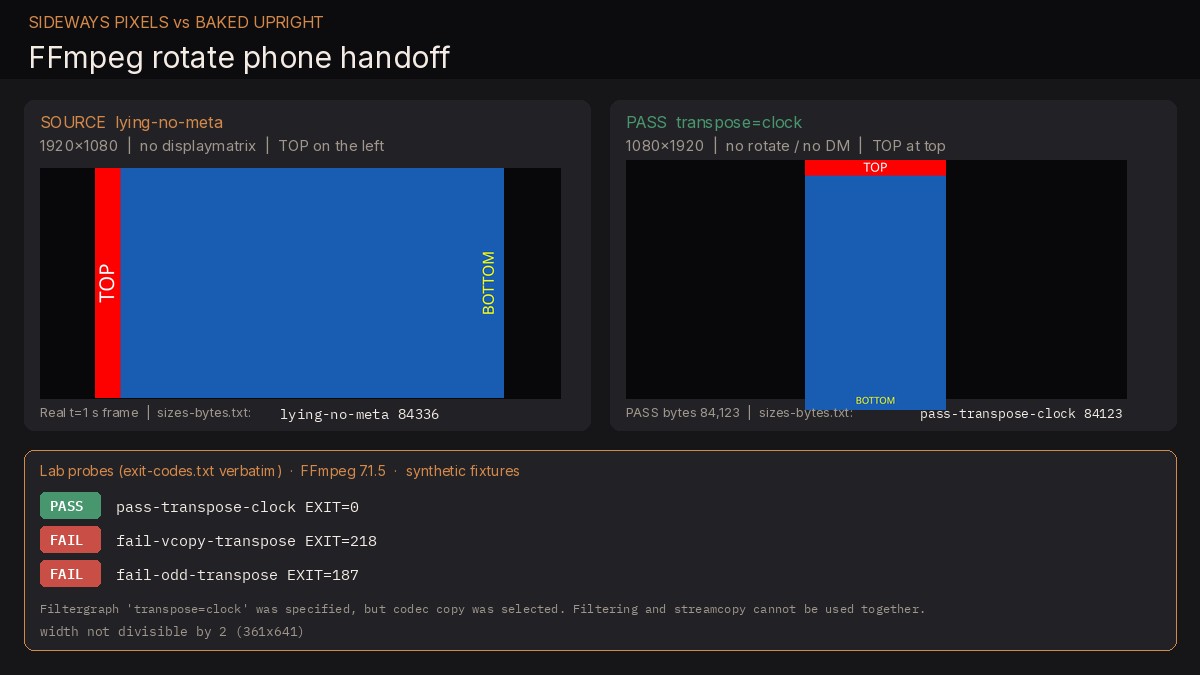
No phone footage. We drew a 1080x1920 blue card with a red "TOP" bar and yellow "BOTTOM" label, then ran transpose=cclock so the red bar sat on the left of a 1920x1080 frame. That file is lying-no-meta.mp4: 120 frames, 4.000000 s video and audio, AAC 48 kHz, 84,336 bytes, no rotation side data.
A second copy got phone-style metadata:
ffmpeg -display_rotation 90 -i lying-no-meta.mp4 -c copy lying-with-meta.mp4Same 84,336 bytes (stream copy). ffprobe now reports Display Matrix with rotation 90. The old tags.rotate field was empty on 7.1.5; trust side_data, not the tag alone.
Frame grabs tell the story. With -noautorotate, both lying files show the red bar on the left. Without that flag, FFmpeg autorotates the tagged file on decode, so a casual screenshot looks upright even though the stored pixels are still sideways. That is exactly the player-vs-editor split the r/ffmpeg portrait-mode thread and the Super User 180° rotate answer describe.
PASS: transpose into the pixels
| Output | Exit | Size | Rotation / matrix | Frames | Audio | Bytes |
|---|---|---|---|---|---|---|
| transpose=clock on lying-no-meta | 0 | 1080x1920 | none | 120 | AAC 48 kHz copy, 4.000000 s | 84,123 |
| default re-encode of lying-with-meta (autorotate) | 0 | 1080x1920 | none | 120 | AAC 48 kHz copy, 4.000000 s | 84,346 |
| noautorotate + transpose, then display_rotation 0 remux | 0 | 1080x1920 | none | 120 | AAC 48 kHz copy, 4.000000 s | 84,123 |
The primary PASS file is 1080x1920, 4.000000 s on both streams, 120 frames, no Display Matrix. A t=1 s frame shows the red TOP bar at the top again. Against the original upright reference, mean per-channel absolute difference was about 0.04 after the round trip. That is a lab check on synthetic color cards, not a claim about real camera grain.
Autorotate on encode also produced a clean 1080x1920 with no matrix (84,346 B). It works when the input already carries the right displaymatrix. If the file is sideways and has no tag, you still need an explicit transpose.
Control: clear the tag, keep the sideways pixels
ffmpeg -display_rotation 0 -i lying-with-meta.mp4 -c copy cleared.mp4EXIT 0. Bytes stayed 84,336 because nothing was re-encoded. ffprobe shows no rotation and no Display Matrix. The picture is still 1920x1080 with the red bar on the left. Any tool that ignores metadata will keep seeing a lying frame. Clearing the tag is not a handoff fix.
We also tried the older suggestion from a FFmpeg 7 displaymatrix thread:
ffmpeg -i lying-with-meta.mp4 -c copy -metadata:s:v:0 rotate=0 out.mp4EXIT 0, same 84,336 bytes, and Display Matrix rotation 90 was still there. On 7.1.5, that metadata write did not clear the side data. Use -display_rotation 0 when you remux.
Mistakes that still exit 0
Wrong transpose direction
transpose=cclock on the already-lying file exited 0 and wrote 1080x1920 at 84,346 B. The probe looks fine: no matrix, matching duration. The t=1 s frame has TOP at the bottom, upside down. Probe summaries do not catch this. A frame grab does.
Leftover displaymatrix after a bake
ffmpeg -noautorotate -i lying-with-meta.mp4 \
  -vf "transpose=clock" -c:v libx264 ... -c:a copy baked.mp4
Pixels came out 1080x1920 and upright. Bytes: 84,123. Side data: rotation 90 still attached. A default decode then rotates that upright picture again, so a screenshot lands back on 1920x1080. Remux with -display_rotation 0 -c copy to strip it. The GoPro overlay case on Super User hit the same leftover-matrix class of bug after a filtergraph.
Mistakes that fail loudly
Filter plus stream copy
ffmpeg -i lying-no-meta.mp4 -vf "transpose=clock" -c:v copy -c:a copy out.mp4EXIT 218, no output file. Message: Filtergraph 'transpose=clock' was specified, but codec copy was selected. Filtering and streamcopy cannot be used together. Baking rotation always means a video encode. The Stack Overflow rotate thread and the rotation-field question both separate "change the tag" from "change the pixels."
Odd sizes into libx264
A 641x361 yuv444 source through transpose=clock into libx264 yuv420p exited 187 with width not divisible by 2 (361x641) and a 0-byte file. A 641x360 source failed the same way on height: height not divisible by 2 (360x641). Pad or use -2 before you encode. We did not re-test the scale+fps odd-width suite here.
Handoff checklist
- Probe with ffprobe and read
side_data_list/rotation, not onlytags.rotate. - Grab one frame with
-noautorotateand one without. If they disagree, metadata is papering over sideways pixels. - For a durable handoff,
transpose=clock|cclock(or autorotate encode when the matrix is already correct), then confirm the output has no Display Matrix. - If a bake leaves rotation side data behind, remux with
-display_rotation 0 -c copy. - Never pair
-vfwith-c:v copy. Check exit codes; 218 and 187 fail closed, wrong-direction transpose does not. - Open a short clip in the editor you actually hand to. We did not import into Premiere, Resolve or Final Cut in this run.
Pros, cons and test limits
- Pro:
transpose=clockgave a clean 1080x1920 file with matching audio timing and no rotation side data. - Pro: Filter-plus-copy and odd-width paths fail with clear EXIT codes.
- Con: Clearing displaymatrix alone leaves sideways pixels. Bytes can match the source and still be wrong for an editor.
- Con: Wrong transpose and leftover matrix both exit 0. You need a frame grab, not just a probe summary.
- Con: Every bake re-encodes video. Plan for time and generation loss.
- Not tested: real iPhone, Android or GoPro footage; Premiere / Resolve / Final Cut timelines; upload-preview auto-correct; GPU encoders; vendor-private atoms; ExifTool writes; speech lip sync; long recordings; subjective quality.
- Mixed resolution and frame-rate handoffs are covered in the scale+fps review. Swapping a finished soundtrack is in the replace-audio review. Vertical reframing is in the Shorts crop and pad review.
Sources and evidence
All measurements came from FFmpeg/ffprobe 7.1.5-0+deb13u1 on Debian 13 with locally generated fixtures. The evidence folder ffmpeg-rotate-phone-handoff, November 9, 2026, holds the commands, full logs, EXIT codes, ffprobe JSON (with side_data), frame grabs, hashes and byte sizes.
- Stack Overflow: Rotating videos with FFmpeg
- Stack Overflow: set rotation field without re-encoding
- Super User: rotate a video 180° with FFmpeg
- Super User: displaymatrix leftover on FFmpeg 7
- Reddit r/ffmpeg: portrait mode being distorted
- Reddit r/ffmpeg: why is rotate 180 so intensive
- FFmpeg product page