
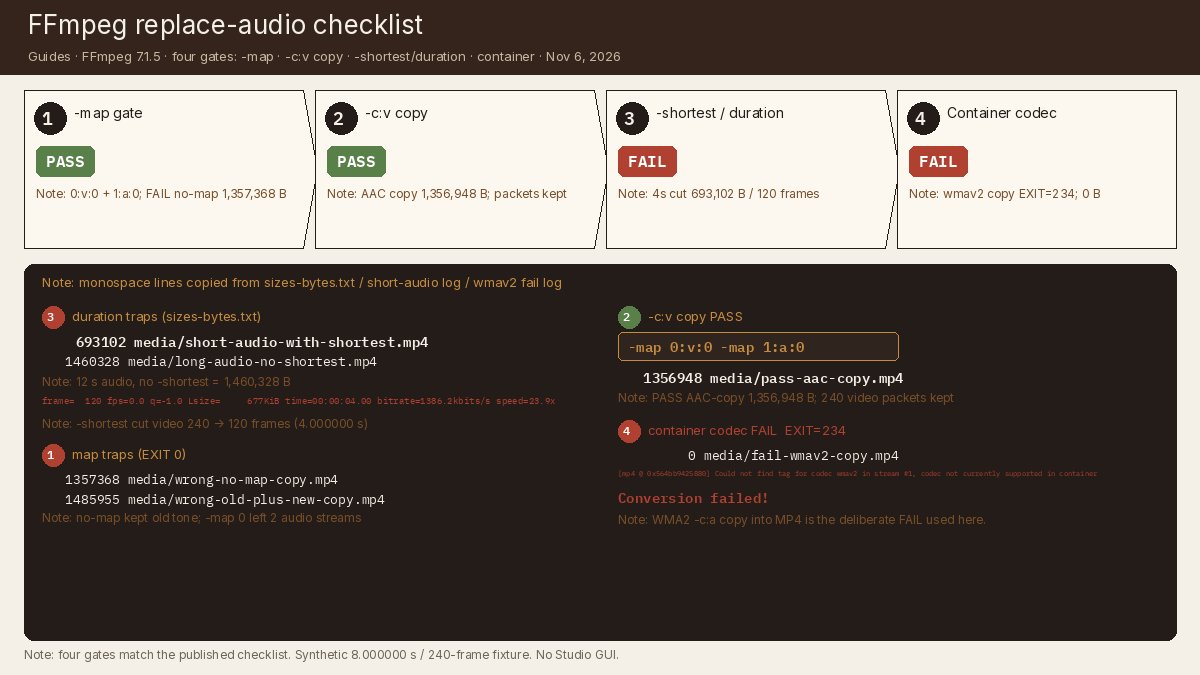
-shortest 693,102 B / 120 frames; FAIL 12 s no--shortest 1,460,328 B; FAIL wmav2 copy EXIT=234. Numbers from the lab sizes log. Not a Studio UI.Use this when a finished MP4 needs a new WAV or AAC track and the picture should not be encoded again. The working command maps video from input 0 and audio from input 1, keeps -c:v copy, then checks stream count, duration, and hashes. The last steps deliberately break those gates: a missing map, two audio tracks, a careless -shortest, a bad input index, and an incompatible audio copy.
Hashes, duration matrix detail, and source notes live in the companion review: FFmpeg replace-audio review. This Guide is the pasteable checklist.
Test note: November 6, 2026, Asia/Shanghai, Debian GNU/Linux 13 (trixie). FFmpeg and ffprobe 7.1.5-0+deb13u1. My synthetic fixture is H.264/AAC at 640×360, 30 fps, 8.000000 s, 240 frames, and 1,357,399 B. The clean replacement is an 8.000000 s WAV at 768,108 B or an 8.000000 s M4A at 129,317 B. These are locally generated tones, not an interview or a client recording.
The checklist
Run the gates in order. Step 3 decides whether audio is encoded or copied. Steps 6 and 8 contain deliberate failure patterns. Step 7 is safe only after you decide which duration the deliverable needs.
| Step | PASS | FAIL | HOLD |
|---|---|---|---|
| 1. FFmpeg version | Version recorded; mine is 7.1.5-0+deb13u1 | Missing binary or an unrecorded version | Windows / macOS builds (not tested) |
| 2. Probe both inputs | Source 640×360, 8.000000 s, 240 frames, 1,357,399 B; WAV 768,108 B or M4A 129,317 B | Choosing codec or duration without probing | |
| 3. Choose audio encode vs copy | WAV/PCM to AAC at -b:a 192k; AAC M4A may use -c:a copy; always -c:v copy | Copying a codec without checking container support | Player acceptance of unusual muxes |
| 4. Exact map + video copy | Exit 0, 2 streams, one video + one new audio; WAV-AAC 1,383,447 B; AAC-copy 1,356,948 B | Missing either explicit map or -c:v copy | GPU / NVENC (not tested) |
| 5. Prove output | V=A=F=8.000000; video MD5 86b28f45226ab6861fd59c72b1e24813; 240 frames; old audio MD5 gone | Trusting EXIT=0 without stream and hash checks | |
| 6. Wrong maps | Recognize FAIL: no-map 1,357,368 B with old audio; -map 0 produces 3 streams / 1,485,955 B | Old audio retained or a second audio track added by accident | Optional subtitle mapping (not tested) |
| 7. Duration decision | 4 s without flag: 1,303,852 B and full picture; 12 s with flag: 1,383,446 B and 240 frames | 4 s + flag cuts to 120 frames / 693,102 B; 12 s without flag leaves an audio tail / 1,460,328 B | Long-tail player behavior (not tested) |
| 8. Bad map / bad copy | Recognize the error and fix the map or encode to AAC | Bad map EXIT=234; WMA2 copy into MP4 EXIT=234 | Other player / container combinations (not tested) |
1. Confirm FFmpeg
ffmpeg -version | head -n 5Write down the version before testing. This run used FFmpeg 7.1.5-0+deb13u1. Windows and macOS builds are on HOLD because they were not tested.
- [ ] Version written down
2. Probe the finished video and the new audio
ffprobe -v error -show_entries format=duration,size \
  -show_entries stream=index,codec_type,codec_name,width,height,nb_frames,sample_rate,channels,duration \
  -of default=nw=1 finished.mp4
ffprobe -v error -show_entries format=duration,size \
  -show_entries stream=codec_type,codec_name,sample_rate,channels,duration \
  -of default=nw=1 clean.wav
My source is h264 at 640×360, 30 fps, with AAC mono audio, 8.000000 s, 240 frames, and 1,357,399 B. The clean WAV is PCM s16le at 8.000000 s / 768,108 B. The clean M4A is AAC at 8.000000 s / 129,317 B.
- [ ] Video size, frames, duration, and bytes recorded
- [ ] New audio codec, duration, and bytes recorded
3. Choose AAC encode vs copy
For WAV/PCM, use -c:a aac -b:a 192k. The 192k setting is my lab choice, not a delivery rule. If the replacement is already AAC in M4A, -c:a copy is the tested path. Keep -c:v copy in either case.
Do not assume every audio codec can be copied into MP4. Step 8 shows a WMA2 copy failure. Acceptance of unusual but technically writable audio muxes is on HOLD.
- [ ] Encode vs copy chosen on purpose
4. Replace with the exact map and -c:v copy
WAV to AAC:
ffmpeg -y -hide_banner -i finished.mp4 -i clean.wav \
  -map 0:v:0 -map 1:a:0 \
  -c:v copy -c:a aac -b:a 192k \
  replaced.mp4
echo exit=$?
stat -c '%s' replaced.mp4
PASS in the lab: 1,383,447 B, 2 streams, V=A=8.000000, and 240 matching video frames. The copied video packet MD5 is 86b28f45226ab6861fd59c72b1e24813.
Already-AAC M4A, copy audio:
ffmpeg -y -hide_banner -i finished.mp4 -i clean.m4a \
  -map 0:v:0 -map 1:a:0 \
  -c:v copy -c:a copy \
  replaced-copy.mp4
PASS in the lab: 1,356,948 B, with the same video MD5. The copied AAC streamhash is 2fc80679e4042a50034c8463d5285cf5, matching the new AAC input.
- [ ] Exit 0; bytes recorded
- [ ] Both explicit maps and
-c:v copypresent
5. Prove the output with ffprobe
OUT=replaced.mp4
ffprobe -v error -show_entries stream=index,codec_type,codec_name,duration,nb_frames \
  -show_entries format=duration,size,nb_streams -of default=nw=1 "$OUT"
V=$(ffprobe -v error -select_streams v:0 -show_entries stream=duration -of csv=p=0 "$OUT")
A=$(ffprobe -v error -select_streams a:0 -show_entries stream=duration -of csv=p=0 "$OUT")
F=$(ffprobe -v error -show_entries format=duration -of csv=p=0 "$OUT")
N=$(ffprobe -v error -show_entries format=nb_streams -of csv=p=0 "$OUT")
echo "streams=$N V=$V A=$A F=$F"
Both intended outputs have streams=2 V=8.000000 A=8.000000 F=8.000000. Check one video and one audio stream, not just the total. The source and both PASS outputs keep video packet MD5 86b28f45226ab6861fd59c72b1e24813, and all 240 decoded frame rows match.
The old audio MD5 is 05c194d7ec0be7ae8fd9f15e2692152f. It must not remain on a one-track replacement. With AAC copy, the output audio matches the new input MD5 2fc80679e4042a50034c8463d5285cf5. With WAV to AAC, a new encoding should not be expected to have that copied-input hash.
- [ ] Exactly one video + one audio
- [ ] Durations match the editorial intent
- [ ] Video hash and frame count still match the source
- [ ] Old audio is not retained
6. Pitfall: wrong maps that still exit 0
No map, default selection:
ffmpeg -y -hide_banner -i finished.mp4 -i clean.wav \
  -c copy \
  wrong-no-map.mp4
echo EXIT_NOMAP=$?
FAIL despite EXIT=0: this produced 1,357,368 B and retained the original AAC MD5 05c194d7ec0be7ae8fd9f15e2692152f. The process succeeded, but the requested replacement did not happen.
Map all of input 0, then add the new audio:
ffmpeg -y -hide_banner -i finished.mp4 -i clean.m4a \
  -map 0 -map 1:a -c copy \
  wrong-old-plus-new.mp4
echo EXIT_DUAL=$?
FAIL for a one-track replacement despite EXIT=0: 3 streams, meaning one video plus two audio tracks, and 1,485,955 B. Use -map 0:v:0 -map 1:a:0 when the old track must disappear. Preserving optional subtitles with -map 0:s? was not tested.
- [ ] No-map EXIT=0 with old audio recognized as a failure
- [ ] Three-stream EXIT=0 result recognized as unintended dual audio
7. Decide on -shortest from measured durations
-shortest is an editorial choice, not a safety switch. Run the relevant comparison and inspect video frames as well as stream durations.
4.000000 s audio, no -shortest:
ffmpeg -y -hide_banner -i finished.mp4 -i clean-short-4s.wav \
  -map 0:v:0 -map 1:a:0 -c:v copy -c:a aac -b:a 192k \
  short-no-shortest.mp4
The picture remains 8.000000 s / 240 frames while audio is 4.000000 s. Output: 1,303,852 B.
4.000000 s audio with -shortest:
ffmpeg -y -hide_banner -i finished.mp4 -i clean-short-4s.wav \
  -map 0:v:0 -map 1:a:0 -c:v copy -c:a aac -b:a 192k \
  -shortest \
  short-with-shortest.mp4
FAIL if the full picture is required: 4.000000 s / 120 frames / 693,102 B. The flag cut half of the source frames.
12.000000 s audio with -shortest:
ffmpeg -y -hide_banner -i finished.mp4 -i clean-long-12s.wav \
  -map 0:v:0 -map 1:a:0 -c:v copy -c:a aac -b:a 192k \
  -shortest \
  long-with-shortest.mp4
PASS for a picture-length deliverable: V=A=F=8.000000, 240 frames, 1,383,446 B.
12.000000 s audio without the flag:
ffmpeg -y -hide_banner -i finished.mp4 -i clean-long-12s.wav \
  -map 0:v:0 -map 1:a:0 -c:v copy -c:a aac -b:a 192k \
  long-no-shortest.mp4
The video remains 8.000000 s / 240 frames, but audio and container duration are 12.000000 s. Output: 1,460,328 B. I did not test how different players present that tail.
- [ ] Both audio and video durations recorded before choosing
-shortest - [ ] Frame count confirms the intended picture length
- [ ] A short-audio cut is recognized as picture truncation when unintended
8. Pitfall: bad map index and incompatible copy
An input index that does not exist:
ffmpeg -y -hide_banner -i finished.mp4 -i clean.wav \
  -map 0:v:0 -map 2:a:0 \
  -c:v copy -c:a aac \
  fail-bad-map.mp4
echo EXIT_BADMAP=$?
FAIL: EXIT=234, Invalid input file index: 2., and Invalid argument. There are only two inputs in this command, indexed 0 and 1. Correct the second audio map to -map 1:a:0.
WMA2 copied into MP4:
ffmpeg -y -hide_banner -i finished.mp4 -i clean.wma \
  -map 0:v:0 -map 1:a:0 \
  -c:v copy -c:a copy \
  fail-wma-copy.mp4
echo EXIT_WMA=$?
FAIL: EXIT=234. The log says Could not find tag for codec wmav2 in stream #1, codec not currently supported in container. Encode the replacement to AAC instead of copying WMA2 into this container. Some PCM and FLAC copies exited 0 in this build, but that observation is not delivery advice.
- [ ] Bad map index EXIT=234 recognized and corrected
- [ ] Incompatible WMA2 copy EXIT=234 recognized; AAC encode chosen
What we saw
These observations come from the November 6, 2026 lab in evidence/ffmpeg-replace-audio-track/. The failure labels describe the editorial outcome, even when FFmpeg returned success.
| Step | What we saw | Call | Where in the evidence |
|---|---|---|---|
| 1 | FFmpeg 7.1.5-0+deb13u1 | PASS | logs/00_ffmpeg_version.log; logs/00_ffprobe_version.log |
| 2 | 640x360; 8.000000 s; 240 frames; 1,357,399 B; WAV 768,108 B; M4A 129,317 B | PASS | source and clean-input probes; sizes-bytes.txt |
| 3 | WAV to AAC encode; M4A AAC copy; video stays copied | PASS | NOTES.md; PASS command and probe files |
| 4 | WAV-AAC 1,383,447 B; AAC-copy 1,356,948 B; same video MD5; 240 frames | PASS | pass-wav-to-aac.mp4.json; pass-aac-copy.mp4.json; hashes/ |
| 5 | Each PASS output has 2 streams and V=A=F=8.000000; old audio is gone; copied AAC MD5 is 2fc80679e4042a50034c8463d5285cf5 | PASS | PASS probes; verification.json; streamhash files |
| 6 | No-map EXIT=0 / 1,357,368 B / old MD5; dual-audio EXIT=0 / 3 streams / 1,485,955 B | FAIL patterns | wrong-no-map-copy.mp4.json; wrong-old-plus-new-copy.mp4.json; hashes/ |
| 7 | 4 s: 1,303,852 B / 240 frames without flag, 693,102 B / 120 frames with flag. 12 s: 1,460,328 B / 12.000000 s container without flag, 1,383,446 B / 8.000000 s with flag | PASS gate / FAIL misuse | Four short/long audio probes; sizes-bytes.txt |
| 8 | Bad map EXIT=234; WMA2 copy EXIT=234 with container tag error | FAIL patterns | logs/41_fail_bad_map_index.*; logs/45_fail_wmav2_copy_into_mp4.* |
For the evidence discussion and source notes, read the companion FFmpeg replace-audio review.
Download the checklist
Download the FFmpeg replace-audio checklist (Markdown). Keep the commands, the PASS / FAIL / HOLD boxes, and your ffprobe results together before delivering the MP4.
FAQ
What is the exact map for a one-track audio replacement?
Use -map 0:v:0 -map 1:a:0 so video comes from the finished MP4 and audio comes from the second input. On our 8.000000 s fixture that wrote one H.264 stream and one AAC stream. Do not omit -map, and do not use -map 0 when the old audio must disappear.
Why did my command exit 0 but keep the old audio?
Default stream selection can ignore the second input. Our no-map -c copy run exited 0, kept the original AAC MD5 05c194d7ec0be7ae8fd9f15e2692152f, and wrote 1,357,368 bytes. Always probe stream count and confirm the new track replaced the old one.
When is -shortest safe?
Only when the shorter stream is the one you want to end on. Our 4.000000 s audio with -shortest cut video from 8.000000 s / 240 frames to 4.000000 s / 120 frames. Without the flag, video stayed 8.000000 s and audio ended at 4.000000 s. For a 12.000000 s replacement, -shortest trimmed audio to the picture's 8.000000 s.
Can I use -c:a copy for every replacement?
Only when the second input is already a container-friendly codec. Our M4A AAC copy path exited 0 at 1,356,948 bytes with identical audio streamhash. WAV should re-encode to AAC (ours: 1,383,447 bytes at -b:a 192k). WMA2 copy into MP4 exited 234 with a container tag error.
Where is the longer write-up?
Hashes, duration matrix detail, and source notes live in the companion FFmpeg replace-audio review. This Guide is the pasteable gate only.
Honest limits
- The fixtures use synthetic lavfi tones, not speech. Lip sync, delayed starts, gradual drift, and clock correction were not tested.
- NLE timeline replacement, multiple languages, dispositions, subtitles, attachments, and optional
-map 0:s?delivery were not tested. apadpadding, looping, fades, and long-audio tail behavior across players were not tested.- HDR, variable-frame-rate phone footage, GPU paths, large files, batch throughput, and performance timings were not tested.
- Platform upload preview and compatibility with NLEs, desktop players, browsers, and mobile players were not tested.
- Deep retests of loudnorm, SoX, burn-in, concat, and Shorts are out of scope.
- PCM/FLAC copy results in this build are observations, not a compatibility promise.
Evidence: evidence/ffmpeg-replace-audio-track/ (NOTES.md, commands, logs, sizes-bytes.txt, probes, hashes), November 6, 2026. Every measurement on this page comes from that lab record.
Sources we opened
- Super User: replace audio in video
- Super User: keep the input video duration
- Super User: combine inputs at the first input's duration
- Stack Overflow: an old FFmpeg version rejects codec copy syntax
- FFmpeg replace-audio review (companion)
- FFmpeg multitrack remux review
- FFmpeg loudnorm interview review
- FFmpeg product page
Need to retain several tracks rather than replace one? Start with the FFmpeg multitrack remux review. When loudness is in scope, use the FFmpeg loudnorm interview review. Those are separate workflows.