
Guides · Caption delivery
Fix reversed SRT timestamps before converting captions to WebVTT
By ToolBrivio Editorial · October 11, 2026 (UTC)
A caption export that finishes without an error can still contain a broken cue. In our two-cue test, FFmpeg accepted an SRT whose second cue ended before it started. The WebVTT output gave that cue an end time of 1193:02:50.296. If you are handing captions to a web-video developer, checking the conversion status alone misses this failure.
This guide is for a creator or developer who has an SRT delivery file and needs a clean WebVTT handoff. The minimum requirement is simple: each cue must end after it starts, and the intended text and times must survive conversion. We use a small local checker before conversion, then inspect the output. This does not test synchronization against the actual recording.
1. Keep the source and reproduce the bad interval
Work on a copy. A timestamp repair can change meaning, so keep the original export available for comparison. Here is our complete failing fixture:
1
00:00:01,000 --> 00:00:02,500
Check the interview microphone.

2
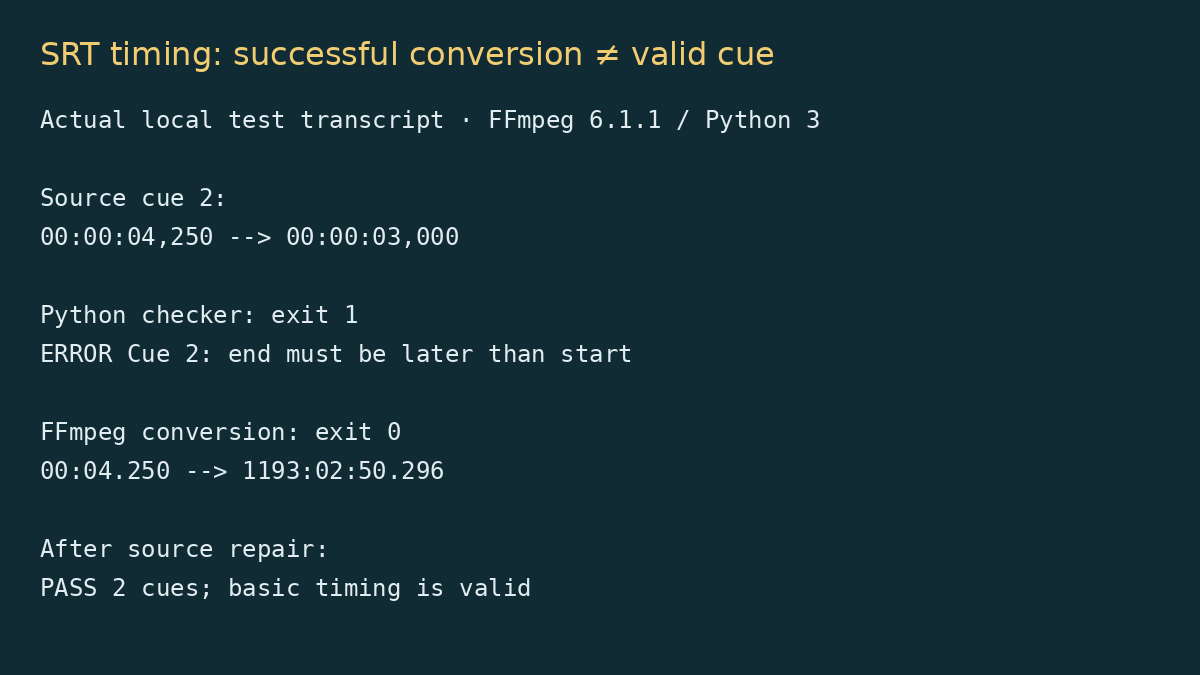
00:00:04,250 --> 00:00:03,000
Keep the desktop audio separate.
Cue 2 is reversed: its start is 4.250 seconds and its end is 3.000 seconds. In this deliberately constructed fixture, the intended range was 3.000 to 4.250 seconds. In a real transcript, do not swap times automatically. Listen to that section and confirm where the sentence belongs.
2. Check timing before running a converter
Download the plain-text Python checker and save it as check-srt-timing.py. It needs Python 3, uses only the standard library and does not upload or modify the file. Inspect the script before running it. On systems where the command is named python, substitute that for python3.
python3 check-srt-timing.py captions.srtOur failing fixture produced ERROR Cue 2: end must be later than start and exit status 1. That is the cue ordinal in the parsed file, not necessarily the numeric label printed in an unusual export. Fix the reported block and run the checker again.
| Input we tested | Checker result | Next action |
|---|---|---|
| Two valid cues | PASS, status 0 | Convert, then inspect the output |
| End before start | ERROR, status 1 | Check the recording and repair the interval |
| Seconds set to 63 | ERROR, status 1 | Correct the timestamp components |
| Dot milliseconds in SRT | ERROR, status 1 | Use comma milliseconds for this plain SRT checker |
| Overlapping cue | WARN and PASS, status 0 | Review whether simultaneous text is intentional |
| UTF-8 BOM and CRLF lines | PASS, status 0 | No line-ending repair needed in this fixture |
| Empty file | ERROR, status 2 | Find the actual caption export |
Overlap is deliberately a warning rather than a hard failure. Two speakers can legitimately have overlapping text; a checker cannot decide the editorial intent. The script also flags a cue that starts before the previous cue ends. Read the message even when the process returns zero.
3. Repair the source and create a fresh output
After confirming our intended cue against the fixture, we replaced only cue 2’s timing line:
00:00:03,000 --> 00:00:04,250The checker then returned PASS 2 cues; basic timing is valid. Choose an output filename that does not already exist, and convert the repaired file:
ffmpeg -hide_banner -n -i captions-fixed.srt captions-fixed.vttOur recorded conversion tests used fresh temporary paths with -y. The command above uses -n to avoid replacing an existing delivery file. Confirm that a new output actually appeared; overwrite protection and an exit status alone are not a delivery check.
4. Inspect the WebVTT instead of trusting “success”
Open the VTT in a text editor. Our repaired output was:
WEBVTT

00:01.000 --> 00:02.500
Check the interview microphone.

00:03.000 --> 00:04.250
Keep the desktop audio separate.
The header is WEBVTT, milliseconds use a dot, and the two texts and intended intervals match the source. The shorter minute-and-second timestamp representation in this output is expected; do not add hours just to make it visually resemble SRT.
For comparison, converting the reversed source with our FFmpeg 6.1.1 distribution build returned status 0 and emitted this second range:
00:04.250 --> 1193:02:50.296That is the observed failure, not a claim about every FFmpeg release or browser. We did not test browser playback. Before publishing, load the repaired captions in your actual target player and check the first cue, the repaired cue and a late cue against the final video.
What this check saves, and what it cannot tell you
The useful shortcut is finding a bad interval before uploading or importing the converted track. One checker invocation points to the second cue in our fixture; there is no need to hunt through a player timeline to discover which block is malformed. We did not benchmark time savings or large-file throughput.
The limitation: this is a basic plain-SRT timing gate, not a subtitle editor. It expects numeric cue labels, UTF-8 text and comma-millisecond timestamps. It does not verify cue-number ordering, spelling, reading speed, speaker identification, styled subtitle formats or alignment with audio. Extended timing syntax may be rejected. A PASS means those basic checks passed, not that the captions are ready for release.
A common wrong fix: shifting every cue when only one interval is reversed. That can move otherwise correct captions out of sync. Repair the individual source block first. If the entire track gradually drifts, investigate the source video and frame-rate workflow separately.
Test scope and references
Tests used synthetic English captions, Python 3 and FFmpeg 6.1.1-3ubuntu5 on Ubuntu 24.04.3. No customer files, large caption archives, editor imports or browser playback were tested. The checker and conversion outputs were recorded locally on October 12, 2026 (Asia/Shanghai).