
A transcript reviewer who finds a clipped name, covered word or stale sponsor line needs a pickup request the speaker can record without reopening the entire transcript. Put each request on one Markdown table row, identify the exact review master that owns the timecode, and inspect the rendered table before sending it. A literal pipe character is enough to hide part of a replacement line if it is not escaped.
Define the handoff before making the table
This workflow is for a podcast or video editor who has already reviewed a transcript against a specific audio or video master. The urgent task is not transcription; it is turning a small set of spoken-word problems into recordable requests. The minimum acceptable handoff gives the speaker an unambiguous timecode, the problem, the exact requested line and a status.
First name the review master and state what zero means. If the producer checks river-city-e12-review-v3.wav but the speaker uses an older edit with a different intro, every later timecode can point to the wrong sentence. A note such as “00:00:00 at the first sample of the review master” is more useful than assuming everyone starts the counter in the same place.
# River City Episode 12 Pickup List

Review master: `river-city-e12-review-v3.wav`
Timecode basis: 00:00:00 at the first sample of the review master
Coordinator: Jordan Lee
Use fictional or approved project names in examples. The downloadable practice file below contains no real client, guest or recording data.
Keep one request on one row
Use columns that answer five questions: where is the problem, who speaks, what is wrong, what should be recorded and what happens next?
| Timecode | Speaker | Problem | Replacement line | Status |
| --- | --- | --- | --- | --- |
| 00:02:16 | Maya | Product name is clipped | Say the full product name once | Ready |
| 00:14:08 | Maya | Slate wording is ambiguous | Say A \| B on the slate | Ready |
| 00:27:41 | Jordan | Room noise covers the final word | Repeat the full sentence | Needs approval |
The problem column explains why a pickup exists. The replacement column tells the speaker what to say. Do not merge those jobs into “fix this line.” A short status vocabulary also prevents “mentioned in chat” from masquerading as completion. This template uses Ready, Needs approval, Recorded, Placed and Waived as a compact working set.
A pickup list is not proof that audio was recorded or inserted. Keep the original request row and update its status. Deleting a completed row removes the decision history that explains why a new clip exists.
Escape a pipe that belongs to the dialogue
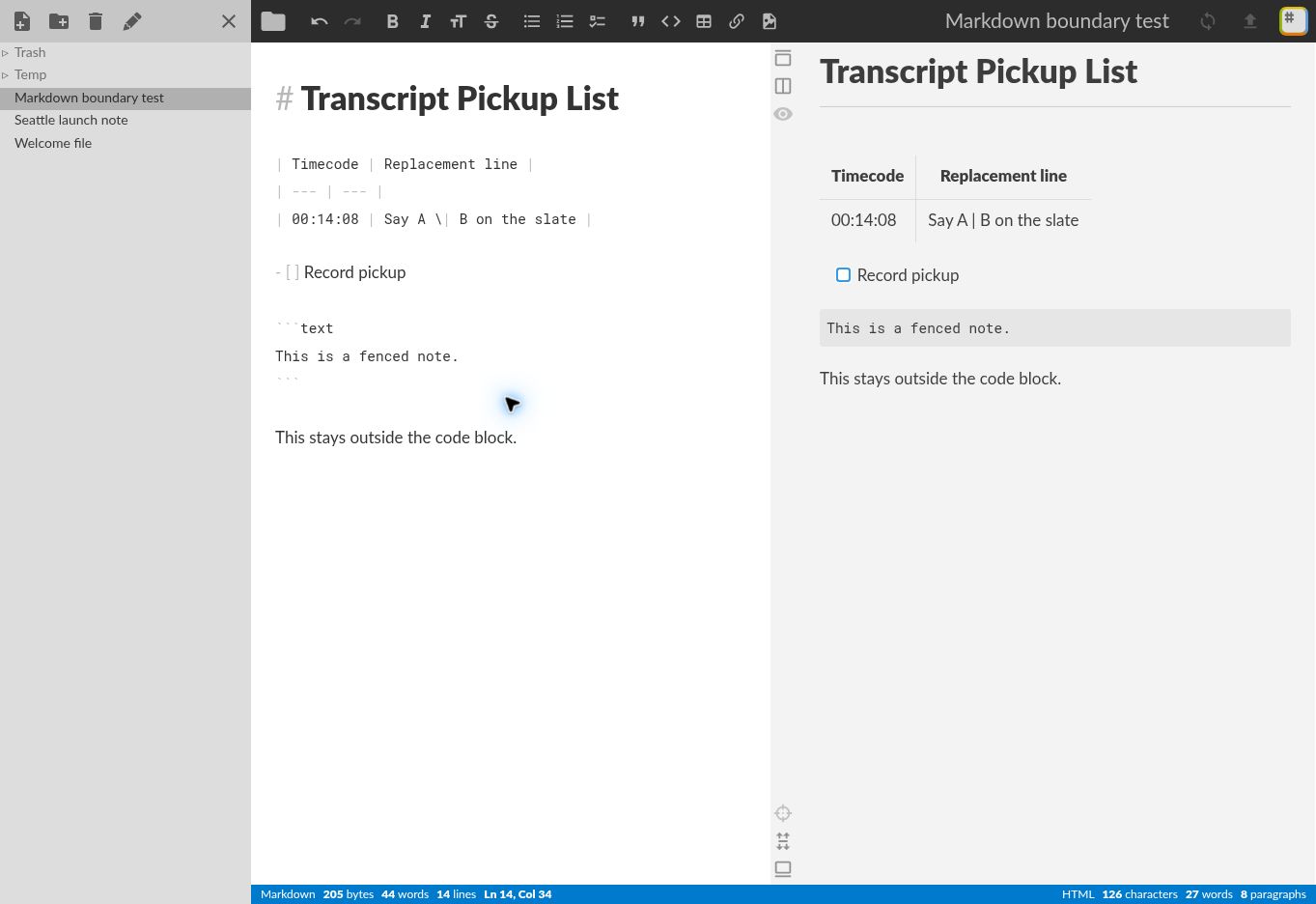
Markdown uses | to separate table cells. In our StackEdit boundary test, the source row below still held every word, but the preview showed only “Say A” in the replacement cell:
| 00:14:08 | Say A | B on the slate |The renderer treated the second pipe as another delimiter. “B on the slate” fell outside the expected two-column structure. The table looked orderly, which made this more dangerous than an obvious parse error.
Add a backslash before a pipe that is part of the spoken line:
| 00:14:08 | Say A \| B on the slate |The corrected preview kept “Say A | B on the slate” in one cell. Compare the source and preview whenever replacement text contains pipes. The same check is useful for technical shows that quote shell pipelines or describe A/B options.
Do not force paragraphs into table cells
A replacement that needs several sentences, pronunciation notes or performance direction is easier to audit below the table. Give the row a short identifier, then add a heading with the complete note.
| ID | Timecode | Speaker | Problem | Status |
| --- | --- | --- | --- | --- |
| P03 | 00:27:41 | Jordan | Final word is masked | Needs approval |

## P03 replacement

Repeat the full sentence. Keep the same microphone distance and pause after
“delivery” so the editor has room for the cut.
This avoids HTML line breaks and editor-specific multiline-table behavior. It also gives a reviewer a stable label for comments: “P03 approved” is harder to misunderstand than “the third one.”
Close every fenced note
Code fences are useful when a pickup contains a filename, command or literal block. A fence that opens with three backticks must close with three backticks. In our boundary test, leaving it open caused later Markdown to appear inside the code block until the closing fence was restored.
```text
Read the filename as: river-city-e12-review-v3.wav
```

This sentence should render as normal text.
Before delivery, scroll past every fenced block. If the remaining headings, lists or paragraphs have code styling, find the missing closing fence instead of reformatting the affected text by hand.
Run a four-part verification
- Master check: open the named audio or video file and confirm two sample timecodes land on the described words.
- Source check: search the Markdown for every literal pipe in dialogue and confirm it is escaped inside a table.
- Preview check: count source rows against rendered rows, then read the final words of each replacement line.
- Export check: download the
.mdfile, reopen it as UTF-8 and confirm the title, master filename, first timecode and last status survived.
Our accompanying StackEdit review documents the tested preview, reload and export behavior. Its Markdown download added a three-byte UTF-8 BOM; the 267-byte payload after that mark matched the editor source. If a repository or script compares exact bytes, decide deliberately whether to retain or remove the BOM.
These checks do not validate the recording itself. Listen to the pickup after it is recorded and again after it is placed in the edit. A table can preserve the request perfectly while the new take still has the wrong wording, microphone position or timing.
Download the practice template
Download the fictional Markdown pickup-list template. Save a copy beside a duplicate of your review master, replace the sample rows and keep the original recording untouched.
The template uses a fictional US production, an explicit timecode basis, escaped table punctuation and a bounded status list. It does not include audio and does not send data anywhere by itself. The StackEdit product profile collects the official links and the limits observed in our browser test.
The handoff is complete when the recipient can act
A useful pickup list lets the speaker locate the moment, understand the failure and record the requested words without reconstructing the editor’s private notes. Name one review master, keep one request per row, escape dialogue punctuation and verify the preview against the source. Then deliver the Markdown beside the pickup audio, not as a substitute for it.
Test basis: the escaped-pipe and closed-fence behavior was reproduced in the public StackEdit web app on October 14, 2026 with fictional US-English data. The workflow conventions are ToolBrivio’s original editorial guidance. We did not test mobile layout, large documents, collaboration or third-party synchronization.