
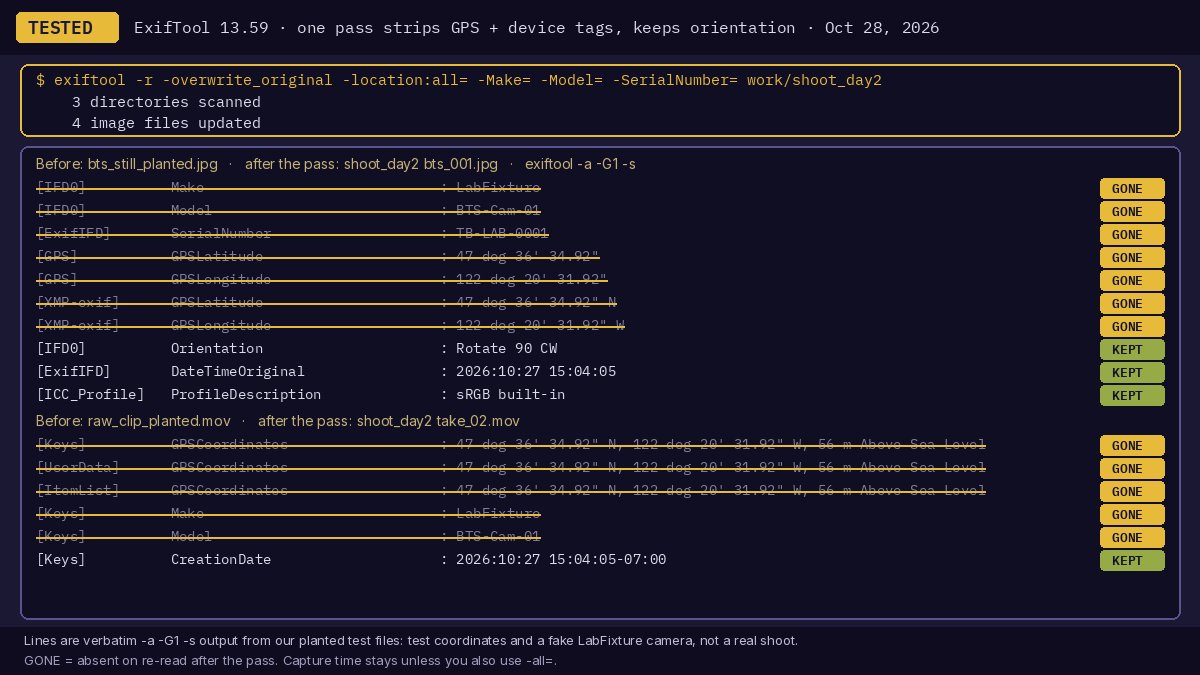
exiftool -r -overwrite_original -location:all= -Make= -Model= -SerialNumber= on our test folder (4 image files updated). The lines are verbatim -a -G1 -s output from the planted test files. Struck-through tags were gone on re-read: EXIF and XMP GPS, all three QuickTime GPSCoordinates, Make, Model and SerialNumber. Orientation, the sRGB ICC profile, DateTimeOriginal and Keys:CreationDate were kept. The coordinates are test values we wrote ourselves, not a real location.By ToolBrivio Editorial · Hands-on test of ExifTool 13.59 (official tarball, checksum verified) on Debian 13, October 28, 2026. FFmpeg/ffprobe 7.1.5 built the samples, served as a second reader, and ran the remux comparison. All samples are synthetic files we made. We wrote test coordinates for a Seattle address into our own copies so we had something to remove. We earn no affiliate commission from links on this page. Research approach · Link disclosure.
You shot BTS stills and a few phone clips at a client's house. The editor wants the raw files tonight. Phones and cameras can write the GPS position, make, model and sometimes a serial number into each file. If you zip the folder, all of that goes with it. In the Apple Community threads we read, people ask how to get the location out of a MOV, and one answer points out that the same coordinates can sit in three different places in the file. The risk is a command that reports success while the coordinates are still in the file.
So we ran that request through ExifTool. We used one JPG, one MP4, one MOV and one rotated MOV, all made on the box. Each one got test coordinates (47.6097 N, 122.3422 W) and a fake device name, and the JPG, MP4 and MOV also got a capture date (the rotated MOV got coordinates and a device name only). After every command we read the file again with exiftool -a -G1 -s and checked its size in bytes.
The short answer
ExifTool can do this job. It does not protect you from picking the wrong command. For a mixed folder of stills and clips, this one pass removed every GPS tag we planted. It also kept orientation, the ICC profile and video rotation:
exiftool -r -overwrite_original -location:all= -Make= -Model= -SerialNumber= shoot_dayThen check the folder including anything that isn't a normal media extension:
exiftool -r -ext '*' -a -G1 -s "-gps*" -Make -Model -SerialNumber shoot_dayIf you want this as a step-by-step pass to run before every upload, we turned it into a pre-upload metadata checklist, with a printable Markdown copy.
- Good:
-location:all=removed EXIF GPS, the XMP copy, and QuickTime Keys/UserData/ItemList coordinates in one pass on our samples. Video and audio stream hashes stayed byte-identical. - Good: It's honest when it does nothing. On video,
-gps:all=printed0 image files updated, and that output is the warning. - Con: Each container stores location under its own group name. The JPG habit
-gps:all=does nothing to MP4/MOV, and on JPG it leaves the XMP copy behind. - Con: The default
_originalbackups are complete copies of the files before cleaning, coordinates included. A plain-rre-read skips them. - Con:
-all=on a JPG also removes Orientation and the ICC profile unless you copy them back. - Not covered: capture dates stayed in our location+device pass. Timed GPS tracks from real phones and action cams were not in our samples.
Trap 1: the photo command does nothing to video
The JPG habit is exiftool -gps:all=. That's the right command for EXIF in a JPG. On our MOV and MP4 it ran without an error, printed 0 image files updated, 2 image files unchanged, and wrote no backup. All three location entries were still there.
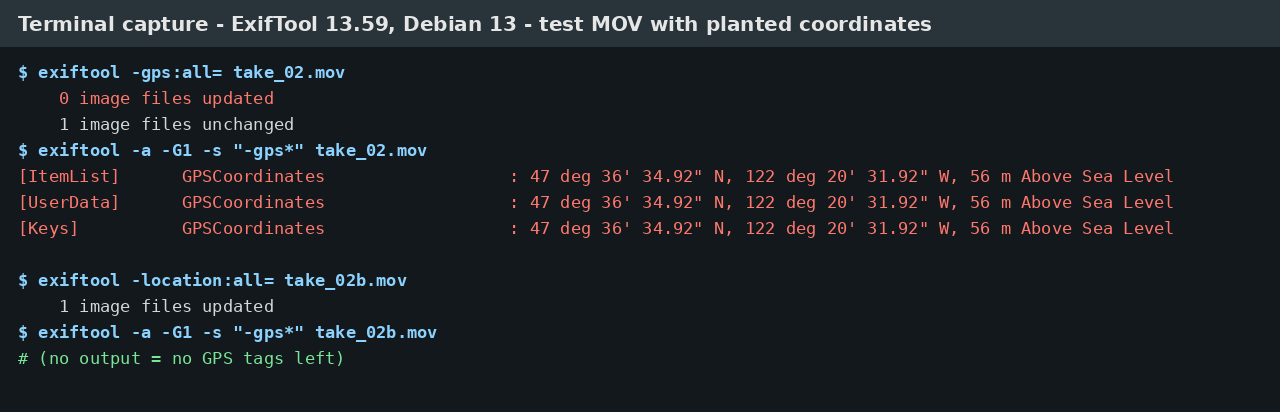
QuickTime files can store the same coordinates in three places. An Apple Community answer we read makes the same point: Apple's apps lean on Keys, and other software reads the rest. Deleting one location is not enough:
| Command (MP4 + MOV) | GPS tags left | MP4 bytes | MOV bytes |
|---|---|---|---|
| None (planted) | Keys, UserData, ItemList | 2,380,353 | 2,380,448 |
-gps:all= | All 3 (0 files updated) | 2,380,353 | 2,380,448 |
-Keys:GPSCoordinates= | UserData, ItemList | 2,380,260 | 2,380,355 |
| Keys + UserData + ItemList, each named | None | 2,380,174 | 2,380,217 |
-GPSCoordinates= (no group) | None | 2,380,174 | 2,380,217 |
-location:all= | None | 2,380,174 | 2,380,217 |
The ungrouped -GPSCoordinates= from that Apple thread worked here too. We use -location:all= anyway because the same command also handled the JPG. ffprobe agreed with ExifTool: after cleaning, no location or com.apple.quicktime.location.ISO6709 tag was left. The SHA-256 stream hashes for video and audio matched the planted file exactly. Make, model and creation date were still in the file, because a location delete doesn't touch them.
One caveat we couldn't test. A GitHub issue thread on ExifTool and MP4 says some cameras write GPS as a timed track or in vendor-specific blocks that ExifTool can read but not remove. We ran -ee after cleaning and it found nothing, but our synthetic clip never had a timed track to begin with. If your footage comes from an action cam or drone, check it with exiftool -ee -a "-gps*" before you trust it.
Trap 2: the JPG has a second copy
Our still had GPS in the EXIF GPS block and also in XMP. -gps:all= removed the EXIF block (45,678 → 45,520 bytes). The XMP latitude and longitude were still there, and ExifTool still worked out a full GPSPosition from them.
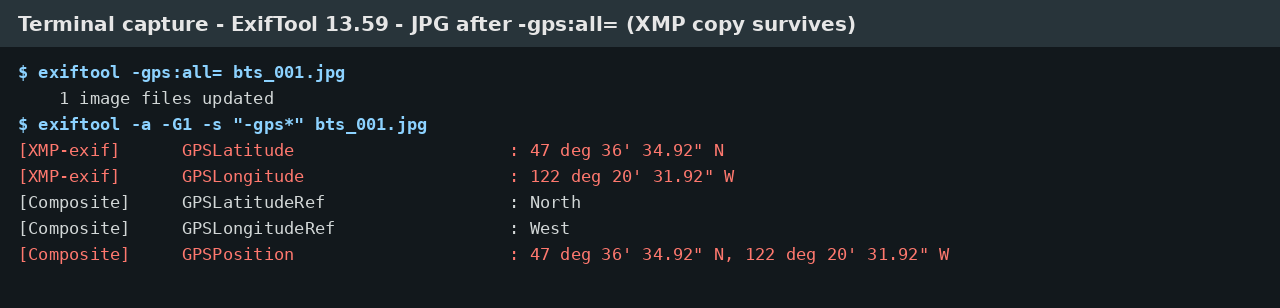
-gps:all=: the XMP copy survives. Verbatim stdout, October 28, 2026.Both "-gps*=" and -location:all= removed every GPS tag (42,630 bytes). Neither one removed Make, Model or SerialNumber. ExifTool's FAQ warns about this too: GPS can be stored outside EXIF, so read with -a -G1 and look at the group names, not just the tag names.
-all= is a sledgehammer
If you don't care which tags exist, -all= feels like the safe choice. On the JPG it removed everything except basic file info (41,748 bytes). It also removed three tags you probably wanted to keep:
- Orientation. Our pixels are stored sideways, the way a phone sensor writes them, with
Orientation = Rotate 90 CW. Without that tag, an EXIF-aware viewer shows the stored 1200×800 frame on its side. - ICC profile. ExifTool warned about it:
ICC_Profile deleted. Image colors may be affected. Our 588-byte sRGB profile was gone. - ColorSpace. Gone with the rest of EXIF.
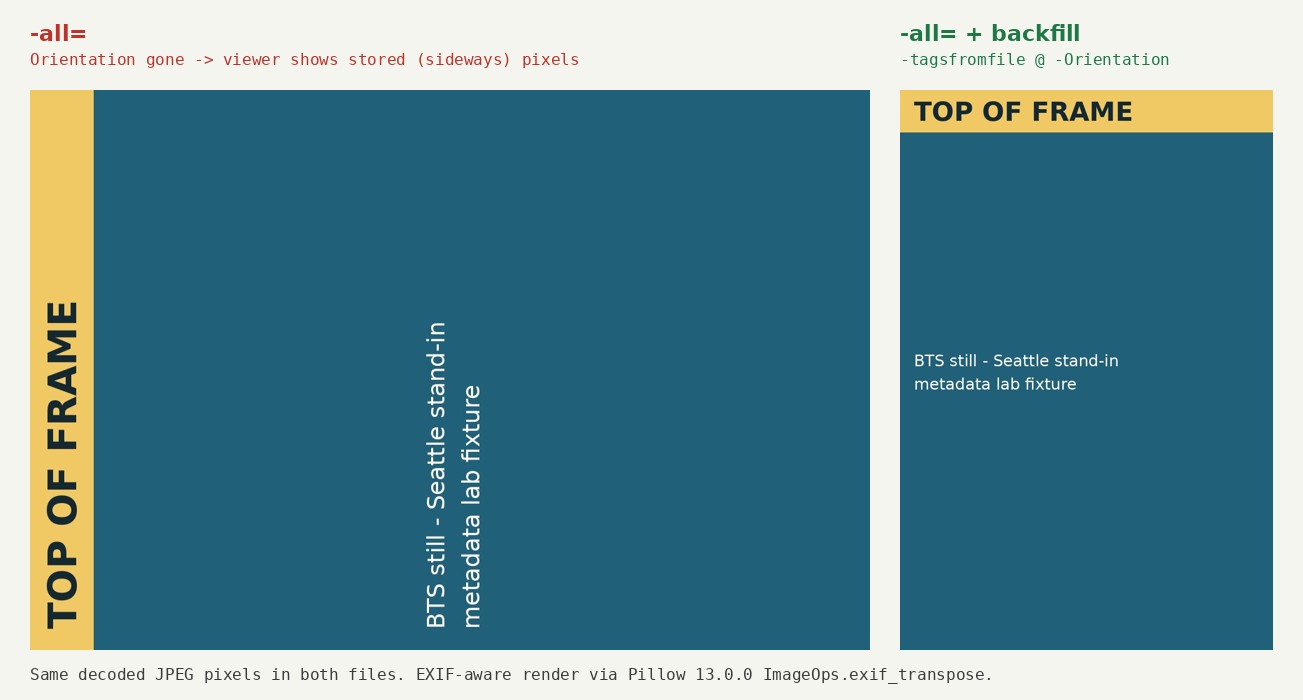
-all=. Right: -all= plus -tagsfromfile @ -Orientation. Rendered with Pillow's EXIF-aware transpose, October 28, 2026.Copying back only Orientation (-all= -tagsfromfile @ -Orientation) fixed the rotation, but the ICC warning came back. The version from ExifTool's own FAQ, with Orientation added, kept all three:
exiftool -all= --icc_profile:all -tagsfromfile @ -colorspacetags -Orientation still.jpgResult: 42,456 bytes, still Rotate 90 CW, still sRGB, ICC kept, and GPS, device, serial and DateTimeOriginal gone. The image data was never re-encoded. The decoded pixel hash was identical in all four versions.
Video turned out simpler than we expected. -all= on the MP4/MOV removed GPS, make/model, creation date and the encoder string. On the rotated MOV it kept the rotation (ExifTool reports 270, ffprobe reports 90). That's because rotation lives in the track header, not in a tag ExifTool deletes. The QuickTime CreateDate field can't be removed. ExifTool shows it as zeros, and ours was already zero.
The backups are the leak
By default ExifTool renames your untouched file to name.ext_original and writes the cleaned version under the original name. That's sensible for photo libraries. For a hand-off folder it's a problem.
- The backup is byte-identical to the file before cleaning (same SHA-256), GPS included.
- A second write does not replace it. After a second pass on the same JPG,
still.jpg_originalwas still the first-generation file and still had the Seattle coordinates. -restore_originalput the planted file back (45,678 bytes, hash match).-overwrite_originalwrites no backup at all.
We built a small shoot folder: A001_stills/ with bts_001.jpg and bts 002.JPG, and B002_video/ with an MP4 and a MOV. Then we ran exiftool -r -location:all= on it. It reported 4 image files updated. A normal -r re-read listed four files, all clean. A re-read with -ext '*' found eight, and the four _original files still held the full GPSPosition. Zip that folder for the editor and the coordinates go with it.
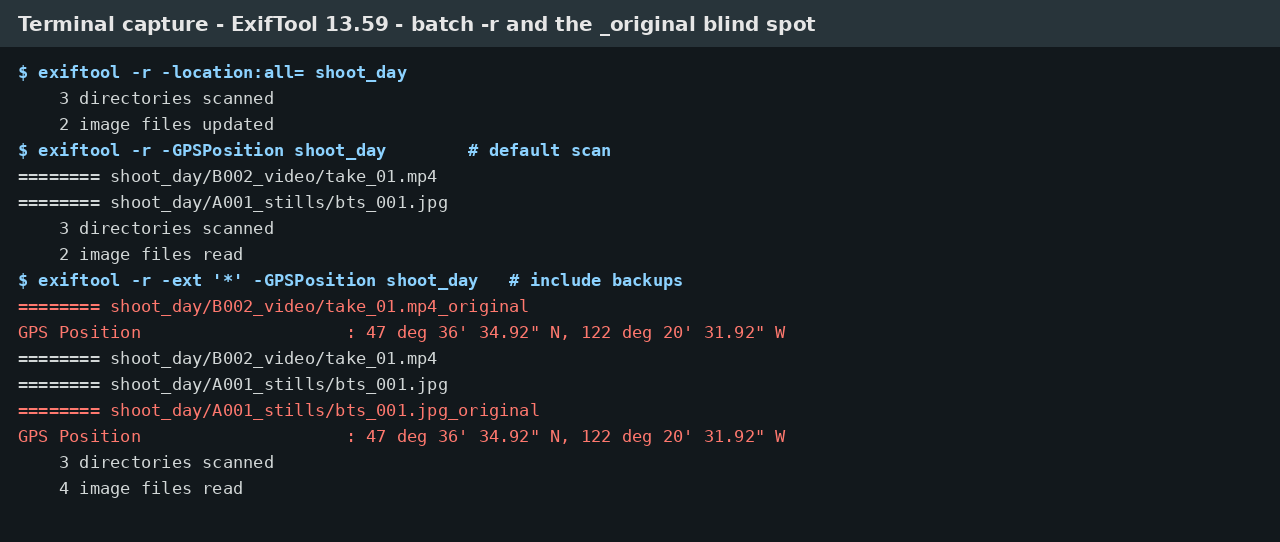
Fix: work on a copy of the shoot folder and use -overwrite_original, or run exiftool -r -delete_original! shoot_day before zipping. In our run that printed 4 original files deleted.
Batch runs: two small gotchas
- Globs and
-r. We ranexiftool -r -location:all= *.jpgfrom a folder that only had subfolders. It printedError: File not found - *.jpgand exited with 1. ExifTool's docs say-ronly applies to directory names. Pass the folder, not a pattern. - A photo-only command on a mixed folder.
-r -gps:all=on the same folder reported2 image files updated, 2 image files unchanged. The two "unchanged" files were the videos, each still with three GPS tags. Read the counts every time.
Uppercase .JPG and a filename with a space went through without trouble. The full location+device pass on four files (JPG, MP4, MOV, rotated MOV) left Orientation, the ICC profile and the 270° rotation in place.
What stayed, on purpose or not
Does stripping metadata hurt the editor? What we saw: codec, resolution, frame rate and the streams themselves were untouched. Removing location and device tags didn't change any of that. What did stay after our recommended pass was capture time: DateTimeOriginal on the JPG and Keys:CreationDate on the clips. Editors often use those to sort footage, so keeping them can be the right choice. If the date is sensitive too, you need -all= with the backfill above, or a separate decision about date tags. Location removal alone won't cover it.
The GitHub issue #136 thread suggests an ffmpeg remux (-map 0 -map_metadata -1 -c copy) instead. On our MOV it removed GPS, make/model and creation date, kept rotation, and left the stream hashes unchanged. It writes a new file instead of editing in place, and it doesn't touch JPGs. If your footage has camera data tracks, compare both on one real clip before you choose.
What we did not test
- Real iPhone, Android, GoPro or DJI files: timed GPS tracks, data tracks, HEIC, Live Photo pairs, RAW/DNG.
- Phone apps and any GUI front end. Windows
exiftool(-k).exeand the macOS package. - Whether YouTube, Instagram, TikTok, Drive, Dropbox or WeTransfer strip or keep metadata on upload. We make no platform promises. Clean the file yourself.
- Sidecar
.xmpfiles, NLE proxies and project files. - Large files and speed. Our biggest sample was 2,380,448 bytes.
Who it suits
ExifTool fits a creator or small post team who already uses a terminal and wants one repeatable pass over a delivery folder before it goes out, plus a readout that proves the result. It's a poor fit if you need a guarantee for footage you haven't inspected. Action-cam and drone files can carry location in places this review didn't reach. Either way, the habit that saved us was the second read with -ext '*', not the cleaning command.
Sources and evidence
Commands, version and checksum, full before/after tag dumps, ffprobe reads and stream hashes are in ToolBrivio's evidence archive for this review (exiftool-creator-metadata-strip, October 28, 2026). Apple Community and GitHub threads showed us which problems to test. Every number above comes from our own files.
- ExifTool FAQ (#3 reading with -a -G1 -s; #32 safely deleting JPG metadata)
- ExifTool QuickTime tags (Keys / UserData / ItemList)
- exiftool application documentation (-r, _original, -overwrite_original)
- GitHub issue #136: MP4 QuickTime metadata (what can't be removed)
- Apple Community: remove location from a MOV
- Apple Community: video GPS in Keys, UserData and ItemList
- MediaInfo delivery QC review (checking the streams, a different job)