
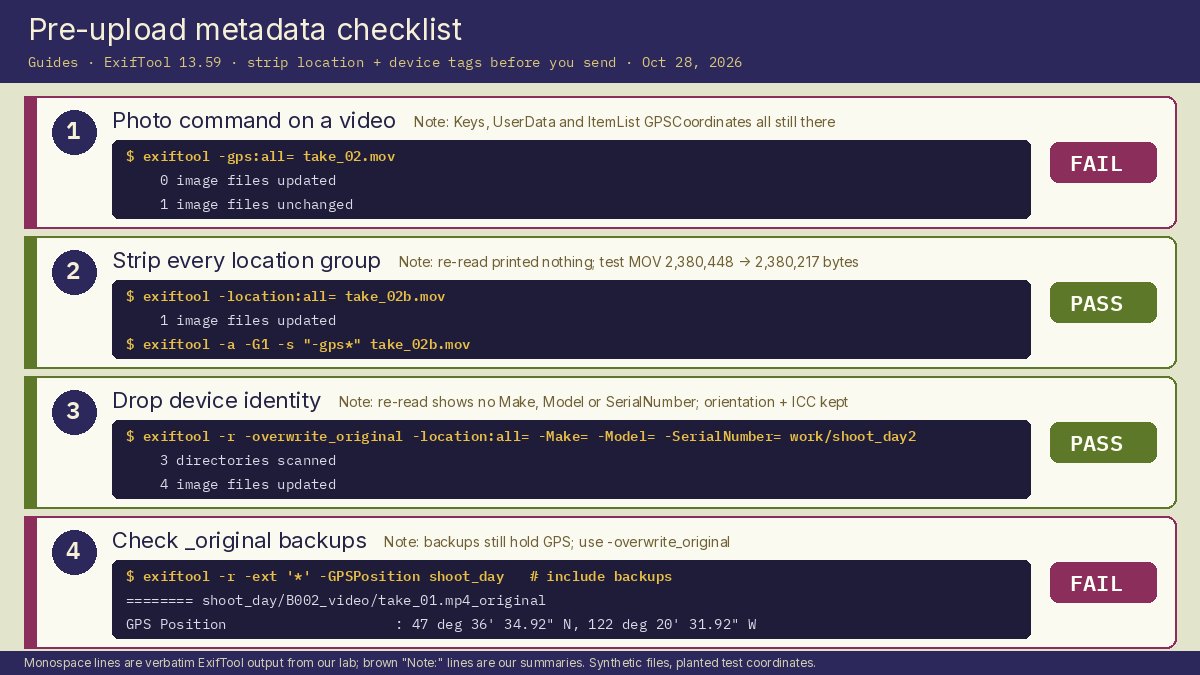
-gps:all= on a MOV (0 image files updated, all three GPSCoordinates still there). PASS -location:all= (2,380,448 to 2,380,217 bytes). PASS device tags removed with Orientation and the sRGB ICC profile kept. FAIL an _original backup still holding the test GPS position. Commands and output from synthetic files with planted test coordinates; not a GUI.You are about to zip a shoot folder for an editor, a client, or a cloud drop. Before it goes, you want the GPS position and the camera name out of every clip and still. This Guide is the pass we now run: read first, clear location with -location:all=, strip make/model/serial, deal with the _original backups, then re-read the folder including files with odd extensions. Every number below comes from our own lab run.
The full test write-up, with every variant we tried, is the companion review: ExifTool review: strip location and device tags before you send raw footage. This page is the short version you can paste into a handoff doc.
Test note: October 28, 2026, Asia/Shanghai, Debian GNU/Linux 13 (trixie). ExifTool 13.59 from the official tarball (SHA2-256 checked against exiftool.org checksums.txt), Perl 5.40.1. FFmpeg/ffprobe 7.1.5 built the samples and acted as a second reader. All samples are synthetic files we made: one JPG, one MP4, one MOV and one rotated MOV. We wrote test coordinates for a Seattle address (47.6097 N, 122.3422 W) plus a fake make, model and serial into our own copies so there was something to remove. These are not real phone or camera files.
Accept criteria before you send
Persona: a creator handing raw clips and BTS stills to someone else, or uploading them, who does not want the shoot location or device identity riding along. Minimum gates:
| Gate | PASS | FAIL | HOLD |
|---|---|---|---|
| Video GPS | -location:all= and the re-read shows no GPSCoordinates in Keys, UserData or ItemList (ours: MP4 2,380,174 B, MOV 2,380,217 B) | -gps:all= on MP4/MOV: "0 image files updated, 2 unchanged", all 3 tags still there | Real phone or action-cam file with a timed GPS track (not tested) |
| Still GPS | No EXIF GPS and no XMP GPS (ours: 42,630 B) | EXIF GPS gone but XMP-exif GPSLatitude/Longitude left (ours: 45,520 B) | HEIC, RAW/DNG, sidecar .xmp (not tested) |
| Display | Orientation, ICC and video Rotation still present after the pass | Bare -all= on a JPG: Orientation and ICC gone, still shows sideways | No eye check of the written still |
| Backups | -overwrite_original, or _original files deleted, confirmed with -ext '*' | _original files still in the folder with GPSPosition | Folder already synced before you cleaned it |
| Capture time | You decided on purpose: keep it, or remove it and re-read | You assumed the location pass removed dates (it did not) | Some QuickTime dates can only be zeroed (GitHub issue #136) |
1. Read what is in the files first
Do this on a copy of the shoot folder. The ExifTool FAQ #3 recommends -a -G1 -s so you see duplicates and the group each tag lives in. That matters here: on video the same coordinates can sit in three places.
exiftool -r -a -G1 -s "-gps*" -Make -Model -SerialNumber \
  -DateTimeOriginal -CreationDate -Orientation -Rotation shoot_day
On our planted MP4 and MOV the read showed GPSCoordinates three times: [Keys], [UserData] and [ItemList]. That matches what an Apple Community answer (thread 255562304) describes for iPhone video, and the QuickTime Tags page lists GPSCoordinates in each of those groups. The JPG had EXIF GPS plus an XMP-exif copy of latitude and longitude.
- [ ] Copy the folder; work on the copy
- [ ] Note every group that holds GPS, make, model, serial, dates
- [ ] Note Orientation (stills) and Rotation (video) so you can confirm they survive
2. Clear location with -location:all=, not -gps:all=
The photo habit is -gps:all=. On our MP4 and MOV it did nothing:
$ exiftool -gps:all= clip.mp4 clip.mov
    0 image files updated
    2 image files unchanged
All three GPSCoordinates tags stayed in both files, no backup was written, and the sizes did not move (MP4 2,380,353 B, MOV 2,380,448 B). It is not an error, so a script will carry on as if it worked.
What did work on every file type we had:
exiftool -location:all= clip.mp4 clip.mov still.jpg- Video: all three GPSCoordinates gone, ffprobe on the MOV shows no
location*tags, and the ffmpeg A/Vstreamhash(sha256) matched the planted file. MP4 2,380,353 → 2,380,174 B, MOV 2,380,448 → 2,380,217 B. - Still: EXIF GPS and the XMP block both gone: 42,630 B. Compare
-gps:all=on the same JPG: EXIF GPS removed, but XMP-exif GPSLatitude/GPSLongitude stayed and Composite GPSPosition still resolved to the Seattle point (45,520 B).
The ungrouped -GPSCoordinates= from an Apple Community answer (thread 254125957) also cleared all three video tags in our run (same bytes as -location:all=). We still use -location:all= because the same flag handles the JPG's XMP copy. Deleting only -Keys:GPSCoordinates= is the one to avoid: UserData and ItemList kept the coordinates.
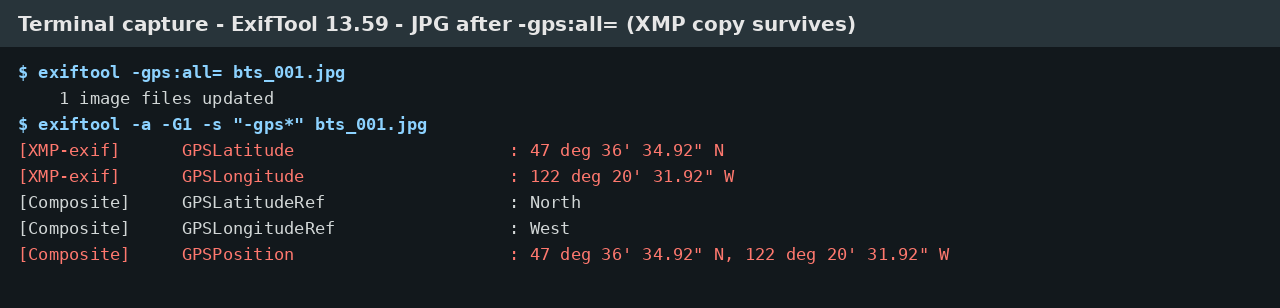
-gps:all= left the XMP copy of the coordinates (45,520 B). Real stdout from the October 28, 2026 lab.- [ ] Use
-location:all=for mixed photo and video folders - [ ] Never accept "0 image files updated" as done
- [ ] If you script it, check the "updated" count, not just the exit code
3. Device tags, and why bare -all= is risky on stills
Location is one flag. Make, model and serial are separate tags; name them:
exiftool -location:all= -Make= -Model= -SerialNumber= still.jpg clip.movThe tempting shortcut is -all=. On our JPG it removed everything except File and Composite data, printed Warning: ICC_Profile deleted. Image colors may be affected, and dropped Orientation, ColorSpace and the 588-byte ICC profile. Our still is stored sideways like a phone sensor, so after -all= it displayed as 1200×800 on its side (41,748 B).
If you do want a near-total wipe on stills, use the pattern from ExifTool FAQ #32 and add Orientation back:
exiftool -all= --icc_profile:all -tagsfromfile @ -colorspacetags -Orientation still.jpgThat kept Orientation, ColorSpace sRGB and the ICC profile, and removed GPS, Make, Model, SerialNumber and DateTimeOriginal: 42,456 B. Decoded pixel sha256 (prefix c8605f20bf2fce4a) was identical before and after every variant, so these commands change metadata, not the image data.
On video, -all= behaved better in our run: GPS, Make, Model, CreationDate and encoder went, and the rotated MOV kept Rotation 270. QuickTime CreateDate read 0000:00:00 00:00:00, but it was already zero in our ffmpeg-made samples, so that is not proof of anything for camera files.
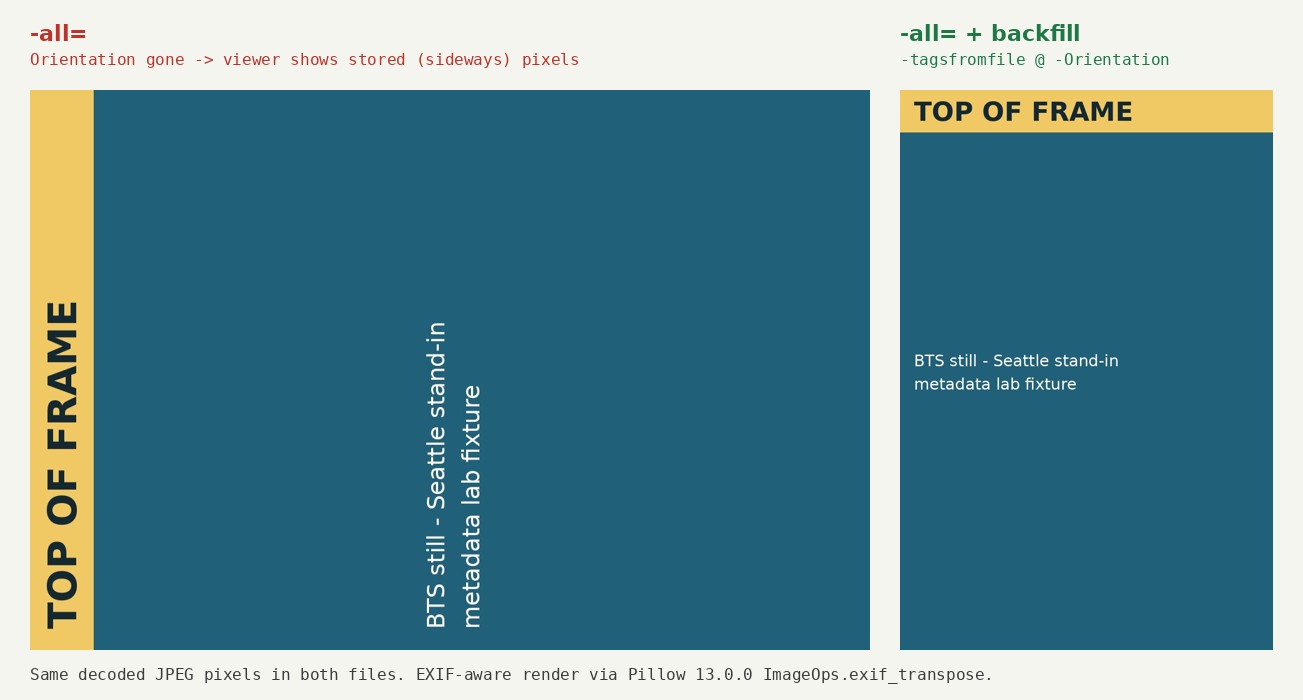
-all= (sideways, ICC gone) versus the FAQ #32 style backfill (upright, ICC kept). October 28, 2026 lab.- [ ] Name
-Make= -Model= -SerialNumber=explicitly - [ ] No bare
-all=on stills without the backfill - [ ] Open one still afterward and check it is upright
4. Deal with _original backups
By default ExifTool keeps the untouched file as name_original next to the edited one (exiftool application docs). That backup still has every coordinate. Three things we saw:
- First write created
still.jpg_original, sha256 identical to the planted file. - A second write does not replace an existing backup. Ours stayed first-generation and still carried GPSPosition.
- A default
-rre-read only looked at 4 files and reported them clean. With-ext '*'it read 8 files, and the 4_originalfiles still held GPSPosition.
# See everything, including backups
exiftool -r -ext '*' -GPSPosition shoot_day

# Pick one:
exiftool -r -delete_original! shoot_day   # delete backups, no prompt
exiftool -restore_original still.jpg      # undo: put the original back
# or write with -overwrite_original so no backup is made
In our runs -restore_original brought back the planted file (sha256 match), -overwrite_original left no backup, and -delete_original! reported "3 original files deleted" on one test folder and "4 original files deleted" on the shoot folder.
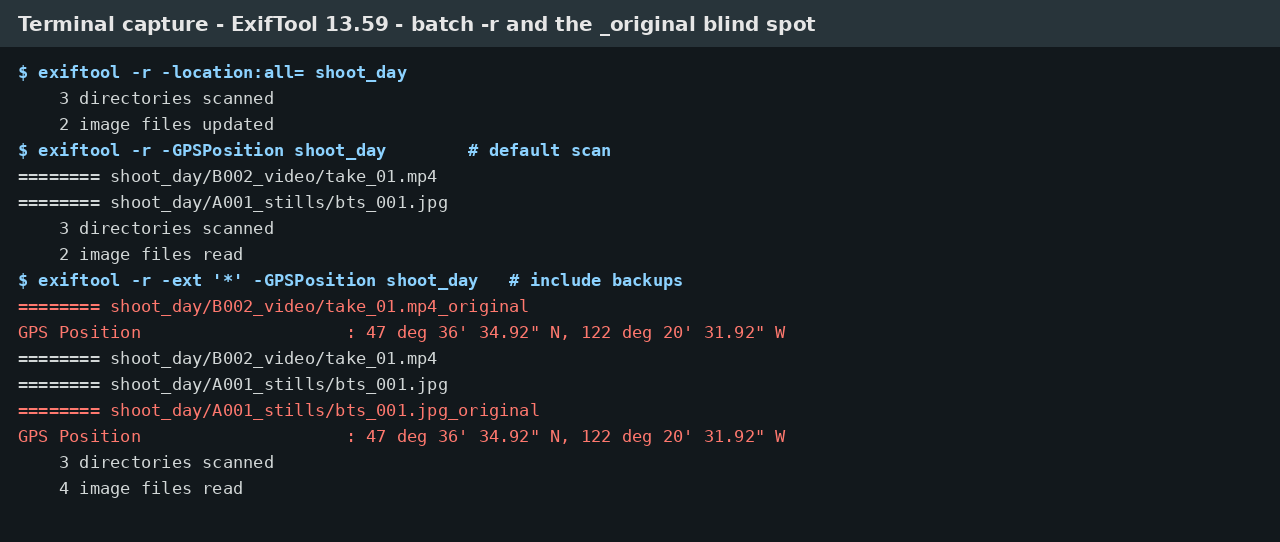
-r reads 4 files, -ext '*' reads 8. October 28, 2026 lab.- [ ] Either
-overwrite_original, or delete backups before zipping - [ ] Re-read with
-ext '*', not a plain-r
5. One folder pass, plus the intentional FAIL
Our test folder had A001_stills (bts_001.jpg and bts 002.JPG, uppercase with a space) and B002_video (MP4 and MOV), plus a rotated MOV in the second copy. This is the pass we recommend:
exiftool -r -overwrite_original -location:all= -Make= -Model= -SerialNumber= shoot_dayResult: "4 image files updated". GPS, Make, Model and SerialNumber gone in every file; Orientation and ICC kept on the JPG; Rotation 270 kept on the rotated MOV. Bytes after: JPG 42,558, MP4 2,379,997, MOV 2,380,040, rotated MOV 2,379,888.
What it did not remove: the JPG still had DateTimeOriginal and the MP4/MOV still had [Keys] CreationDate. If capture time is sensitive for you, that is a separate decision (see FAQ below). Do not hand off assuming the location pass covered it.
The -location:all= pass without device tags also worked on the folder ("4 image files updated"), including bts 002.JPG. The -gps:all= version did not: "2 image files updated, 2 image files unchanged", with 3 GPS tags left in each video and the XMP GPS left in both stills.
Intentional FAIL, worth running once so you recognize it:
$ cd shoot_day && exiftool -r -location:all= *.jpg
Error: File not found - *.jpg
    0 image files updated
    1 files weren't updated due to errors
# exit 1
The shell glob found nothing at the top level (only subfolders there), and -r only recurses when you give it a directory name. Pass the folder, not a wildcard.
- [ ] Run on the folder name, never
*.jpgwith-r - [ ] "N image files updated" matches the number of media files
- [ ] Rotated clips still report their Rotation
6. Self-check before you upload or hand off
We did not upload to any platform, so we cannot tell you whether YouTube, Instagram, TikTok, Drive, Dropbox or WeTransfer strip anything on their side. Treat the file you send as the file they get.
exiftool -r -ext '*' -a -G1 -s "-gps*" -Make -Model -SerialNumber \
-DateTimeOriginal -CreationDate -Orientation -Rotation shoot_day- No
GPS*lines in any file, including anything ending in_original. - No Make, Model or SerialNumber.
- Dates: either gone, or kept because you chose to keep them.
- Orientation and Rotation still there where they were before.
- Open one still and play one clip. Then zip.
If you want a full wipe of a clip instead, ffmpeg -i in.mov -map 0 -map_metadata -1 -c copy out.mov left no GPS, Make, Model or CreationDate on our MOV, kept Rotation 270, and matched the A/V stream hash, but it writes a new file rather than editing in place.
Download the checklist
Download the ExifTool pre-upload metadata checklist (Markdown). Paste the commands, tick each gate, record the "updated" count and the re-read result, and mark PASS / FAIL / HOLD before the folder leaves your machine.
FAQ
Why did -gps:all= say "0 image files updated" on my MOV?
On our MP4 and MOV the coordinates were QuickTime GPSCoordinates tags in the Keys, UserData and ItemList groups, and -gps:all= left all three. The output was "0 image files updated, 2 unchanged" and the bytes did not change (2,380,353 / 2,380,448). -location:all= removed all three.
Does -location:all= touch the picture or sound?
Not in our run. The ffmpeg sha256 stream hash for video and audio was identical before and after on both MP4 and MOV. The files shrank only by the removed metadata: 2,380,353 to 2,380,174 bytes (MP4) and 2,380,448 to 2,380,217 bytes (MOV).
Can I just run -all= on everything?
On video it worked in our test and kept Rotation 270. On our JPG it dropped Orientation, ColorSpace and the ICC profile and the still displayed sideways (41,748 B). Use -all= --icc_profile:all -tagsfromfile @ -colorspacetags -Orientation for stills instead (42,456 B, upright, ICC kept).
I cleaned the folder. Why does GPS still show up?
Check for _original backups. A default -r re-read skipped them and reported 4 clean files; -ext '*' read 8 and found GPSPosition in all 4 backups. Write with -overwrite_original or run -delete_original! before you zip.
Does this remove the capture date?
No. After our recommended pass, the JPG kept DateTimeOriginal and the videos kept Keys CreationDate. The FAQ #32 style backfill on stills and -all= on video did remove them in our runs. The discussion in GitHub issue #136 notes that some QuickTime dates can only be zeroed, not deleted, and that timed GPS tracks or vendor data blocks may not be removable with ExifTool; a remux is suggested there for a full wipe.
Honest limits
- Synthetic samples only, with planted Seattle test coordinates. No real iPhone, Android, GoPro or DJI files, so no timed GPS tracks, HEIC, RAW/DNG or Live Photo pairs. Our
-eepass found nothing because our samples have no timed track; that is not a test of real ones. - No platform uploads. Whether YouTube, Instagram, TikTok, Drive, Dropbox or WeTransfer strip metadata is untested.
- Linux command line only (ExifTool 13.59, Perl 5.40.1, Debian 13). The Windows executable, the macOS package and GUI front ends were not tested.
- Sidecar XMP files and NLE project or proxy metadata were not tested.
- Small files only (about 2.4 MB clips, 45 KB still). Large files,
-api LargeFileSupportand network drives were not tested. - We did not test deleting dates tag by tag; the date notes above come from the passes we actually ran.
Evidence: evidence/exiftool-creator-metadata-strip/ (NOTES, commands.log, dumps, work, screenshots), October 28, 2026. Every byte count on this page appears there.