What we checked on ExifTool 13.59
We made our own samples on the box: one JPG, one MP4, one MOV and one rotated MOV. Each got test coordinates for a Seattle address (47.6097 N, 122.3422 W) and a made-up device name so there was something to remove. After every command we re-read the file with exiftool -a -G1 -s and checked its size in bytes.
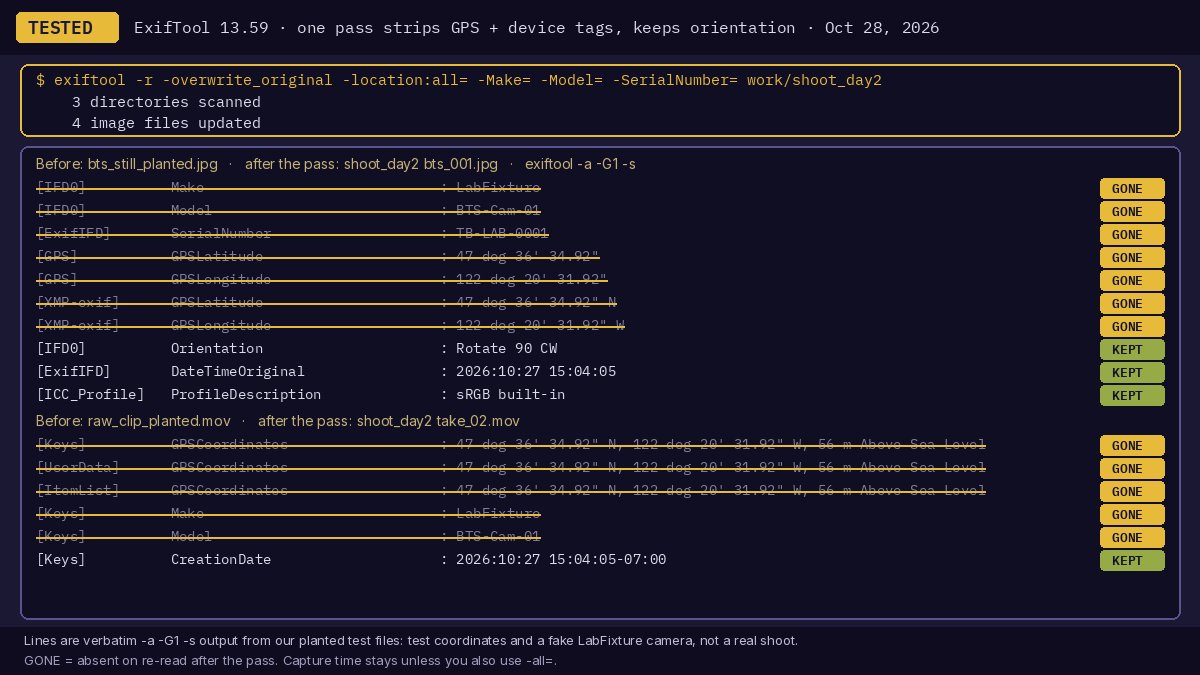
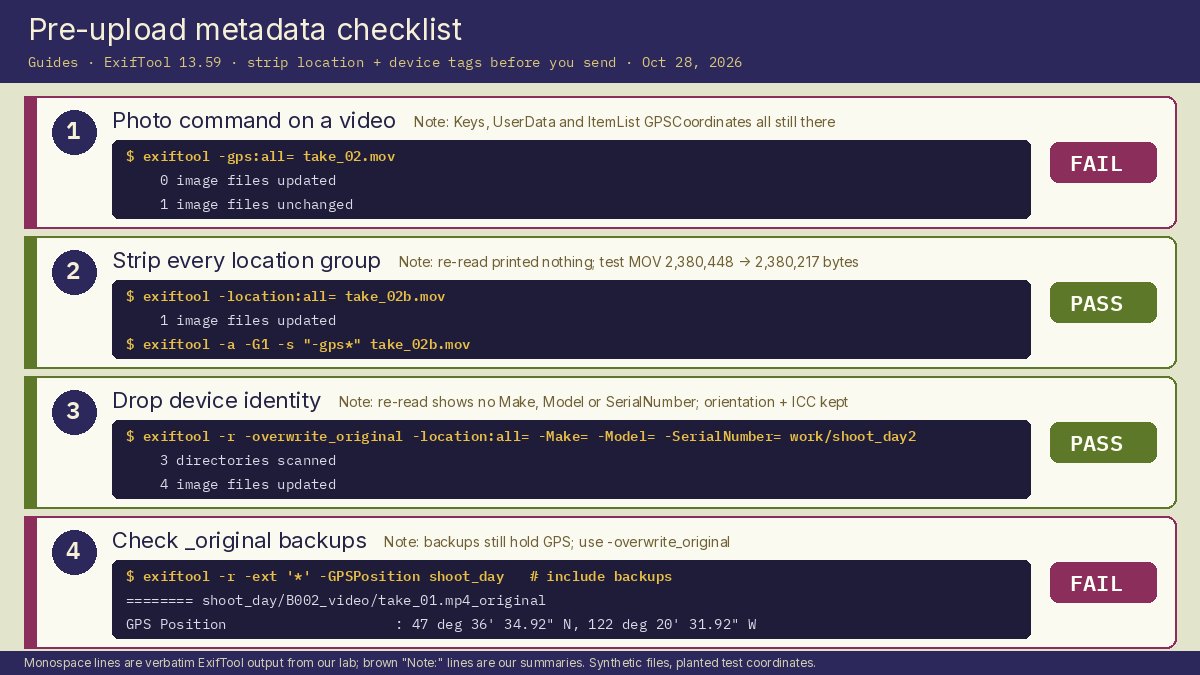
The trap is video. The photo habit -gps:all= ran on our MP4 and MOV without an error, printed 0 image files updated, 2 image files unchanged, and left the coordinates in all three QuickTime places they were written: Keys, UserData and ItemList. Deleting only -Keys:GPSCoordinates= still left UserData and ItemList. -location:all= cleared all three in one pass (MOV 2,380,448 to 2,380,217 bytes, MP4 2,380,353 to 2,380,174 bytes). ffprobe found no location tag afterward, and the audio and video stream hashes matched the original. Make, model and creation date stayed, since a location delete does not touch them.
On the JPG, -gps:all= removed the EXIF GPS block but missed the XMP copy, and ExifTool still worked out a full GPS position from it. -location:all= removed both (42,630 bytes). -all= went too far on the still: it dropped Orientation, ColorSpace and the 588-byte ICC profile, so the photo showed sideways in an EXIF-aware viewer. The FAQ form with Orientation added, -all= --icc_profile:all -tagsfromfile @ -colorspacetags -Orientation, kept rotation and color and still removed GPS, device, serial and capture date.
The quiet leak is the backup. By default ExifTool keeps name.ext_original, a byte-identical copy of the file before cleaning, coordinates included. A second write did not replace it. On a small shoot folder, a plain -r re-read showed four clean files; adding -ext '*' showed eight, and the four backups still held the full GPS position. Our one-pass folder command, exiftool -r -overwrite_original -location:all= -Make= -Model= -SerialNumber= shoot_day, cleared GPS and device tags on all four files and kept orientation, ICC and video rotation. DateTimeOriginal on the JPG and Keys CreationDate on the clips were still there.
Limits from those runs: All samples were synthetic. Real iPhone, Android, GoPro and DJI files were not tested, so timed GPS tracks, mebx/gpmd data tracks, HEIC, Live Photo pairs and RAW/DNG/CR3 are open questions; check action-cam or drone footage with exiftool -ee -a "-gps*" yourself. Phone metadata apps, the Windows exiftool(-k).exe build, the macOS package and any GUI front end were not tested, nor were Windows Remove Properties or macOS Finder/Preview. We make no claim about whether YouTube, Instagram, TikTok, Drive, Dropbox or WeTransfer strip or keep metadata on upload. Sidecar .xmp files, NLE project or proxy metadata, network drives and large files were out of scope; our biggest sample was 2,380,448 bytes, and we make no speed claim.
Before installing
On October 28, 2026 the official site listed Version 13.59 (May 27, 2026) as the current download. It describes ExifTool as a platform-independent Perl library plus a command-line application. The license line on the homepage says it is free software you can redistribute and/or modify under the same terms as Perl itself, and donations are optional. The site also offers a Windows executable (32-bit and 64-bit zips that include Perl; double-click exiftool(-k).exe, or rename it to exiftool.exe for command-line use, and keep the exiftool_files folder next to it) and a macOS package that installs the command-line tool and libraries in /usr/local/bin. Download links on the homepage now point to SourceForge, and the site publishes checksums for every package.
We only tested the 13.59 Perl tarball on Debian 13. The Windows and macOS builds, and any GUI, were not run here. Compare the SHA2-256 of whatever you download against the official checksums list, as we did, and work on a copy of the shoot folder until you trust your command.
Official site · Installation instructions · 13.59 checksums · FAQ