
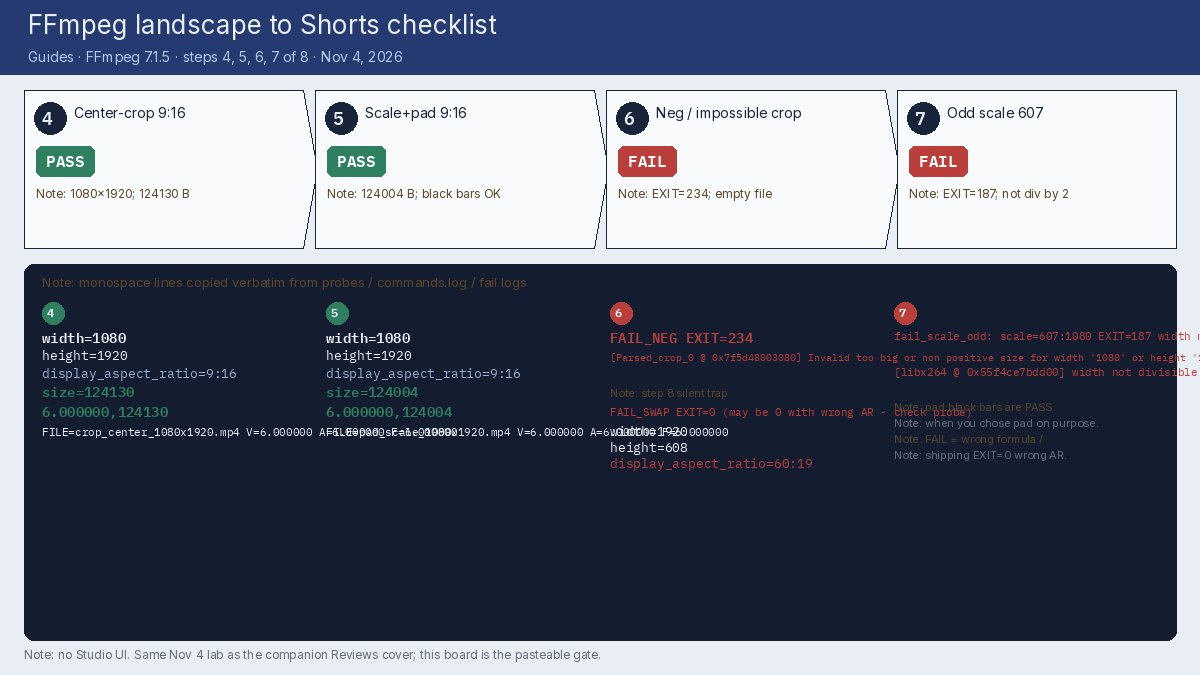
EXIT=234; step 7 FAIL EXIT=187. Monospace lines are from the lab log. Not a Studio screenshot.We have a finished landscape interview or talking-head MP4. YouTube Shorts (or a similar 9:16 slot) wants a vertical file, and we do not want to reopen an NLE just to reframe. This Guide is the FFmpeg CLI gate we now run: choose center crop vs scale+pad, paste one command with -c:a copy, prove width/height/duration/audio with ffprobe, then deliberately hit the FAIL patterns (negative crop, odd scale, wrong-axis crop that exits 0). About eight steps. Each one has a command and a PASS, FAIL, or HOLD call.
Frames, scoreboard, and the longer write-up live in the companion review: FFmpeg review: landscape to 9:16 Shorts - center crop vs scale+pad. We do not repeat that narrative here.
Test note: November 4, 2026, Asia/Shanghai, Debian GNU/Linux 13 (trixie). FFmpeg/ffprobe 7.1.5-0+deb13u1. Fixture: our own synthetic Seattle talking-head MP4 at 1920×1080@30 H.264 + AAC mono, 6.000000 s, 129,857 B, with a centered FACE ZONE box. Secondary 720p source: 1280×720, 4.000000 s, 78,948 B. Not a client recording. We did not test face-tracking, GPU/NVENC, phone upload preview, or platform ranking.
The checklist
Persona: a creator with a landscape handoff who needs a Shorts-ready 9:16 file from the CLI. Run the steps in order. Step 3 is the crop-vs-pad choice. Steps 6 through 8 are deliberate FAIL patterns (one of them still exits 0).
| Step | PASS | FAIL | HOLD |
|---|---|---|---|
| 1. FFmpeg version | ffmpeg -version cites a 7.x line you can write down (ours: 7.1.5-0+deb13u1) | Missing binary | Windows / macOS builds (not tested) |
| 2. Probe source | WxH, duration, audio recorded (ours: 1920×1080, 6.000000 s, 129,857 B, h264+aac) | Guessing geometry or length | |
| 3. Choose crop vs pad | Crop when the face stays centered and sides can go; pad when you must keep the full 16:9 picture (black bars OK) | Shipping both without a decision | Face-tracking auto-reframe (not tested) |
| 4. Center crop → 1080×1920 | Exit 0; 1080×1920; DAR 9:16; duration matches; -c:a copy (ours: 124,130 B; V=A=F=6.000000) | Non-zero exit; wrong WxH | GPU / NVENC path (not tested) |
| 5. Scale+pad → 1080×1920 | Exit 0; 1080×1920 with black bars; audio copied (ours: 124,004 B; V=A=F=6.000000) | Non-zero exit; stretched picture without pad | |
| 6. Pitfall negative crop | You recognize FAIL: EXIT=234; Invalid too big or non positive size… height '1920'; empty file | Asking crop for a taller window than the source | |
| 7. Pitfall odd scale 607 | You recognize FAIL: EXIT=187; width not divisible by 2 (607x1080) | Encoding an odd width/height with libx264 | |
| 8. Pitfall wrong-axis crop | You recognize FAIL: EXIT=0 yet ffprobe shows 1920×608 (DAR 60:19), not 9:16 | Trusting exit code alone; shipping the landscape strip | Phone upload / Shorts algorithm (not tested) |
1. Confirm FFmpeg
ffmpeg -version | head -n 5PASS when the version line is citeable. Our lab: FFmpeg 7.1.5-0+deb13u1. HOLD on Windows / macOS builds (not tested).
- [ ] Version written down
2. Probe the landscape source
ffprobe -v error -show_entries format=duration,size \
  -show_entries stream=codec_type,codec_name,width,height,sample_aspect_ratio,display_aspect_ratio,r_frame_rate,pix_fmt,sample_rate,channels \
  -of default=nw=1 source_16x9.mp4
Ours: h264 + aac mono, 1920×1080, SAR 1:1, DAR 16:9, 30/1, duration 6.000000 s, size 129,857 B. PASS when WxH, duration, and audio facts are written down before any filter.
- [ ] WxH / DAR / duration / audio recorded
3. Choose crop vs scale+pad
Center crop keeps full height, cuts left/right, then scales to the Shorts canvas. Use it when the talking head stays in the middle (our FACE ZONE survived; LEFT/RIGHT EDGE labels did not).
Scale+pad fits the whole 16:9 picture inside 1080×1920 and fills the rest with black. Use it when side content matters more than a full-bleed frame.
Both paths below use -c:a copy so audio duration should match the source. HOLD: face-tracking / auto-reframe tools (not tested).
- [ ] Crop or pad chosen on purpose
4. Center crop to 1080×1920
ffmpeg -y -hide_banner -i source_16x9.mp4 \
  -vf "crop=trunc(ih*9/16/2)*2:ih:(iw-ow)/2:0,scale=1080:1920:flags=lanczos,setsar=1" \
  -c:v libx264 -pix_fmt yuv420p -preset veryfast -crf 18 \
  -c:a copy \
  crop_center_1080x1920.mp4
echo exit=$?
stat -c '%s' crop_center_1080x1920.mp4
Formula we used: even 9:16 width from trunc(ih*9/16/2)*2, centered with (iw-ow)/2, then scale=1080:1920. Ours wrote 124,130 B at 1080×1920, DAR 9:16, duration 6.000000 s. Intermediate even crop without scale was 606×1080 on this fixture. CRF 18 / veryfast / lanczos are our lab choices, not a platform rule. HOLD: GPU / NVENC (not tested).
Optional 720×1280 from a 720p source (same crop idea, different scale target):
ffmpeg -y -hide_banner -i source_16x9_720p.mp4 \
  -vf "crop=trunc(ih*9/16/2)*2:ih:(iw-ow)/2:0,scale=720:1280:flags=lanczos,setsar=1" \
  -c:v libx264 -pix_fmt yuv420p -preset veryfast -crf 18 \
  -c:a copy \
  crop_center_720x1280.mp4
Ours from the 1280×720 / 4.000000 s fixture: 720×1280, 80,367 B, duration 4.000000 s.
- [ ] Exit 0; bytes recorded
- [ ] Output is 1080×1920 (or your chosen even 9:16 target)
5. Scale+pad to 1080×1920 (black bars)
ffmpeg -y -hide_banner -i source_16x9.mp4 \
  -vf "scale=1080:1920:force_original_aspect_ratio=decrease,pad=1080:1920:(ow-iw)/2:(oh-ih)/2:color=black,setsar=1" \
  -c:v libx264 -pix_fmt yuv420p -preset veryfast -crf 18 \
  -c:a copy \
  pad_scale_1080x1920.mp4
echo exit=$?
stat -c '%s' pad_scale_1080x1920.mp4
Ours wrote 124,004 B at 1080×1920 with black bars, duration 6.000000 s, V=A=F aligned. PASS when the full landscape picture survives inside the portrait canvas.
- [ ] Exit 0; 1080×1920; black bars expected
Prove with ffprobe (after step 4 or 5)
OUT=crop_center_1080x1920.mp4   # or pad_scale_1080x1920.mp4
ffprobe -v error -select_streams v:0 \
  -show_entries stream=width,height,sample_aspect_ratio,display_aspect_ratio,codec_name,duration \
  -show_entries format=duration,size -of default=nw=1 "$OUT"
ffprobe -v error -select_streams a:0 -show_entries stream=duration,codec_name -of default=nw=1 "$OUT"
# one-line A/V check
V=$(ffprobe -v error -select_streams v:0 -show_entries stream=duration -of csv=p=0 "$OUT")
A=$(ffprobe -v error -select_streams a:0 -show_entries stream=duration -of csv=p=0 "$OUT")
F=$(ffprobe -v error -show_entries format=duration -of csv=p=0 "$OUT")
echo "V=$V A=$A F=$F"
Crop PASS on our file: width 1080, height 1920, DAR 9:16, size 124130, V=6.000000 A=6.000000 F=6.000000. Pad PASS: same geometry/duration, size 124004. Do not ship on exit code alone.
- [ ] WxH is even 9:16 (1080×1920 or 720×1280)
- [ ] Duration matches source; A and V line up under
-c:a copy
6. Pitfall: negative / impossible crop
ffmpeg -y -hide_banner -i source_16x9.mp4 \
  -vf "crop=1080:1920:(iw-1080)/2:(ih-1920)/2" \
  -c:v libx264 -pix_fmt yuv420p -preset veryfast \
  -c:a copy \
  fail_neg_crop.mp4
echo EXIT_NEG=$?
FAIL pattern. Ours: EXIT=234; Invalid too big or non positive size for width '1080' or height '1920'; nothing useful written. Fix: crop a window that fits inside the source (see step 4), then scale up to 1080×1920.
- [ ] Recognized EXIT=234 + empty/unusable output
7. Pitfall: odd scale width 607
ffmpeg -y -hide_banner -i source_16x9.mp4 \
  -vf "scale=607:1080" \
  -c:v libx264 -pix_fmt yuv420p -preset veryfast -crf 23 \
  -c:a copy \
  fail_scale_odd.mp4
echo EXIT_ODD=$?
FAIL pattern. Ours: EXIT=187; width not divisible by 2 (607x1080). Note: a bare crop=607:… on this box can quietly even to 606×1080 and still exit 0; the hard fail we cite is the odd scale into libx264. Fix: force even sizes with trunc(.../2)*2 (or an equivalent even round).
- [ ] Recognized EXIT=187 + odd geometry message
8. Pitfall: wrong-axis crop (silent EXIT=0)
ffmpeg -y -hide_banner -i source_16x9.mp4 \
  -vf "crop=iw:ih*9/16:0:(ih-oh)/2" \
  -c:v libx264 -pix_fmt yuv420p -preset veryfast -crf 23 \
  -c:a copy \
  fail_iw_ih_swap.mp4
echo EXIT_SWAP=$?
ffprobe -v error -select_streams v:0 \
  -show_entries stream=width,height,display_aspect_ratio -of default=nw=1 fail_iw_ih_swap.mp4
FAIL pattern. Ours: EXIT=0 with output 1920×608, DAR 60:19. Silent trap: process success is not a Shorts canvas. Always probe WxH/DAR before upload.
- [ ] Recognized EXIT=0 + wrong WxH
- [ ] Delivery list requires ffprobe 9:16 proof
What we saw
All from our November 4, 2026 lab log (evidence/ffmpeg-shorts-crop-pad/). Same synthetic 1080p fixture unless noted.
| Step | What we saw | Call | Where in the evidence |
|---|---|---|---|
| 1 | FFmpeg 7.1.5-0+deb13u1 | PASS | versions.txt; commands.log header |
| 2 | 1920x1080; 6.000000 s; 129857 B; h264+aac | PASS | probes/source_1080.txt |
| 3 | Crop for full-bleed face; pad when edges must stay | PASS | NOTES decision; review frames |
| 4 | crop 1080x1920; 124130 B; V=A=F=6.000000; optional 720x1280 = 80367 B / 4.000000 s | PASS | commands.log CENTER CROP; AV DURATION ALIGN |
| 5 | pad 1080x1920; 124004 B; V=A=F=6.000000; black bars | PASS | commands.log SCALE+PAD |
| 6 | EXIT=234; Invalid too big… height '1920' | FAIL pattern | logs/fail_neg_crop.log |
| 7 | EXIT=187; width not divisible by 2 (607x1080) | FAIL pattern | logs/fail_scale_odd.log; commands.log EXTRA FAILS |
| 8 | EXIT=0; 1920x608; DAR 60:19 | FAIL pattern | probes/fail_swap_ar.txt |
For the longer crop-vs-pad notes and the source pages we opened, read the full FFmpeg landscape to 9:16 Shorts review.
Download the checklist
Download the FFmpeg landscape to Shorts checklist (Markdown). Paste the commands, mark PASS / FAIL / HOLD, and keep the ffprobe numbers next to each step before the MP4 leaves your machine.
FAQ
Crop or scale+pad for YouTube Shorts?
Center crop fills 9:16 and cuts the sides. Scale+pad keeps the full 16:9 picture with black bars. On our 1920×1080 fixture, crop wrote 124,130 B and pad wrote 124,004 B, both 1080×1920 for 6.000000 s with -c:a copy. Pick crop when the face stays in the center; pick pad when edge content matters.
Why did crop=1080:1920 on a 1080p source exit 234?
You asked crop for a height taller than the source. Our negative/impossible crop exited 234 with Invalid too big or non positive size for width '1080' or height '1920' and wrote an empty file. Crop first to an even 9:16 window that fits inside the frame, then scale up if needed.
Why did scale=607:1080 exit 187?
libx264 rejected an odd width. Our scale=607:1080 run exited 187 with width not divisible by 2 (607x1080). Use trunc(.../2)*2 (or another even round) before encode.
FFmpeg exited 0 but the file is not 9:16. What happened?
Wrong-axis crop can succeed silently. Our crop=iw:ih*9/16 path exited 0 and wrote 1920×608 (DAR 60:19), not a Shorts canvas. Always ffprobe width, height, and display_aspect_ratio before you ship.
Where is the longer write-up?
Frames, scoreboard, and source notes live in the companion FFmpeg landscape to 9:16 Shorts review. This Guide is the pasteable gate only.
Honest limits
- One synthetic talking-head fixture (plus a secondary 720p source). Not a real multi-cam interview.
- Face-tracking / auto-reframe: not tested.
- GPU / NVENC / hardware encode path: not tested.
- Phone upload preview and platform Shorts ranking / algorithm claims: not tested.
- Deep retest of concat, burn-in SRT, thumbnail, loudnorm, or delivery-encode: out of scope (backlinks only).
- CRF 18 / veryfast / lanczos are lab encode choices, not a delivery standard.
Evidence: evidence/ffmpeg-shorts-crop-pad/ (NOTES, commands.log, lab, outputs, probes, logs), November 4, 2026. Every number on this page appears in that lab log (or the probe/fail files it names).
Sources we opened
- FFmpeg Filters - crop (scale and pad on the same manual page)
- Stack Overflow: FFmpeg command to format videos to TikTok's specs
- Stack Overflow: FFmpeg fit 1920x1080 video in 1080x1920 (Reels)
- Stack Overflow: FFmpeg / libx264 height not divisible by 2
- FFmpeg landscape to 9:16 Shorts review (companion)
- FFmpeg concat same-codec checklist
- FFmpeg burn-in SRT checklist
- FFmpeg YouTube thumbnail checklist
Next: after the vertical file lands, run the FFmpeg loudnorm delivery checklist when loudness is in scope, then the burn-in SRT checklist when open captions are required. We do not expand those workflows on this page.