
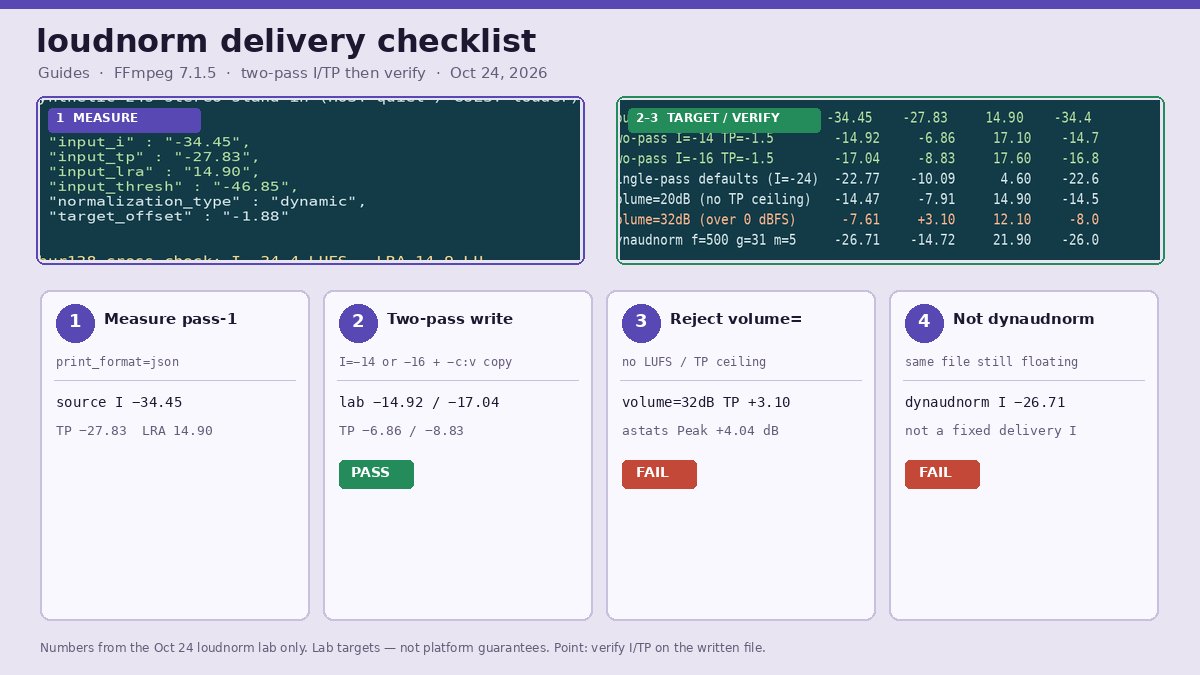
The picture is done. The upload still sounds too quiet next to peer episodes — or you already slammed volume= and clipped — or host and guest jump between sections, or you trusted FFmpeg’s loudnorm defaults (I=−24) and shipped a light file. This Guide is the pasteable two-pass loudnorm gate: write the target, measure, apply with -c:v copy, then verify integrated loudness (I) and true peak (TP) from the second-pass print.
Companion deep dive: FFmpeg loudnorm interview review. Picture/size path: FFmpeg delivery-encode checklist. Track/metadata gate: MediaInfo pre-upload checklist.
Test note: October 24, 2026, Asia/Shanghai, Debian GNU/Linux 13 (trixie). Tools: FFmpeg / ffprobe 7.1.5-0+deb13u1. Fixture: synthetic 24.000 s stereo 1280×720 MP4 (quiet HOST 0–12 s / louder GUEST 12–24 s) — Seattle stand-in title cards, not a real interview. Lab targets only: I=−14 and I=−16 (TP=−1.5, LRA=11). No YouTube / podcast-host upload in this run — do not treat −14/−16 as platform-official LUFS guarantees.
Accept criteria before you upload
Persona: a creator with a finished interview or podcast MP4 who needs a binary go / no-go on loudness before upload. Minimum gates:
| Gate | PASS | FAIL | HOLD |
|---|---|---|---|
| Target written | I=−14 or I=−16 named on the brief (plus TP/LRA) | — | No written I target |
| Integrated I (written file) | Near chosen lab target (ours: −14.92 after I=−14; −17.04 after I=−16) | Still near default class (ours: −22.77 after I=−24 defaults) | No re-measure on written file |
| True peak TP | Below 0 dBTP (ours: −6.86 / −8.83 on −14/−16 outs) | Above 0 (ours: +3.10 dBTP after volume=32dB) | — |
| Video bitstream | -c:v copy; frame count / video bit_rate match source when checked | Unexpected re-encode | — |
| Command documented | Pass-1 JSON values + full pass-2 line recorded | — | Cannot reproduce |
1. Write the brief first
Record the chosen integrated target before you touch FFmpeg:
- I=−14 — common YouTube-facing creator / forum lab target on this box
- I=−16 — common podcast-ish lab target
Also write TP (we used −1.5) and LRA (we used 11). Leave picture/size work to the delivery-encode checklist — this page only normalizes audio on an MP4 you already accept for picture.
Our source measured I −34.45 LUFS / TP −27.83 dBTP / LRA 14.90 LU (ebur128 I −34.4). That is the quiet starting point the commands below assume you will replace with your pass-1 numbers.
2. Measure (pass 1)
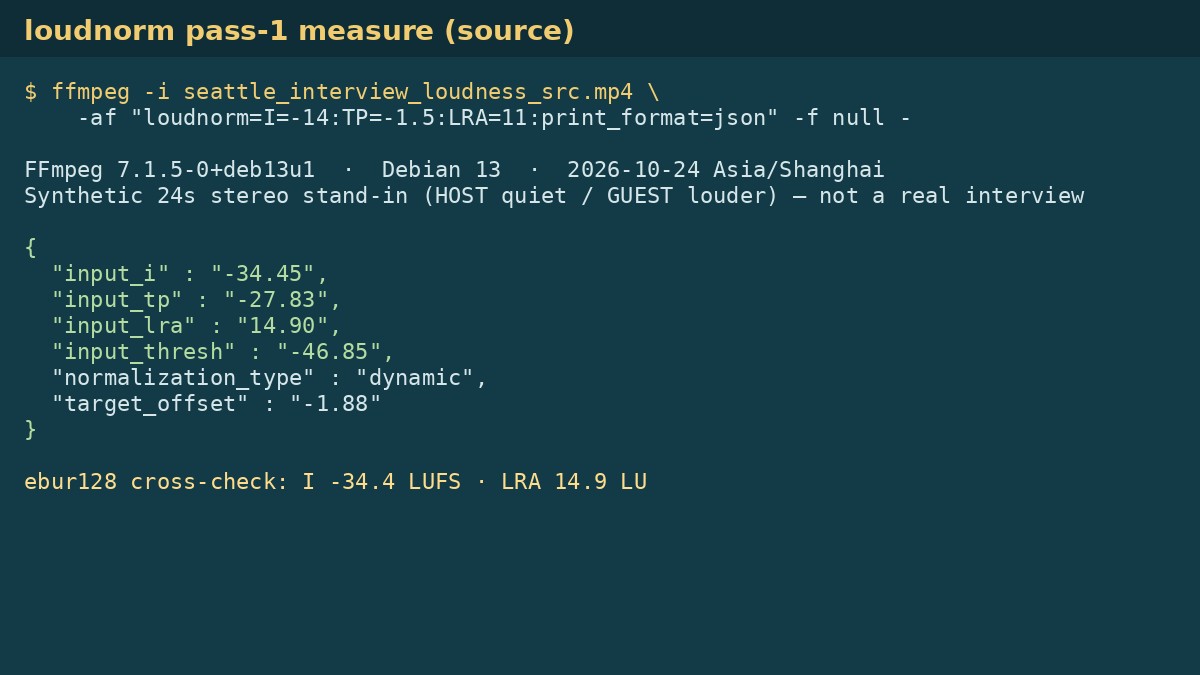
ffmpeg -i delivery.mp4 \
  -af "loudnorm=I=-14:TP=-1.5:LRA=11:print_format=json" -f null -
Swap I=-16 if that is your brief. JSON lands on stderr mixed with progress — copy input_i, input_tp, input_lra, input_thresh, and target_offset. Our pass-1 on the synthetic source:
input_i−34.45input_tp−27.83input_lra14.90input_thresh−46.85target_offset−1.88 when targeting I=−14 (we used −2.20 for the I=−16 twin)
3. Two-pass apply with -c:v copy
Pass 2 feeds the measured values back in. Keep video copy; rewrite audio only.
# Two-pass to lab I=-14 (YouTube-ish lab target — not a platform guarantee)
ffmpeg -y -i delivery.mp4 \
  -af "loudnorm=I=-14:TP=-1.5:LRA=11:measured_I=-34.45:measured_TP=-27.83:measured_LRA=14.90:measured_thresh=-46.85:offset=-1.88:linear=true:print_format=json" \
  -c:v copy -c:a aac -b:a 192k -ar 48000 -movflags +faststart \
  out_loudnorm_I14.mp4

# Two-pass to lab I=-16 (podcast-ish lab target)
ffmpeg -y -i delivery.mp4 \
  -af "loudnorm=I=-16:TP=-1.5:LRA=11:measured_I=-34.45:measured_TP=-27.83:measured_LRA=14.90:measured_thresh=-46.85:offset=-2.20:linear=true:print_format=json" \
  -c:v copy -c:a aac -b:a 192k -ar 48000 -movflags +faststart \
  out_loudnorm_I16.mp4
Replace every measured_* and offset with your pass-1 print. The numbers above are from our 24 s fixture only. On this box, -c:v copy kept H.264 frame count 720 and video bit_rate 18903 identical to the source.
Note: When source LRA exceeds the LRA target (ours: 14.9 > 11), pass-1 may report normalization_type: dynamic even with linear=true. Our −14/−16 outs exited near LRA 17 — document it; do not pretend LRA is a hard lock.
4. Verify I / TP on the written file
ffmpeg -i out_loudnorm_I14.mp4 \
  -af "loudnorm=I=-14:TP=-1.5:LRA=11:print_format=json" -f null -

# Optional cross-check
ffmpeg -i out_loudnorm_I14.mp4 -af ebur128 -f null -
Read input_i and input_tp from the written file — that is the gate, not your ears alone.
| File | I (LUFS) | TP (dBTP) | Notes |
|---|---|---|---|
| Source (synthetic) | −34.45 | −27.83 | Pass-1 start |
| Two-pass I=−14 | −14.92 | −6.86 | Near −14 lab target; ebur128 I −14.7 |
| Two-pass I=−16 | −17.04 | −8.83 | Near −16 lab target; ebur128 I −16.8 |
| Default I=−24 | −22.77 | −10.09 | FAIL vs −14/−16 briefs |
| volume=32dB | −7.61 | +3.10 | FAIL — clipped true peak |
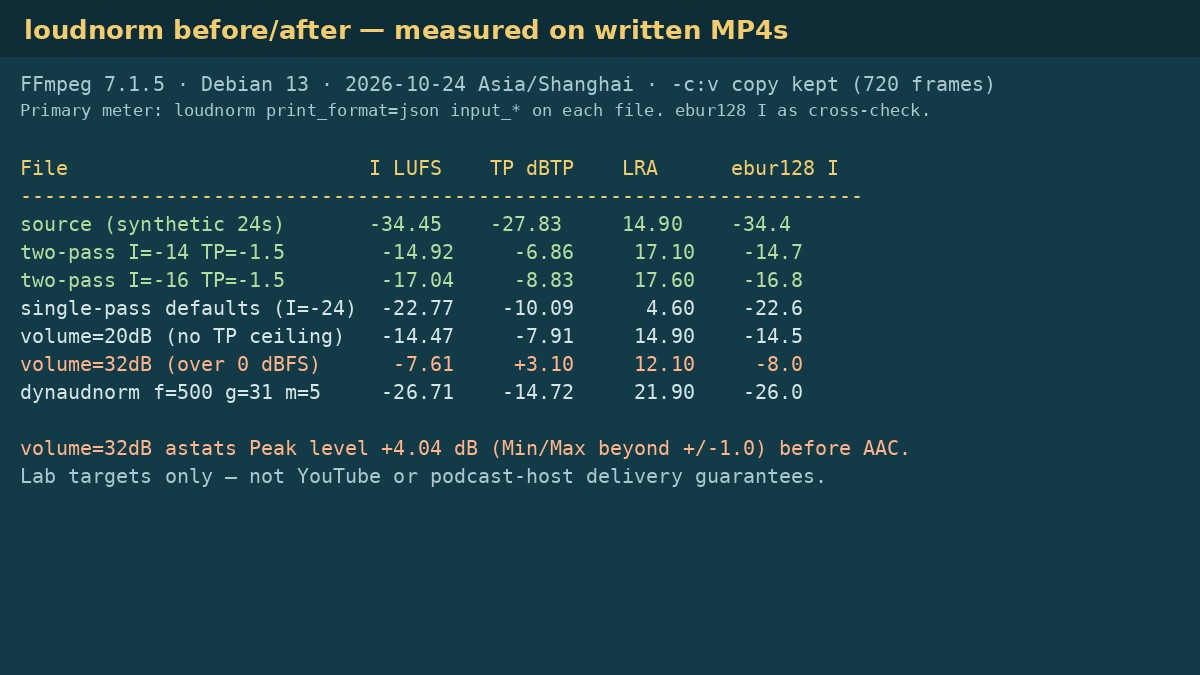
loudnorm input_* on each written MP4.5. FAIL paths we measured
- Default loudnorm (I=−24) — single-pass with no
I=override wrote −22.77 LUFS on this fixture. Still quieter than our −14/−16 lab targets. SetI=explicitly. volume=boost without a TP ceiling —volume=32dBhit astats Peak +4.04 dB and loudnorm TP +3.10 dBTP. Amplitude gain is not a LUFS delivery method.- Skip re-measure — pass-2 print during encode is not a substitute for measuring the written file. Our gate is the second-pass (verify) print on the output MP4.
- Reuse another file’s measured_* — paste only values from the same source’s pass 1.
Download the checklist
Download the FFmpeg loudnorm two-pass delivery checklist (Markdown). Fill the brief, paste pass-1 JSON fields, run pass 2 with -c:v copy, then tick I/TP verify before upload. Keep the picture master bit-identical when you only need a loudness remux.
FAQ
Should I aim for I=−14 or I=−16?
Pick one lab target and write it on the brief before you run. On our synthetic 24 s fixture, two-pass I=−14 re-measured −14.92 LUFS / TP −6.86 dBTP; two-pass I=−16 re-measured −17.04 LUFS / TP −8.83 dBTP. These are lab targets used in creator forums, not official YouTube or podcast-host upload contracts — we did not verify platform ingest.
Why is default loudnorm too quiet for many uploads?
FFmpeg filter help defaults loudnorm to I=−24, TP=−2, LRA=7. On our source (−34.45 LUFS), a single-pass default run wrote a file that re-measured −22.77 LUFS — still well below our −14/−16 lab targets. Set I= explicitly.
Why not just use volume=?
volume= raises every sample by a fixed gain. It does not aim at integrated LUFS or a true-peak ceiling. On this quiet source, volume=32dB drove astats Peak +4.04 dB and loudnorm true peak +3.10 dBTP. Use two-pass loudnorm for a measured I/TP delivery.
How do I verify after pass 2?
Re-run loudnorm=…:print_format=json on the written MP4 (same I/TP/LRA you targeted) and read input_i and input_tp. Our −14 out printed I −14.92 / TP −6.86; our −16 out printed I −17.04 / TP −8.83. Optional ebur128 cross-check is fine; small deltas are expected.
Honest limits
- Synthetic 24 s stereo fixture — not a real multi-mic interview; no claim about dialogue intelligibility.
- No YouTube Studio, podcast-host, or Stats for Nerds upload in this run — no platform LUFS guarantee.
- Linux CLI only (FFmpeg 7.1.5-0+deb13u1 on Debian 13); Windows / macOS builds unverified.
- Hour-long throughput,
dual_mono, and listening-panel scores — not tested. - LRA target is soft when source LRA is higher (ours moved ~14.9 → ~17).
Evidence: evidence/ffmpeg-loudnorm/ (NOTES, commands.log, versions, JSON / ebur128 / astats logs), October 24, 2026. Every I/TP figure on this page appears there.