
You already have a finished or rough-cut MP4. You need to drop the heads and tails, or pull a section, before you hand the file to an NLE, a platform, or the next editor. Prefer stream copy when the in-point sits on a keyframe. If it sits mid-GOP, copy can still exit 0 with the wrong start or a hidden lead-in. Probe the I-frames, make the cut, then prove the first frame and the duration.
This is the working checklist, not another benchmark. The companion FFmpeg trim-cut handoff review holds the comparison tables, trap stills, and community links. A GUI for the same job is covered in our LosslessCut interview-cut review; this page stays on the CLI.
Test record: November 11, 2026 (Asia/Shanghai), FFmpeg/ffprobe 7.1.5-0+deb13u1 on Debian GNU/Linux 13. All fixtures are a local lavfi testsrc2 card with a fixed GOP and burned-in T=/F= timecode, not a real interview tape, NLE export, or platform upload. Numbers below are lab examples, not size targets for your footage. verification.txt: 30/30 PASS.
1. Write the trim handoff contract
ffmpeg -version
ffprobe -version
2. Probe I-frames and the source clock
ffprobe -v error -count_frames -show_streams -show_format -of json source-fixed-gop.mp4 > source-probe.json
ffprobe -v error -select_streams v:0 -show_frames \
  -show_entries frame=pts_time,pkt_pts_time,pict_type,key_frame,width,height \
-of csv=p=0 source-fixed-gop.mp43. Copy on (or near) an I-frame
ffmpeg -ss 4.000 -i source-fixed-gop.mp4 -t 2.000 -c copy pass-copy-on-iframe.mp4
printf "EXIT=%s\n" "$?"
Put -ss before -i, then -t, then -c copy. Pick a new output filename. Without -y, FFmpeg asks before overwriting.
4. Mid-GOP: default copy vs make_zero vs libx264
Now start at 5.000 s, one second into the GOP that begins at 4.000, and still ask for 2.000 s (source 5.000 to 7.000).
ffmpeg -ss 5.000 -i source-fixed-gop.mp4 -t 2.000 -c copy ctl-midgop-copy.mp4
ffmpeg -ss 5.000 -i source-fixed-gop.mp4 -t 2.000 -c copy -avoid_negative_ts make_zero ctl-midgop-copy-make-zero.mp4
ffmpeg -ss 5.000 -i source-fixed-gop.mp4 -t 2.000 -c:v libx264 -preset veryfast -crf 18 -pix_fmt yuv420p -c:a copy ctl-midgop-reencode-ss-before.mp4
ffmpeg -i source-fixed-gop.mp4 -ss 5.000 -t 2.000 -c:v libx264 -preset veryfast -crf 18 -pix_fmt yuv420p -c:a aac -b:a 128k ctl-midgop-reencode-ss-after.mp4
printf "EXIT=%s\n" "$?"5. Prove the cut
ffprobe -v error -count_frames -show_streams -show_format -of json out.mp4 > out-probe.json
ffprobe -v error -select_streams v:0 -show_entries packet=pts_time,dts_time,flags,duration_time,size -of csv=p=0 out.mp4
ffmpeg -i out.mp4 -frames:v 1 -update 1 out-first.png6. Stop on EXIT 0 traps
ffmpeg -i source-fixed-gop.mp4 -ss 5.000 -t 2.000 -c copy trap-ss-after-copy.mp4
ffmpeg -ss 5.000 -i source-fixed-gop.mp4 -ss 2.000 -t 2.000 -c:v libx264 -preset veryfast -crf 18 -pix_fmt yuv420p -c:a aac -b:a 128k trap-double-ss-reencode.mp4
ffmpeg -ss 4.000 -i source-fixed-gop.mp4 -to 6.000 -c copy trap-to-after-input-ss.mp4
printf "EXIT=%s\n" "$?"7. Open the trial in the receiving tool
8. Attach the proof and sign off
Evidence checkpoints
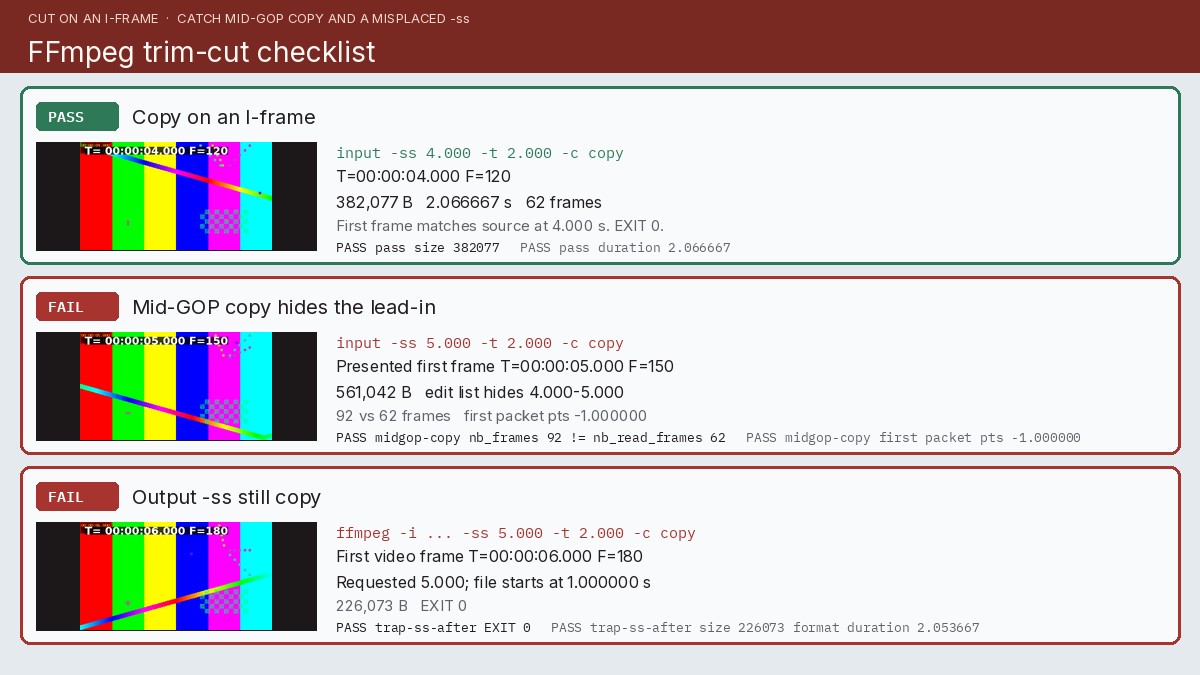
Use these as lab examples, not size targets for your own footage. Source: 1,830,062 B, 10.000000 s, 300 frames. PASS copy on I-frame: format 2.066667 s, 62 frames, 382,077 B. Mid-GOP default copy: format 2.066992 s, nb_frames 92 / nb_read_frames 62, first packet PTS -1.000000, 561,042 B. make_zero: video 3.066667 s, 92 frames, 561,054 B. libx264 input -ss: video 2.000000 s / 60 frames / 369,059 B. libx264 output -ss: 2.000000 s / 60 frames / 351,724 B. Trap -ss after -i still copy: 226,073 B, first frame T=00:00:06.000. Trap stacked -ss: 361,815 B, first frame T=00:00:07.000. Trap -to after input -ss: 6.000000 s / 180 frames / 1,088,108 B. verification.txt: 30/30 PASS.
Trace: evidence/ffmpeg-trim-cut-handoff/NOTES.md records the source, PASS, control, and trap matrices. run-lab.sh records the commands. summary-probes.json and probes/ hold stream fields; sizes-bytes.txt holds exact bytes; exit-codes.txt and logs/ record encoder outcomes; verification.txt shows 30/30 checks passed. Pulling a soundtrack out of a finished MP4 is covered in the extract-audio review. We did not re-test extract-audio, rotate, scale+fps, or replace-audio here.
Download the checklist
Download the checklist (Markdown). Keep it with the probes and fill in each box before delivery. For the control runs, trap stills, and community links, return to the companion review.
FAQ
Does -c copy on a keyframe give an exact 2.000 s clip?
No. Our -ss 4.000 -t 2.000 -c copy run exited 0 at 382,077 B. Format duration was 2.066667 s (0.066667 s longer than requested) with 62 frames, not 60. The first frame was clean at T=00:00:04.000 F=120. Copy can overshoot the out-point by a packet or two.
Why did a mid-GOP copy look like 2 s but carry 92 packets?
Default input -ss 5.000 -t 2.000 -c copy exited 0 at 561,042 B. Format duration read 2.066992 s and the first presented frame was T=00:00:05.000 F=150, but ffprobe reported nb_frames 92 / nb_read_frames 62, and the first packet PTS was -1.000000. An MP4 edit list hid the 4.000-5.000 s lead-in.
What does -avoid_negative_ts make_zero do to that mid-GOP copy?
The same command plus -avoid_negative_ts make_zero exited 0 at 561,054 B, 12 bytes more than the default copy, not the same file. Video duration became 3.066667 s with all 92 frames presented. The first frame was T=00:00:04.000 F=120, one second early.
Why is EXIT 0 not proof the cut is correct?
All three traps exited 0. -ss after -i with -c copy started video at T=00:00:06.000 F=180 (226,073 B). Stacked -ss then re-encode landed at T=00:00:07.000 F=210 (361,815 B). Input -ss 4.000 plus -to 6.000 without -copyts wrote 6.000000 s / 180 frames / 1,088,108 B.
What still needs a HOLD after the probes pass?
LosslessCut, Avidemux, and Smart Cut GUIs; NLE timeline import, including whether an editor honors the MP4 edit list; GPU/NVENC; batch GUIs; and platform upload previews were not tested in this lavfi lab. Leave those on HOLD until checked.
Honest limits
Not tested: LosslessCut, Avidemux, or commercial Smart Cut GUIs; NLE timeline import (including whether an editor honors the MP4 edit list); GPU/NVENC; batch GUI tools; platform upload previews. Fixtures were lavfi/synthetic. This checklist does not certify those paths. No deep retests of extract-audio, rotate, scale+fps, replace-audio, Shorts crop/pad, concat, burn-in, thumbnail, or delivery CRF workflows are included.