
By ToolBrivio Editorial · Hands-on test of FFmpeg/ffprobe 7.1.5-0+deb13u1 on Debian 13, November 11, 2026 (Asia/Shanghai). Community pages are linked where they raised a test case; every number below comes from our own synthetic files. We earn no affiliate commission from links on this page. Research approach · Link disclosure.
Skip the whole-timeline re-export when you only need to drop the ends or pull a section:
ffmpeg -ss 4.000 -i finished.mp4 -t 2.000 -c copy clip.mp4Stream copy is fast. It is only clean when that in-point is a keyframe. If the start sits mid-GOP, FFmpeg still exits 0. The file may start early, hide that lead-in inside an MP4 edit list, or hold a still until the next I-frame. Prove the cut with ffprobe and a first frame, not with the exit code. A GUI for the same job is covered in our LosslessCut interview-cut review; this page stays on the CLI.
What we built on the box
No interview tape. We encoded a 640x360, 30 fps, 300-frame, 10.000000 s H.264 card with a 440 Hz stereo AAC track. x264 was pinned to a fixed GOP: keyint=60:min-keyint=60:scenecut=0. ffprobe lists I-frames at 0.000000, 2.000000, 4.000000, 6.000000, 8.000000. Each frame is burned with T= and F=, so F=120 is 4.000 s, F=150 is 5.000 s, F=180 is 6.000 s, and F=210 is 7.000 s. The source file is 1,830,062 bytes.
That is the job the January 2026 r/ffmpeg trim-without-re-encoding thread and the Stack Overflow precise-trim question describe: keep the encode if you can, but do not trust a copy cut that does not start on an I-frame.
PASS: copy on an I-frame
ffmpeg -ss 4.000 -i source-fixed-gop.mp4 -t 2.000 -c copy pass-copy-on-iframe.mp4| Output | Exit | Duration | Video | First frame | Bytes |
|---|---|---|---|---|---|
| -ss 4.000 -t 2.000 -c copy, start on I-frame | 0 | 2.066667 s | H.264 640x360 30/1, 62 frames | I at 0.000000; burned T=00:00:04.000 F=120 | 382,077 |
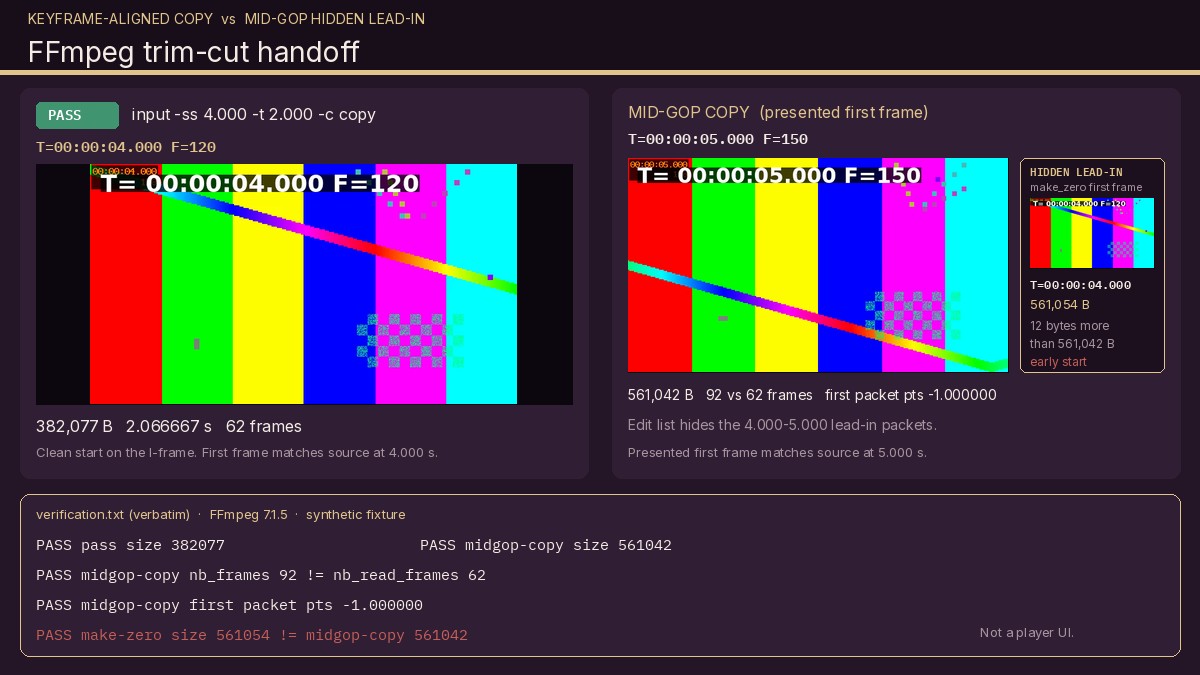
The first-frame PNG matches the source frame grabbed at 4.000 s, byte-for-byte (63,720 B, sha256 prefix 99f37ebf096b231d). I-frames in the output sit at 0.000000 and 2.000000. Codec, size, and frame rate stayed H.264 640x360 at 30/1, with AAC audio at 2.016000 s. That is the clean copy path the Super User frame-cut answer points to: start on a GOP boundary.
It is not a perfect 2.000000 s. We asked for 60 frames and got 62. Format duration is 2.066667 s, 66.7 ms longer than -t 2.000, and the last frame PTS is 2.133333. Copy can overshoot the out-point by a packet or two. Do not write this file down as "the same bytes as the source" (1,830,062 B) or as an exact 2.000000 s clip.
Control: the same timestamps, mid-GOP
Now start at 5.000 s, one second into the GOP that begins at 4.000, and still ask for 2.000 s (source 5.000 to 7.000).
Input -ss plus -c copy
ffmpeg -ss 5.000 -i source-fixed-gop.mp4 -t 2.000 -c copy midgop-copy.mp4EXIT 0. Format duration reads 2.066992 s, which looks close. ffmpeg's first extracted frame is burned T=00:00:05.000 F=150 and matches source-t5.png. If you stop there, the cut looks right.
The container disagrees with that first impression. ffprobe reports nb_frames 92 and nb_read_frames 62. There are 92 video packets, and the first packet PTS is -1.000000. Those 30 hidden packets are the GOP from 4.000 to 5.000. An MP4 edit list (negative timestamps, discard flags) keeps them around for decode and hides them from presentation. File size is 561,042 B, larger than the 2 s I-frame PASS, which is a hint that more than two seconds of packets went in.
Adding -avoid_negative_ts make_zero unwraps that lead-in. EXIT 0 again. Video duration becomes 3.066667 s with all 92 frames presented. The first frame is now burned T=00:00:04.000 F=120, the previous I-frame, and the PNG hash matches the PASS / source-t4 still. Format duration is 3.140690 s. Size is 561,054 B, 12 bytes more than the default copy, not the same file. We did not import either file into an NLE, so we cannot say how a timeline would treat that edit list.
The Super User thread on -ss and keyframes is the same class of surprise: a copy cut can look the right length while the bitstream still starts at the earlier I-frame.
libx264, same in-point
ffmpeg -ss 5.000 -i source-fixed-gop.mp4 -t 2.000 -c:v libx264 -preset veryfast -crf 18 -c:a copy midgop-reencode.mp4
ffmpeg -i source-fixed-gop.mp4 -ss 5.000 -t 2.000 -c:v libx264 -preset veryfast -crf 18 -c:a aac midgop-reencode-ss-after.mp4| Output | Exit | Video duration | Frames | First frame | Bytes |
|---|---|---|---|---|---|
| input -ss 5.000, libx264, AAC copy | 0 | 2.000000 s (format 2.019000 s) | 60 | burned T=00:00:05.000 F=150 | 369,059 |
| output -ss 5.000, libx264 + AAC encode | 0 | 2.000000 s | 60 | same first-frame PNG as the row above | 351,724 |
Both re-encodes start on the requested 5.000 s card and run 60 frames. The two first-frame PNGs match each other (74,405 B) and, as expected after a CRF 18 pass, do not match the source-t5 PNG. This is the frame-accurate path. It is also a new encode, not a copy. The r/ffmpeg thread on -ss and -t not being frame-accurate was chasing this gap: a duration of 2 s in ffprobe is not proof the in-point is the frame you wanted.
Traps that still exit 0
-ss after -i, still -c copy
ffmpeg -i source-fixed-gop.mp4 -ss 5.000 -t 2.000 -c copy out.mp4EXIT 0. Format duration is 2.053667 s, start 0.013000. The video stream tells on itself: duration 1.066667 s, start_time 1.000000, only 32 frames. Audio runs 2.005333 s from 0.013000. The first video frame is an I-frame at PTS 1.000000, burned T=00:00:06.000 F=180, the next keyframe, not 5.000. File size 226,073 B. The extracted frame sequence itself does not freeze, because we only pulled the packets that start at 6.000. A player that starts audio at 0.013 s has no video until 1.000 s and typically holds that first I-frame. The FFmpeg Seeking wiki and the keyframe Super User thread both warn that output -ss plus copy is a different seek than input -ss.
Stacked -ss
ffmpeg -ss 5.000 -i source-fixed-gop.mp4 -ss 2.000 -t 2.000 -c:v libx264 -preset veryfast -crf 18 -c:a aac out.mp4EXIT 0. Format and video duration are a tidy 2.000000 s with 60 frames, 361,815 B. The first frame is burned T=00:00:07.000 F=210. The two -ss values added: a 5.000 s input seek plus a 2.000 s output seek lands at 7.000, not at 5.000. The Seeking wiki calls this combined seeking. The clip looks perfect if you only read duration.
-to after an input -ss, timestamps already reset
ffmpeg -ss 4.000 -i source-fixed-gop.mp4 -to 6.000 -c copy out.mp4If you meant "cut source 4.000 to 6.000," that should have been a 2 s clip. Input -ss resets the timeline to zero, so -to 6.000 is a 6 s out-point. EXIT 0. Duration 6.000000 s, 180 frames, 1,088,108 B. The first frame is the 4.000 s I-frame (same PNG as the PASS still). The file runs to the end of the 10 s source. The Super User cut-from-start-to-end thread documents the same reset; -copyts is the way to keep -to on the source clock, and we did not add it here on purpose.
Handoff checklist
- Probe I-frame times first:
ffprobe -select_streams v:0 -show_frames -show_entries frame=pts_time,pict_type,key_frame. - If the in-point is on (or you can move it to) an I-frame,
-ss IN -i src -t DURATION -c copyis the fast path. Confirm the first frame and the duration; they can still overshoot by a packet. - If the in-point is mid-GOP and you need that exact frame, re-encode (
-c:v libx264, audio may copy). Prefer one-ss, not two. - Do not put
-ssafter-iand keep-c copyunless you have checked videostart_timeagainst the audio start. - After an input
-ss,-tois not "source clock end time" unless you also pass-copyts.-tis duration. Do not mix them from memory. - Compare requested interval vs format duration, video duration,
nb_framesvsnb_read_frames, first packet PTS, and a first-frame grab. EXIT 0 is not a cut proof. - Play the clip in the tool that will actually receive it. NLE import and platform preview were not tested here.
Pros, cons and test limits
- Pro: Copy on an I-frame kept H.264/AAC and opened on the requested card at T=00:00:04.000.
- Pro: A mid-GOP libx264 pass hit 2.000000 s and 60 frames with the burned-in 5.000 s in-point.
- Con: Even the I-frame PASS overshot
-t 2.000(2.066667 s, 62 frames). Copy is not a frame-accurate trimmer at the tail either. - Con: Mid-GOP copy can hide a 1 s lead-in behind an edit list. ffprobe duration can still look like 2 s.
make_zerorevealed 3.066667 s starting at 4.000. - Con: Output
-ssplus copy, stacked-ss, and a-tomixup all exited 0 with the wrong in-point or duration. - Not tested: LosslessCut, Avidemux, or commercial Smart Cut GUIs; NLE timeline import (including whether an editor honors the edit list); GPU/NVENC; batch GUIs; platform upload previews. We did not prove a timeline handoff.
- Pulling a soundtrack out of a finished MP4 is covered in the extract-audio review. We did not re-test extract, rotate, scale+fps, replace-audio, Shorts, concat, or burn-in here.
Sources and evidence
All measurements came from FFmpeg/ffprobe 7.1.5-0+deb13u1 on Debian 13 with a locally generated fixed-GOP fixture. The evidence folder ffmpeg-trim-cut-handoff, November 11, 2026, holds the commands, full logs, EXIT codes, ffprobe JSON, frame and packet CSVs, first-frame PNGs, sizes and SHA-256 records.
- FFmpeg wiki: Seeking
- Super User: cut from a start time to an end time
- Super User: cut video files by frame
- Super User: FFmpeg -ss and keyframes
- Super User: mix copy and encode for a faster accurate cut
- Stack Overflow: how to precisely trim a video
- Reddit r/ffmpeg: trimming video without re-encoding (January 2026)
- Reddit r/ffmpeg: cutting with -ss and -t is not frame-accurate
- LosslessCut interview-cut review
- FFmpeg product page