
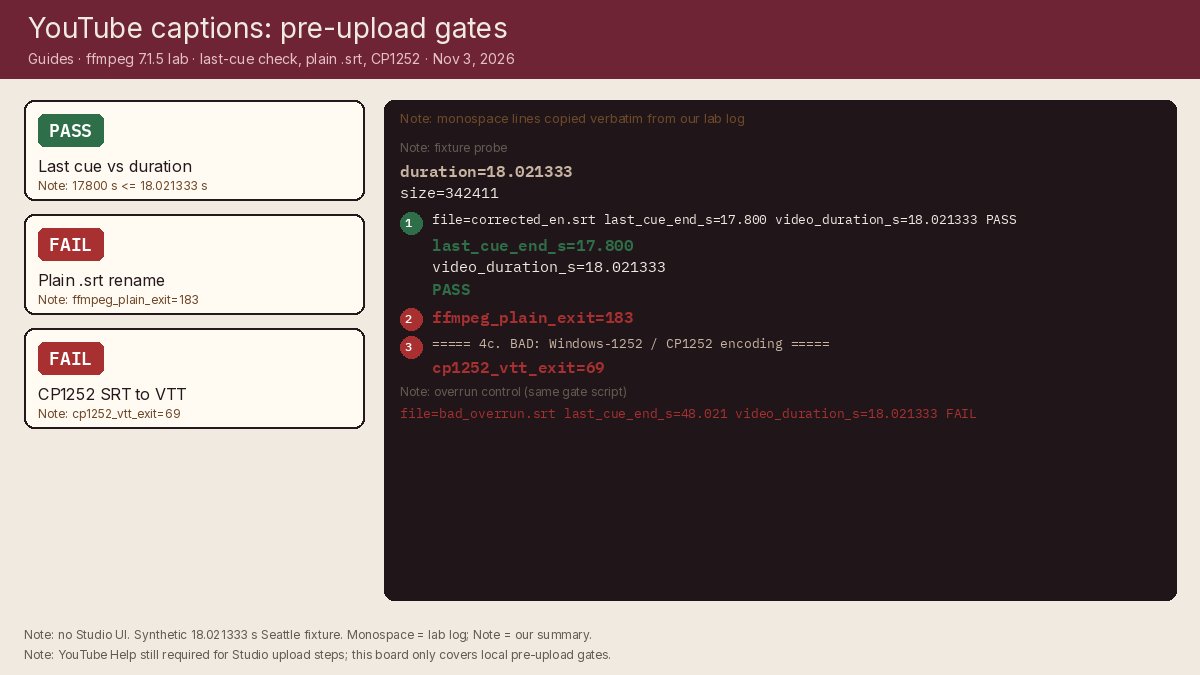
The video is locked and you already have a corrected caption file. The remaining risk is pairing the wrong bytes with the wrong cut: an old SRT after a trimmed intro, a transcript renamed to .srt, or a legacy encoding that YouTube Help says must be plain UTF-8. This Guide is the local pre-upload pass we ran with ffmpeg/ffprobe 7.1.5, then the Studio upload path taken only from YouTube Help (we did not screen-record Studio).
Test note: November 3, 2026, Asia/Shanghai. Debian GNU/Linux, ffmpeg/ffprobe 7.1.5-0+deb13u1, GNU iconv. Fixture reused from our burn-in lab: synthetic 18.021 s, 1280×720 MP4 (342,411 B) plus a five-cue English SRT (451 B). The file binary was missing on this box, so encoding checks used iconv, Python byte counts, and od. We did not upload to a live YouTube channel.
Prepare the file first (measured)
Before Studio, record three facts: video duration, last cue end, and UTF-8 validity. Our numbers:
| Gate | Command / check | Our result |
|---|---|---|
| 1. Probe duration | ffprobe -v error -show_entries format=duration,size ... | 18.021333 s, 342411 B, 1280×720 - PASS when written down |
| 2. Last cue ≤ duration | python3 check_last_cue.py video.mp4 captions.srt | last cue 17.800 s ≤ 18.021333 → PASS (delta 0.221333 s) |
| 3. UTF-8 + line endings | iconv -f UTF-8 -t UTF-8 -o /dev/null captions.srt; byte scan | iconv_utf8=OK; 451 B; LF; no BOM → PASS |
| 4a. Plain text as .srt | ffmpeg -i bad_plain.srt -f null - | exit 183; Invalid data found when processing input; no VTT → recognize FAIL |
| 4b. Last cue after duration | same checker; end set to 48.021 s (duration+30) | checker FAIL; ffmpeg still wrote VTT with 00:16.500 --> 00:48.021 (exit 0) → do not trust convert-only |
| 4c. Windows-1252 SRT | iconv as UTF-8; ffmpeg -i bad_cp1252.srt out.vtt | illegal input sequence at position 47; ffmpeg exit 69, Invalid UTF-8..., VTT header only (7 B); -sub_charenc CP1252 restored cues (exit 0) |
1. Probe the finished MP4
ffprobe -v error -show_entries format=duration,size \
  -show_entries stream=codec_type,codec_name,width,height \
  -of default=nw=1 final.mp4
stat -c '%s bytes' final.mp4
Ours printed duration=18.021333 and size=342411. PASS when those values are on paper before you touch the SRT.
2. Compare last SRT cue to duration
# check_last_cue.py
import re, subprocess, sys
from pathlib import Path

def last_end(srt: str) -> float:
    cues = re.findall(
        r"(\d{2}):(\d{2}):(\d{2}),(\d{3})\s*-->\s*(\d{2}):(\d{2}):(\d{2}),(\d{3})",
        srt,
    )
    h, m, s, ms = cues[-1][4:]
    return int(h)*3600 + int(m)*60 + int(s) + int(ms)/1000

mp4, srt = sys.argv[1], sys.argv[2]
end = last_end(Path(srt).read_text(encoding="utf-8"))
dur = float(subprocess.check_output(
    ["ffprobe","-v","error","-show_entries","format=duration",
     "-of","default=nw=1:nk=1", mp4], text=True).strip())
print(f"last_cue_end_s={end:.3f}")
print(f"video_duration_s={dur:.6f}")
print("PASS" if end <= dur else "FAIL")
Run: python3 check_last_cue.py final.mp4 captions.srt. Clean file: PASS at 17.800 vs 18.021333. Deliberate overrun to 48.021: FAIL (exit 1). ffmpeg converting that overrun SRT to WebVTT still exited 0 and kept the late end time. Muxing it as mov_text also exited 0 while the MP4 duration stayed 18.021333. The checker is the gate; convert-success is not.
3. Confirm UTF-8 (YouTube Help requirement)
YouTube Help Supported subtitle and closed caption files states that a SubRip (.srt) file must be plain UTF-8. Local proof:
iconv -f UTF-8 -t UTF-8 -o /dev/null captions.srt && echo iconv_utf8=OK
# ours: iconv_utf8=OK; 451 bytes; LF; no BOM
Optional on our box: a UTF-8 BOM copy (454 B, ef bb bf) and a CRLF copy (470 B) both converted to a 419-byte WebVTT with 5 cues under ffmpeg 7.1.5. That is a local ffmpeg result, not a YouTube upload proof.
4. Three deliberate fails we recorded
- Plain transcript renamed to .srt: three lines of text, no timestamps.
ffmpeg -i bad_plain.srt -f null -→ exit 183,Invalid data found when processing input. No VTT written. - Last cue after the video: end pushed to 00:00:48,021 (about duration+30 s). Checker FAIL. A 99-hour end (
99:00:00,000= 356400.000 s) also FAIL. ffmpeg did not refuse the file. - Windows-1252 bytes with accented text:
iconvas UTF-8 failed at position 47. ffmpeg SRT→VTT printedInvalid UTF-8 in decoded subtitles text; maybe missing -sub_charenc option, exited 69, and left a 7-byteWEBVTTheader with zero cues. With-sub_charenc CP1252, exit 0 and both cues returned. Prefer fixing the master to UTF-8 before Studio.
Add the caption track in YouTube Studio (documentation-based)
Documentation-based: steps below paraphrase YouTube Help opened November 3, 2026. We did not screen-record Studio, and we did not upload this fixture to a live channel. If the UI differs, follow the live Help article.
From Add subtitles & captions:
- Sign in to YouTube Studio.
- From the left menu, select Subtitles.
- Select the video.
- Click ADD LANGUAGE and choose the language.
- Under Subtitles, click ADD.
- Choose Upload file, then With timing for a file that already has timestamps (our preferred path after the local gates), or Without timing / Auto-sync when you only have transcript text. Select the file, then Save.
Help also notes you can add captions during upload. Supported formats (including plain UTF-8 SRT) are listed on the supported files page we opened the same day.
What if you only have a transcript?
Do not rename a .txt to .srt and expect a timed track. Our rename failed locally with exit 183. YouTube Help documents Auto-sync and without-timing upload for transcript text, and Tips for creating a transcript file recommends UTF-8 for non-English text. If you still need a first timed draft offline, use the whisper.cpp first-draft SRT checklist; we do not re-run that lab here.
Review after Studio processing
After the track is available, watch the opening, a mid point, and the ending on the published player. Confirm language label, spelling, and that the file matches this cut (not an earlier edit). We did not measure YouTube player quirks or Auto-sync accuracy in this lab. For a broader meaning/timing pass, see the caption checklist.
FAQ
Why did ffmpeg reject my .srt with exit 183?
Our plain-text file renamed to .srt had no timestamps. ffmpeg 7.1.5 printed "Invalid data found when processing input" and exited 183; no WebVTT was written. A timed SubRip structure is required before you treat the file as an SRT.
ffmpeg converted my overrun SRT without errors. Is that a PASS?
No. Our last-cue check failed at 48.021 s against an 18.021333 s video, but ffmpeg still wrote a VTT that kept 00:16.500 --> 00:48.021 and muxed mov_text with exit 0. Conversion success does not prove the track fits the video.
What does YouTube require for an uploaded SRT?
YouTube Help Supported subtitle and closed caption files states that a SubRip (.srt) file must be plain UTF-8, with only basic content (no style markup). We opened that page on November 3, 2026; we did not re-test Studio upload.
Does a UTF-8 BOM or CRLF break the file for ffmpeg?
Not in our ffmpeg 7.1.5 lab. The BOM copy (454 bytes, EF BB BF) and the CRLF copy (470 bytes) both converted to WebVTT with exit 0 and 5 cues, matching the clean 419-byte VTT. We did not upload either copy to YouTube.
Can I upload a transcript without timings as a caption file?
YouTube Help distinguishes Upload file With timing vs Without timing, and offers Auto-sync for transcript text. Renaming a plain transcript to .srt failed locally with exit 183. Prefer a real timed SRT, or use Studio's documented without-timing / Auto-sync path.
Honest limits
- YouTube Studio UI: not screen-tested. Upload steps are documentation-based from Help pages opened this day.
- Live channel upload and YouTube player / Auto-sync behavior: not measured.
- GPU / NVENC paths: N/A for this text-file lab.
- One synthetic 18.021 s fixture reused from the burn-in evidence set. Not a multi-hour client interview.
file(1)missing on the lab box; encoding checks used iconv + Python bytes.- BOM and CRLF copies: tested with ffmpeg SRT→VTT only; not uploaded to YouTube.
Evidence: evidence/youtube-captions-2026-11-03/ (NOTES.md, commands.log, lab.sh, check_last_cue.py, media/, bad/, outputs/), November 3, 2026. Every lab number on this page appears in commands.log.
Sources we opened
- YouTube Help: Add subtitles & captions (YES)
- YouTube Help: Supported subtitle and closed caption files (YES; SRT must be plain UTF-8)
- YouTube Help: Tips for creating a transcript file (YES)
Forum threads that returned HTTP 403 were dropped and are not cited.
Keep reading
- SRT file guide - structure, encoding, and silent ffmpeg accepts.
- whisper.cpp first-draft SRT checklist - when you still need a timed draft offline.
- FFmpeg burn-in SRT checklist - when the destination needs hardsub pixels instead of a soft track.
- Fix subtitle drift after audio edits - offset vs drift vs cut jump.
- Captions vs. subtitles for delivery - soft track, burn-in, or SDH.
- Five checks before you publish captions - meaning, timing, layout.