
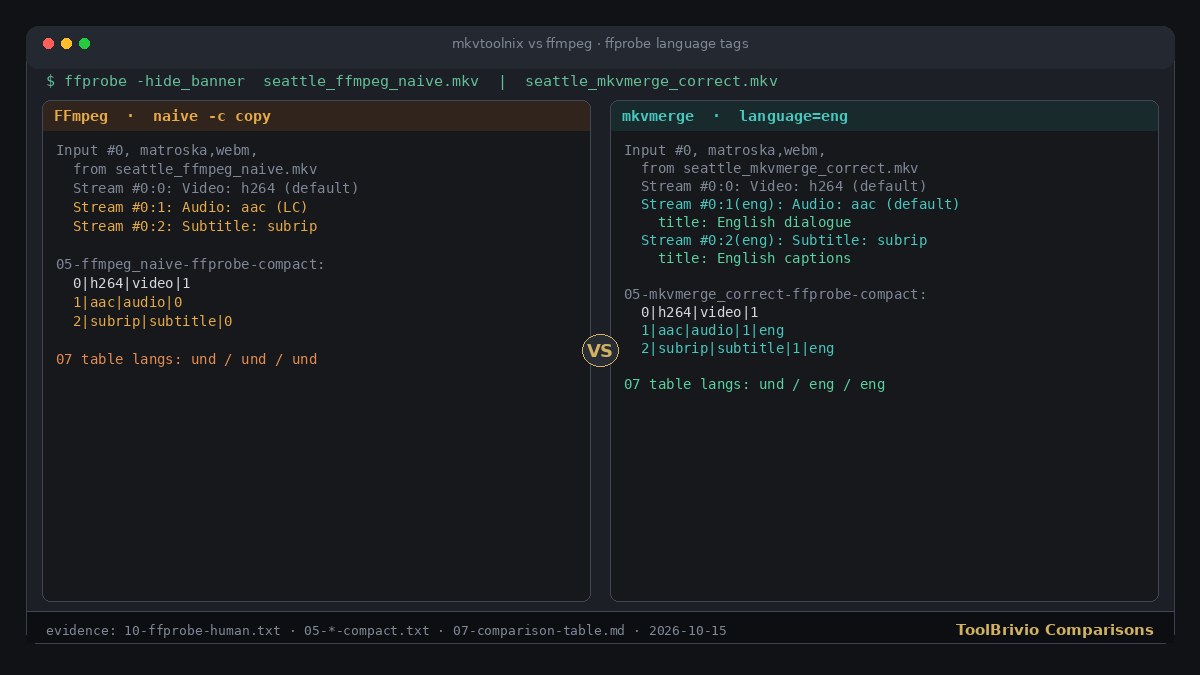
-c copy left audio/subtitle languages und; mkvmerge wrote eng with English dialogue / English captions titles (evidence 10-ffprobe-human.txt, 05-*-compact.txt, 07-comparison-table.md).By ToolBrivio Editorial · Hands-on comparison of MKVToolNix 92.0 (Debian mkvtoolnix / mkvtoolnix-gui 92.0-1+deb13u1) and FFmpeg 7.1.5-0+deb13u1 on Linux, October 15, 2026, using the same fixtures. We earn no affiliate commission from links on this page. Research approach · Link disclosure.
You already have a picture file, a dialogue AAC (or WAV), and an SRT. The client wants one MKV with languages labeled and the right track marked default—without another video encode. The practical fork is MKVToolNix’s Multiplexer / mkvmerge, or an FFmpeg -c copy map. We ran both on identical Seattle interview fixtures and compared what landed in the container.
Test basis: Debian 13; MKVToolNix 92.0; FFmpeg/ffprobe 7.1.5. Fixtures: 6.000 s 1280×720 H.264 High video-only MP4, AAC LC mono 48 kHz, UTF-8 English SRT, plus a Windows-1252 SRT boundary. This is a choose-by-job piece, not a rewrite of our MKVToolNix mux review or FFmpeg multitrack remux review.
Short answer by job
| Your job | Lean toward | Why (from this test) |
|---|---|---|
| Confirm Language and Default track in a UI before export | MKVToolNix GUI | Properties sit beside the track list; same flags are available on mkvmerge for a scripted remux after you confirm once. |
| Batch the same map in CI or a shell habit | FFmpeg or mkvmerge | Both stream-copied our H.264. FFmpeg needs explicit -metadata:s / -disposition; a bare map left languages und. |
Need Matroska language_ietf (BCP 47) as well as ISO 639-2 | mkvmerge | Fresh mkvmerge wrote eng + en. FFmpeg -metadata … language=eng wrote language=eng with language_ietf absent in mkvmerge -J. |
| Windows-1252 SRT still in the folder | Either, with an explicit charset step | mkvmerge: --sub-charset. FFmpeg: -sub_charenc on the SRT input plus subtitle re-encode, or iconv to UTF-8 first—pure -c copy of Latin-1 failed later extraction. |
What both got right on the happy path
Correct FFmpeg command shape we used:
ffmpeg -i video_only.mp4 -i dialogue.aac -i captions.srt \
  -map 0:v:0 -map 1:a:0 -map 2:s:0 -c copy \
  -metadata:s:v:0 language=und \
  -metadata:s:a:0 language=eng -metadata:s:a:0 title="English dialogue" \
  -metadata:s:s:0 language=eng -metadata:s:s:0 title="English captions" \
  -disposition:v:0 default -disposition:a:0 default -disposition:s:0 0 \
  -default_mode passthrough delivery.mkv
Equivalent mkvmerge (same flags as our solo review):
mkvmerge -o delivery.mkv \
  --language 0:und --default-track-flag 0:yes video_only.mp4 \
  --language 0:eng --track-name 0:"English dialogue" --default-track-flag 0:yes dialogue.aac \
  --language 0:eng --track-name 0:"English captions" --default-track-flag 0:no captions.srt
Both produced three tracks (H.264 / AAC / SubRip), English labels on audio and captions in ffprobe, titles “English dialogue” / “English captions”, audio default on, subtitle default off. The extracted Annex-B H.264 payload hashed to 41199096f6ee…d2e9c7 for the source MP4, the FFmpeg MKV, and the mkvmerge MKV—copy, not a silent re-encode. FFmpeg’s own -f streamhash video digest matched across source, FFmpeg output and mkvmerge output as well.
Side-by-side container check
| Check | mkvmerge correct | FFmpeg correct | FFmpeg naive (map + copy only) |
|---|---|---|---|
| Track count / codecs | 3 · h264 / aac / subrip | 3 · same | 3 · same |
| language (mkvmerge -J) | und / eng / eng | und / eng / eng | und / und / und |
| language_ietf | und / en / en | absent / absent / absent | absent |
| default_track | Y / Y / N | Y / Y / N | Y / N / N |
| Track names | set | set | none |
| H.264 Annex-B SHA-256 | matches source | matches source | matches source |
The naive FFmpeg line is the trap for this persona: exit status 0, three codecs present, video still a clean copy—yet languages stay und, audio is not marked default, and there are no titles. That is enough to fail a client checklist that asks for labeled English dialogue even when the packets are fine.
Where FFmpeg is weaker than MKVToolNix for this job
- No LanguageIETF from our metadata flags. Setting
-metadata:s:a:0 language=eng(orlanguage=en) filled the conventional Language element aseng.mkvmerge -Jstill showedlanguage_ietfas missing. Passing-metadata:s:a:0 language_ietf=enstored a generic tag during mux but did not populate the Matroska LanguageIETF property identify reports. mkvmerge’s--language 0:engwrote bothengandenin one step. - Defaults are easy to omit. Without
-dispositionand-default_mode passthrough, our naive mux left audio default off. MKVToolNix’s GUI “Default track” column makes the same choice visible before Start multiplexing. - No finishing-editor GUI. FFmpeg does the job in a reviewable command; it does not show Language / Default beside a track list. If the reason you opened this comparison is “I refuse to FFmpeg-mux blindly,” that friction is the product difference, not a missing codec.
Friction both tools will write faithfully
- Wrong defaults. Forcing subtitle default yes and audio default no produced matching ffprobe disposition on both FFmpeg and mkvmerge. Neither tool “fixes” a mistaken flag. Confirm before you ship.
- Language typo
enq. FFmpeg accepted-metadata:s:a:0 language=enqand identify listedenq. The MKVToolNix GUI likewise muxed a mistypedenqin our solo review (IETFenq, older language fieldund). Neither blocked the export. Verify codes after mux, not only track names. - Windows-1252 SRT. FFmpeg
-c copyof the Latin-1 file exited 0; extracting the subtitle later failed with invalid UTF-8 / missing-sub_charenc. Re-encoding the subtitle with-sub_charenc windows-1252on that input, or converting withiconvfirst, yielded proper “That’s” / “café”. mkvmerge warned on invalid UTF-8 without--sub-charsetand fixed the same file when the charset was declared—see the MKVToolNix review for that path.
Pros and cons tied to measurements
- MKVToolNix pro: GUI +
mkvmergewrite language and language_ietf together; Default track is a visible property. - MKVToolNix pro: Same stream-copy hash as FFmpeg on our fixtures.
- MKVToolNix con: Typo
enqstill muxes; you must probe the output. - FFmpeg pro: One explicit map remuxes video+audio+SRT with
-c copy; dispositions and titles work when you set them; video hash matched source. - FFmpeg con: Naive map+copy left
undlanguages and non-default audio; LanguageIETF not set by our metadata attempts on 7.1.5. - FFmpeg con: Latin-1 SRT needs an extra charset/re-encode or iconv step—copy alone is not enough.
Recommendation
For a finishing editor whose acceptance check is “languages labeled, audio default on, captions not default, picture not re-encoded,” start in MKVToolNix when you want to see those flags before export; keep the matching mkvmerge line for repeats. Use FFmpeg when the map is already reviewed and you will always pass -metadata:s / -disposition (and verify with ffprobe or mkvmerge -J). Do not treat a successful -c copy alone as a labeled delivery.
If you are still repairing cue timing, finish that in Subtitle Edit before either muxer. If your problem is silent track loss when remuxing an already-bundled file, the FFmpeg remux review covers stream maps—not this language-tagging handoff.
Limits of this comparison
- Six-second synthetic fixtures; not a large-file speed test.
- Linux only. Windows and macOS installers / GUIs unverified here.
- Player UI auto-selection of default audio/subtitle beyond container flags and ffprobe disposition is unverified.
- We did not re-test mobile, network privacy or hour-long sources.