
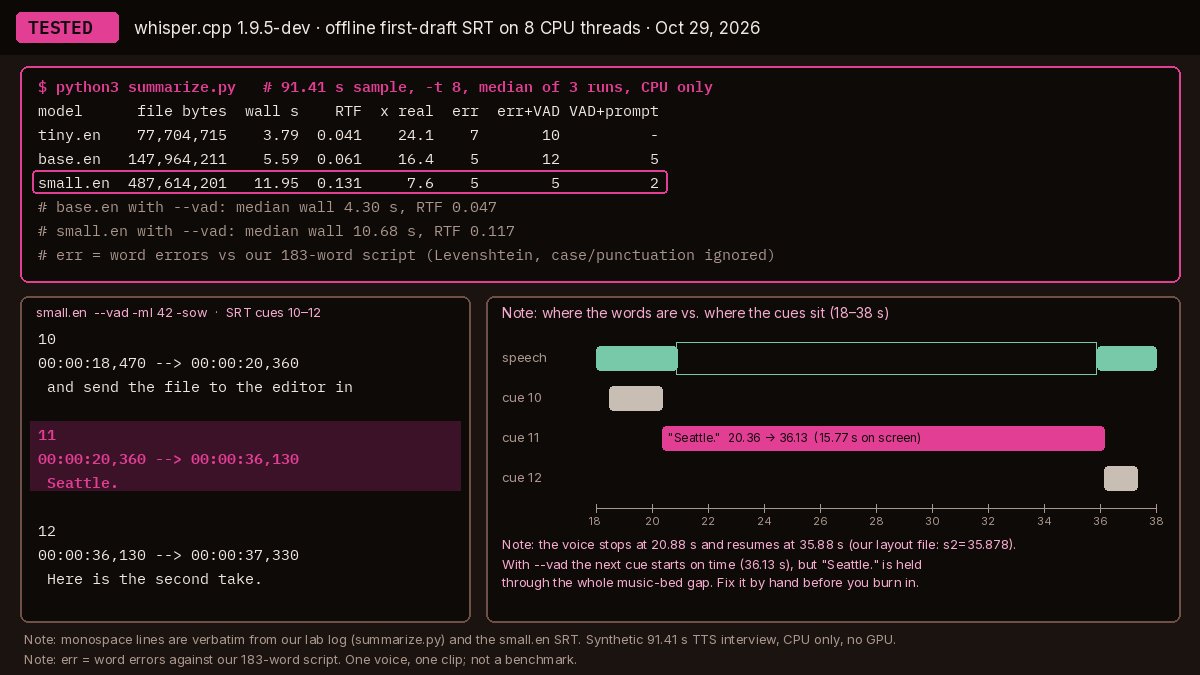
summarize.py (median of 3 runs, 8 CPU threads, 91.41 s test clip). Bottom: cues 10 to 12 copied from the small.en --vad -ml 42 -sow SRT. Cue 11, "Seattle.", stays up from 20.36 to 36.13 s while the voice is silent from 20.88 to 35.88 s. The timeline is drawn from those timestamps. No GUI.By ToolBrivio Editorial · Hands-on test of whisper.cpp built from the official repo (master commit 284029c, reports 1.9.5-dev) on Debian 13, October 29, 2026. CPU only, no GPU. The test audio is our own: a text-to-speech voice reading a script we wrote, mixed with a synthetic music bed. FFmpeg 7.1.5 made the files and burned the test frames. We earn no affiliate commission from links on this page. Research approach · Link disclosure.
You have a locked cut of a client interview. Captions are due, and the footage isn't supposed to leave your laptop. What you want is a rough SRT you can correct, not a finished file. That's the job we gave whisper.cpp: a free, local speech-to-text engine with a command-line tool, whisper-cli, that writes SRT and VTT directly.
The complaints we kept finding in the project's GitHub issues were practical. Which model is fast enough on a CPU? Does the audio really have to be 16 kHz WAV? Does it invent text during silence? Can it keep captions short? Will it spell the guest's name? We built a test file around those questions and checked each output against the script.
The short answer
whisper.cpp does give you a usable first draft offline, and quickly. It doesn't give you finished captions. This is the command we would start from on English speech:
ffmpeg -i interview.mp4 -vn -ar 16000 -ac 1 -c:a pcm_s16le interview_16k.wav

./build/bin/whisper-cli -m models/ggml-small.en.bin -t 8 -f interview_16k.wav \
  --vad -vm models/ggml-silero-v6.2.0.bin -ml 42 -sow \
  --prompt "Maya Delgado, Jordan Whitaker, ToolBrivio, Subtitle Edit, SRT." \
  -osrt -ovtt -of interview
Then go through it in a subtitle editor. Our Subtitle Edit review covers that step.
- Good: fast on CPU. On our 8-thread box,
small.enran at about 7.6 times real time andbase.enat about 16.4 times. - Good:
--promptworked on names. With it,small.enspelled all nine names and terms in our script correctly, including both fictional people. - Good: on tiny.en and small.en,
--vadfixed where captions start. Without it, both opened the third section 11.83 s before anyone spoke. - Con: it doesn't fix where captions end. In our small.en runs, the last cue before each gap stayed up for more than 15 seconds of silence.
- Con:
-ml 42gives one short line per cue, not two-line captions. It also leaves fragments like a 0.44-second "before". - Con: VAD made
base.enworse on words (5 errors became 12). Don't assume one flag helps every model.
What we fed it
Real client audio was off the table, so we made our own. The script is 183 words in three parts. It names a fictional host (Maya Delgado) and editor (Jordan Whitaker), plus ToolBrivio, DaVinci Resolve, Premiere Pro, OBS Studio (said twice), Subtitle Edit, SRT and Seattle. A local text-to-speech voice (Piper, en_US-lessac-medium) read it. Under the voice runs a soft synthetic chord pad with pink noise, made with FFmpeg. There's no third-party music in it.
| Time (s) | What's there |
|---|---|
| 0 to 2.00 | Music bed only |
| 2.00 to 20.88 | Part 1 voice over the bed |
| 20.88 to 35.88 | 15 s gap, bed only (mean -37.3 dB) |
| 35.88 to 56.83 | Part 2 voice over the bed |
| 56.83 to 71.83 | 15 s gap, digital silence (-91 dB) |
| 71.83 to 89.40 | Part 3 voice, then a short tail |
We exported it the way an editor might: a 48 kHz, 24-bit stereo WAV and an MP4 with AAC audio. Word errors were counted with a script. It lowercases everything, strips punctuation, and aligns the caption text against our script word by word (substitutions, deletions and insertions). That's one clean synthetic voice on one file. It's a way to compare settings on the same input. It is not an accuracy figure for your recordings.
Build and models
We cloned github.com/ggml-org/whisper.cpp and built it with CMake in Release mode for the native CPU. The box is a KVM guest: lscpu says "Intel(R) Xeon(R) Processor", with 8 cores, 1 thread per core, AVX-512 and AMX. Most creators don't edit on a server CPU like this, so treat our timings as numbers for this machine only.
cmake -B build -DCMAKE_BUILD_TYPE=Release -DBUILD_SHARED_LIBS=OFF
cmake --build build -j 8 --target whisper-cli
One detour: this box had no g++, so we compiled with zig's clang (22.1.8). The default shared-library build compiled, then aborted on every run with free(): invalid pointer. A static build (-DBUILD_SHARED_LIBS=OFF) took 18.6 s and worked. We think that's down to our toolchain, not whisper.cpp, but if you see the same crash, try the static build.
We downloaded the English-only tiny.en, base.en and small.en models from the project's Hugging Face page, and ran each three times on the same 16 kHz file (91.41 s):
| Model | File size | Median wall time | Real-time factor | Word errors | What went wrong |
|---|---|---|---|---|---|
| tiny.en | 77.7 MB | 3.79 s | 0.041 | 7 | "Mia", "Quittaker", SRT heard as "as our T", a doubled "Thanks" |
| base.en | 148.0 MB | 5.59 s | 0.061 | 5 | "Ia Dolgado", "can't" became "cat", "Whittaker" |
| small.en | 487.6 MB | 11.95 s | 0.131 | 5 | "Mia Dolgado", "Whittaker", "the" became "a" |
Real-time factor is wall time divided by audio length, using our own numbers. All three models heard "caption file" as "captioned file", and we counted that as an error. With the default 4 threads, base.en took 6.35 s instead of 5.59 s. Set -t to your core count. Speed also depends on the build: in GitHub issue #2666, Subtitle Edit users reported CPU runs getting several times slower after a whisper.cpp update. Note the version you used, so you can compare later runs.
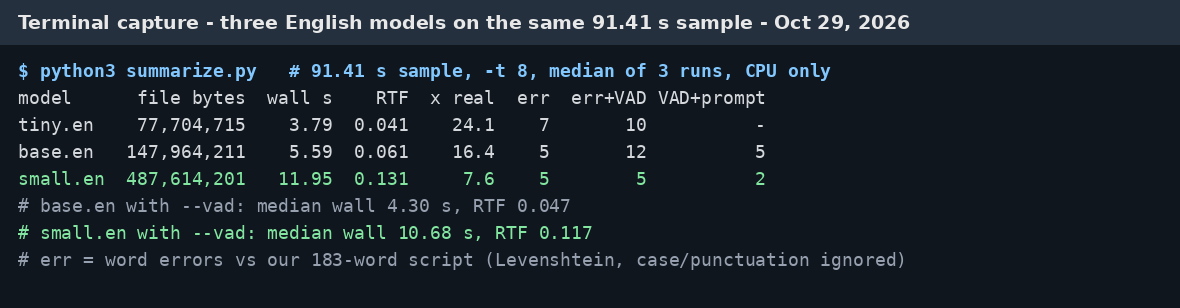
Without a prompt, base.en and small.en made the same number of errors on our clip. small.en was the one that improved once we added names, which is why we'd use it when you can spare about 12 seconds per 90 seconds of audio on a machine like ours.
The input pitfall: MP4 fails, a 48 kHz WAV didn't
A lot of whisper.cpp tutorials, and an older GitHub issue, say the WAV must be 16 kHz. The README on our commit still says whisper-cli "currently runs only with 16-bit WAV files". We fed it the camera-style files anyway.
- The MP4:
failed to read audio data, thenerror: 1 input file(s) failed. It returned exit code 11 and wrote no SRT. The help text lists flac, mp3, ogg and wav, and that's what it means. - The 48 kHz, 24-bit stereo WAV: accepted. The log says it decoded through miniaudio, and the SRT was byte-identical (
diff -s) to the one from a converted 16 kHz mono file.
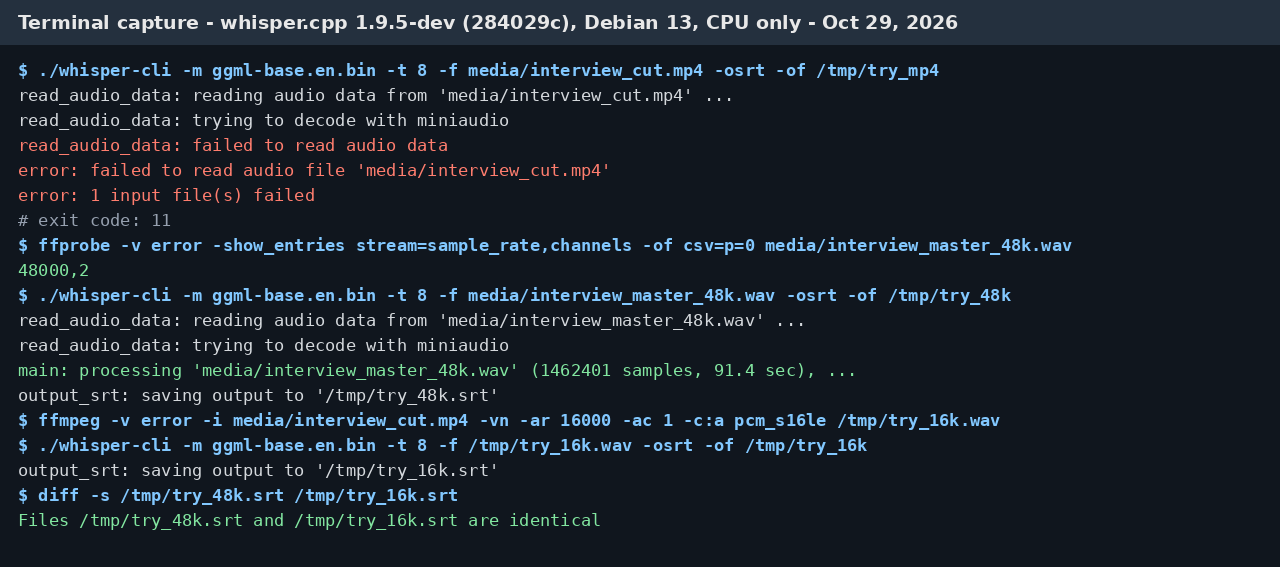
We'd still convert every time. The one-line FFmpeg command fixed the MP4 case, and older builds or front ends may still enforce the old rule. Just don't take the "must be 16 kHz" error in an old tutorial as proof your WAV is broken. We didn't test MP3, FLAC, OGG or 44.1 kHz files. If your file has more than one audio track, add -map 0:a:0 (or whichever track holds the dialogue). Our FFmpeg multitrack review shows how to check which track is which.
Silence and the music bed
People report whisper.cpp inventing text after silence or getting stuck repeating a phrase. The reports we read involve real recordings, and in issue #3744, long files. On our 91-second clip, no model and no flag combination put made-up words in either gap, and nothing looped. That's good news for a short clip like ours. It doesn't prove anything about a 40-minute podcast.
The timestamps were the problem. Here's where each run started the captions for each part:
| Run | Part 1 (speech 2.00) | Part 2 (speech 35.88) | Part 3 (speech 71.83) |
|---|---|---|---|
| tiny.en / small.en, default | 0.00 | 30.00 (5.88 s early) | 60.00 (11.83 s early) |
| base.en, default | 0.00 | Merged into a cue running 18.08 to 38.00 | 71.76 |
tiny.en / small.en, --vad | 2.02 | 36.13 | 71.98 |
base.en, --vad | 2.02 | 20.25 (cue starts when the gap starts) | 56.28 (same) |
Without VAD, tiny.en and small.en started parts 2 and 3 at exactly 30.00 and 60.00 s, which line up with Whisper's 30-second processing windows. The opening line of a section appeared seconds before anyone spoke. All runs without VAD also started the first cue at 0.00, two seconds early. small.en also wrote a [BLANK_AUDIO] cue from 90.0 to 98.5 s, past the end of a 91.41 s file. Trying -mc 0 (no text carried between windows) cut small.en to 4 errors but left the 30.00 and 60.00 starts unchanged.
Adding --vad with the Silero model (885 KB, one download) fixed the starts for tiny.en and small.en. The log showed it dropped 37.9% of the samples as non-speech. The trade-off shows up at the ends of cues. In the small.en runs, each gap was added to the cue right before it: "Seattle." ran from 20.36 to 36.13 s, and "it." from 56.63 to 71.98 s. Burn that SRT into the video and a single word sits on screen for the whole 15-second gap. base.en with VAD did the reverse: it started the next section's first cue at the beginning of the gap, so that line appears about 15 seconds early.
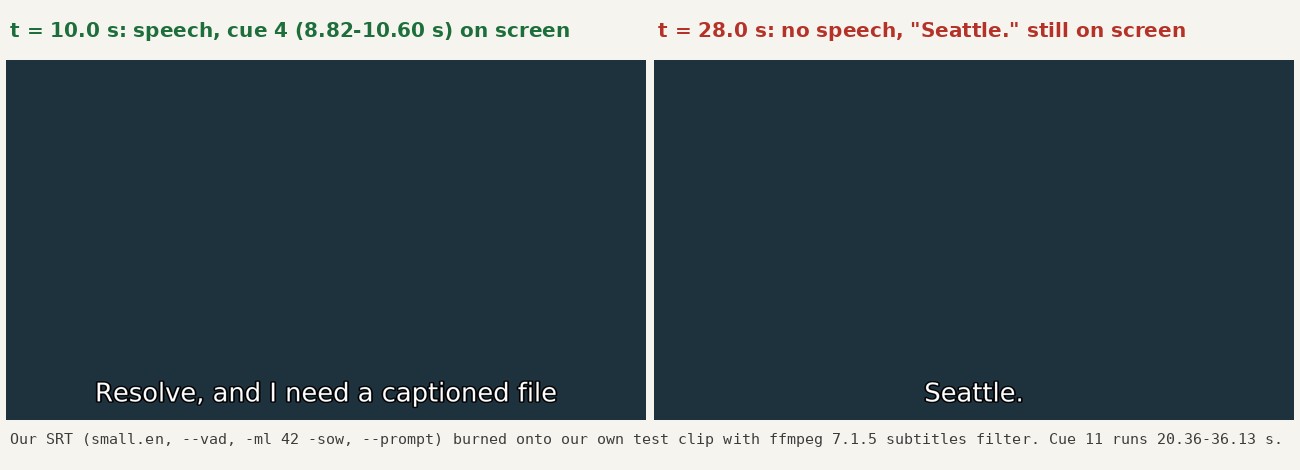
VAD didn't help every model with the words. small.en stayed at 5 errors. base.en went from 5 to 12: it split DaVinci into "Da Vinci" and turned SRT into "as RT ... as our tea". tiny.en went from 7 to 10. When you review the draft, check where each cue ends as well as where it starts. If your editor can cap cue duration, use that. Our SRT file guide covers checking an SRT's timing and encoding before you export it.
Line length: -ml 42 with -sow
By default each cue is one long line. small.en with VAD wrote 17 cues, 12 of them longer than 42 characters, and the longest was 91. That's wider than a phone screen. -ml 42 sets a maximum segment length in characters. -sow makes it break between words instead of between tokens.
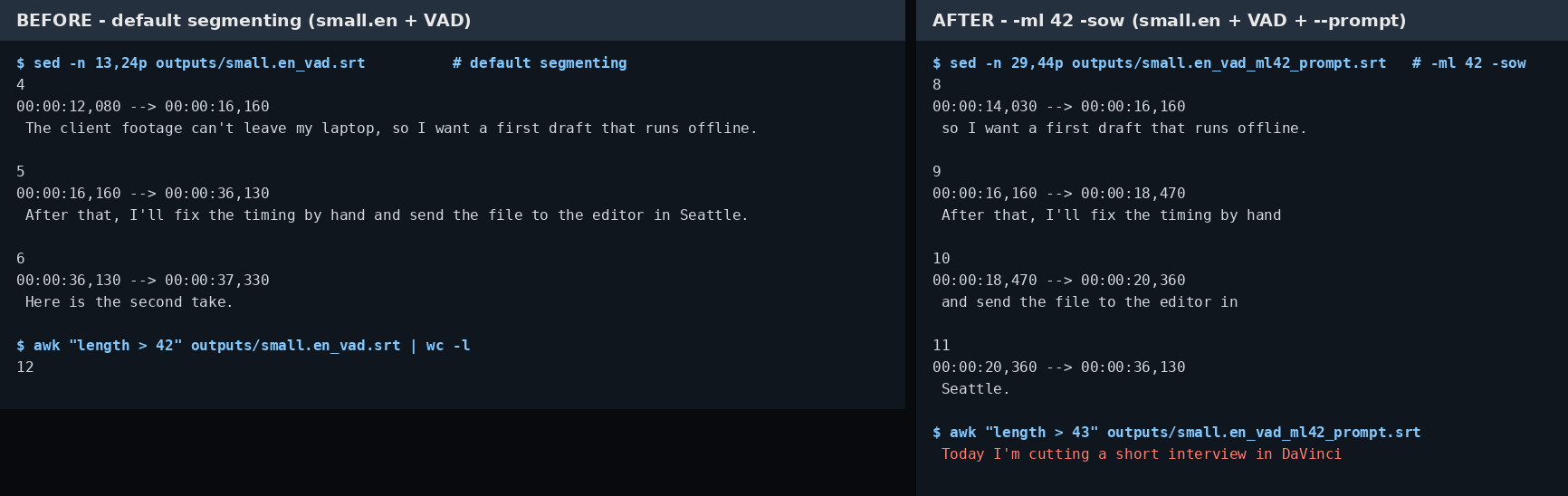
- small.en went from 17 cues to 34. One line still came out at 46 characters ("Today I'm cutting a short interview in DaVinci"), so treat 42 as a target, not a hard cap.
- Every cue is still a single line. You don't get balanced two-line captions. Merging pairs is an editing job.
- It leaves fragments: "before" for 0.44 s and "should" for 0.47 s. A GitHub issue reported zero-duration captions with these two flags. We didn't see any. The shortest cue in this run was 0.44 s. Across every
-sowrun, including the one with--prompt, the shortest was 0.36 s. - Without
-sow, base.en produced a cue holding only a period, for 0.28 s. - Splitting didn't change the word errors. It only changed the cue boundaries.
Names: --prompt helped small.en most
Out of the box, no model spelled Maya Delgado or Jordan Whitaker correctly. We added one prompt line listing the names and terms we cared about:
--prompt "Maya Delgado, Jordan Whitaker, ToolBrivio, Subtitle Edit, SRT."- small.en (with VAD and
-ml 42 -sow): 5 errors dropped to 2. All nine names and terms came out in the right case, including "Subtitle Edit", which every earlier run wrote in lowercase. The two errors left were "captioned" and "a" for "the". Wall time was 12.85 s. - base.en (same flags): 12 errors dropped to 5. Jordan Whitaker and ToolBrivio were fixed, but it still wrote "Mia", "Da Vinci" and "cat".
--carry-initial-prompt, which repeats the prompt for every 30-second window, made no difference for base.en on our file. A GitHub comment says the plain prompt fades after the first window on longer audio. We only tested 91 seconds, so we can't confirm that.
The prompt only helps with names you already know. A guest's surname you didn't put in the list still needs checking by hand.
What we did not test
- Any GPU backend (CUDA, Metal, Vulkan, Core ML). Everything here ran on the CPU.
- Non-English and mixed-language speech, and the multilingual models.
- Windows and macOS builds, and laptop CPUs. Our box has AVX-512 and AMX, so expect slower times on most laptops.
- Real human voices, accents, crosstalk and room noise. Our voice was clean synthetic speech.
- Files longer than 91 seconds, where the repetition reports usually come from.
- The medium, large and turbo models, and quantized models.
- MP3, FLAC, OGG and 44.1 kHz input. Speaker labels. Front ends that bundle whisper.cpp, including Subtitle Edit's.
Who it suits
whisper.cpp suits a creator who can paste two commands into a terminal and needs a caption draft that never leaves the machine. Use small.en with --prompt and --vad, and budget review time for cue ends and the names you didn't list. If you need a finished caption file straight out of the tool, or two-line captions with reading-speed limits, this won't do it alone. Plan on an editor pass. Our subtitle handoff checklist lists what to check before the file goes out.
Sources and evidence
Build log, model checksums, the reference script, every SRT/VTT output, the scoring and timing scripts and the full command log are in ToolBrivio's evidence archive for this review (whispercpp-offline-captions, October 29, 2026). The GitHub threads below showed us which problems to test. Every number above comes from our own runs.
- whisper.cpp repository and README (build steps, 16-bit WAV note, VAD section)
- Issue #909: 16 kHz required (where the 16 kHz rule comes from)
- Issue #1724: hallucination on silence
- Issue #3744: repetition in long-form decoding
- Issue #1967: --max-len and --split-on-word empty subtitles
- Issue #2140: initial prompt tokens and carry-initial-prompt
- Issue #2666: slow CPU runs reported by Subtitle Edit users
- Subtitle Edit review (where the draft goes next)